

Pariah Burke
Community Expert
Community Expert
November 10, 2015
Question

How to Get Adobe Color CC Swatches Into Illustrator

  • November 10, 2015
  • 3 replies
  • 35529 views

Adobe Color CC (formerly Kuler https://color.adobe.com), enables you to create and save colors and harmonious color themes right in your browser. Those themes and swatches can easily be transferred into Illustrator (and other CC desktop applications) via the Creative Cloud Libraries feature. Here's the very simple 3-step process to do that. Note that you will need an active Creative Cloud subscription.

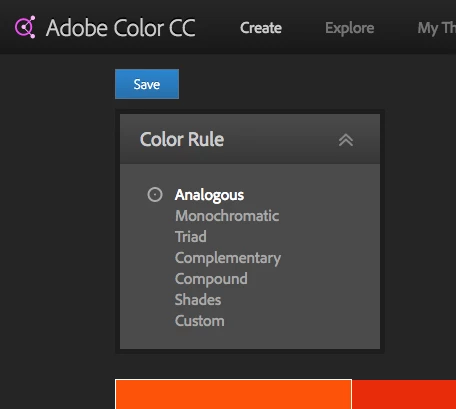
Step 1: MIx your colors and then click the Save button in Color CC.
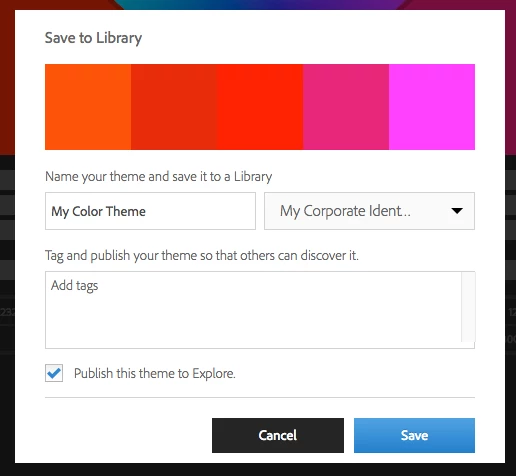
Step 2: Choose a CC library and name the swatch theme.
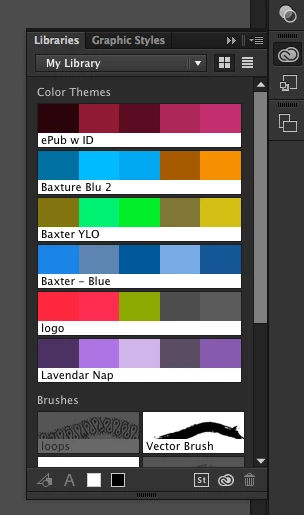
Step 3: Inside Adobe Illustrator, load the swatches from the Libraries panel (Window > Libraries).
This topic has been closed for replies.

3 replies

Participant
November 28, 2023

Incomplete instructions

Monika Gause
Community Expert
Community Expert
November 28, 2023

It's nearly 10 years old. Things have changed. At which point are you unable to figure it out?

tonir29847590
Participant
May 17, 2021

It doesn't work. Not showing at all in swatches panel nor is there an option to import it into the swatches panel??? This continues to be an issue for me to try and get my swatches into Illustrator to use.

michelew83603738
Community Expert
Community Expert
May 17, 2021

Assuming you have an updated version of Illustrator, if you look at the bottom of your color swatch panel there should be an icon that will let you go to the Adobe Colors without even leaving Illustrator:

 Then the following panel will open:

While I picked the Explore panel, whether you are in that or Create or My Themes, once you find what you like, you should have the 3 dots, which when you hover over brings out the menu which allows you to save that palette to the swatched panel. When I pick save, it immediately pops into my swatches panel as a color folder.


August 18, 2016
Pariah Burke
Community Expert
Community Expert
August 18, 2016

Yes. Thank you. The Kuler Color Themes panel allows access to existing Kuler themes and, via the buttons at the bottom of the panel, to Kuler on the Web. From there, follow my instructions above to add custom swatch sets into your CC Libraries.