Rick E Johnson
Inspiring
February 10, 2024
Question

How to get Apple-style crash reports

  • February 10, 2024
  • 1 reply
  • 536 views

I used to get an Apple-style crash report when debugging with Xcode, which showed which plugin and which function caused the crash, but the format changed with recent versions of Illustrator. One of my users apparently still gets the Apple-style crash reports, and I want to enable that! Here's an example of the crash report format I want:
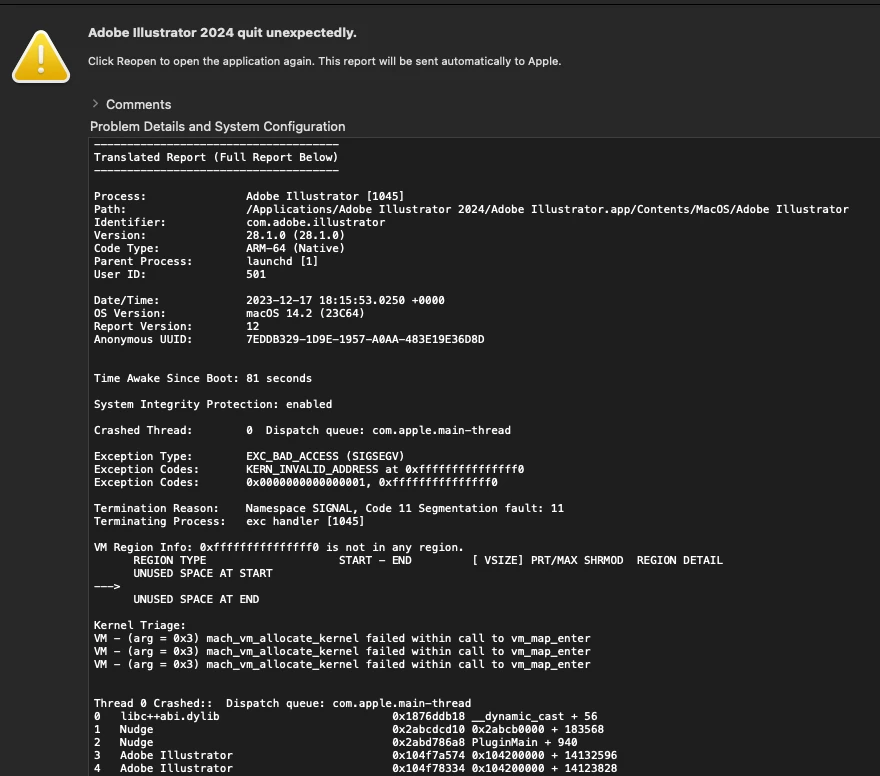


This format may be helpful to Adobe, but it tells me nothing:


{"app_name":"Adobe Illustrator","timestamp":"2024-02-10 16:44:51.00 +0100","app_version":"28.2.0","slice_uuid":"d65987c1-00fd-3117-bf3c-4564e9869210","build_version":"28.2.0","platform":1,"bundleID":"com.adobe.illustrator","share_with_app_devs":0,"is_first_party":0,"bug_type":"309","os_version":"macOS 14.4 (23E5191e)","roots_installed":0,"name":"Adobe Illustrator","incident_id":"2729B49A-96AA-4180-B853-7B77AA482AC8"}


In my system settings (macOS 14) I have enabled all options for sharing analytics. Any suggestions would be much appreciated.

This topic has been closed for replies.

1 reply

Anshul_Saini
Community Manager
Community Manager
February 13, 2024

Hello @Rick E Johnson,


Thank you for reaching out. I understand how important it is for you to receive detailed crash reports, especially when debugging with Xcode.

Please try the following steps and see if that helps:

  1. Cmd+click or right-click the Illustrator.app icon under Applications folder > Adobe Illustrator 2024 and choose Show Package Contents.
  2. Select Contents > Frameworks > AdobeCrashReporter.framework.
  3. Cmd+click or right-click the alias named AdobeCrashReporter and select Show Original.
  4. Double-click Adobe Crash Reporter (Red A app icon, not the black AdobeCrashReporter UNIX executable file).
  5. Choose "Don't show Crash Reporter dialog and never send crashes to Adobe" and click Done.

I hope this helps!


Best,

Anshul Saini

Rick E Johnson
Inspiring
February 14, 2024

Thanks, Anshul,


I made the change you suggested and the result seems to be that I get no crash reports at all. My user said that he got the Apple-formatted crash report from the "View Report" link in the Adobe Crash Reporter and I recall getting Apple-formatted crash reports in the Adobe crash dialog years ago also.


At one time Apple crash reports were also saved at Macintosh HD:Users:<user>:Library:Logs:DiagnosticReports: but I don't see them there anymore.  Do you know if they are sent somewhere else now?


Is there a way that plugin developers can determine from the Adobe-formatted crash data which plugin and which function caused the crash?


Thanks -- Rick