Inspiring
September 1, 2023
Answered

How to get even distance using the Blend Tool

  • September 1, 2023
  • 3 replies
  • 670 views

Hi community. 


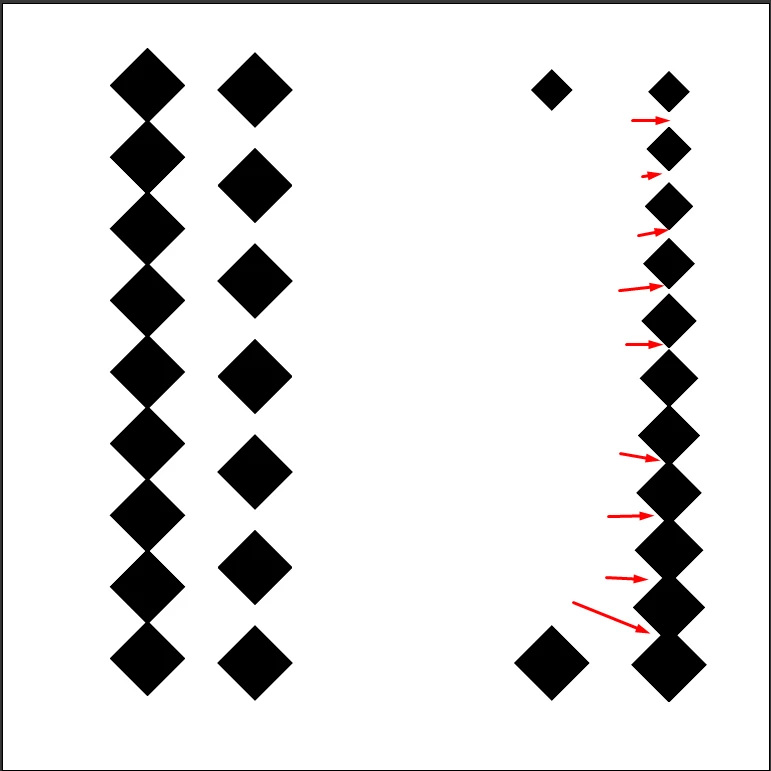
I'd like to know why the blend tool, when a shape is smaller from one end to another, the specified distance is not equal in Shape B, as opposed to shape A, where the rectangles are the same size from top to bottom. 

And what is the best method to have a larger shape which is smaller on the end, and have the in btween intervals evenly spaced.


Thank you.


This topic has been closed for replies.
Correct answer Jacob Bugge

Stefan,


To obtain a harmonious relation between size and spacing, you might consider a much simpler way with an Effect based on the first (and smallest) instance instead, such as Effect>Distort&Transform>Transform with a suitable modest scaling and a corresponding Move, shown here with 110% scaling and a horizontal Move of twice the side length (of the unrotated square):

Click/RightClick to get closer, Click again to get closer still


3 replies

Jacob Bugge
Community Expert
Jacob BuggeCommunity ExpertCorrect answer
Community Expert
September 1, 2023

Stefan,


To obtain a harmonious relation between size and spacing, you might consider a much simpler way with an Effect based on the first (and smallest) instance instead, such as Effect>Distort&Transform>Transform with a suitable modest scaling and a corresponding Move, shown here with 110% scaling and a horizontal Move of twice the side length (of the unrotated square):

Click/RightClick to get closer, Click again to get closer still


Inspiring
September 1, 2023

Always Helpful!


Kind regards!


Jacob Bugge
Community Expert
Community Expert
September 1, 2023

Thank you for your kind words, Stefan, and for presenting another intriguing case.

Jacob Bugge
Community Expert
Community Expert
September 1, 2023

Stefan,


The distance is measured centre to centre, so with changing size the spacing will change (to negative even).

Monika Gause
Community Expert
Community Expert
September 1, 2023

If it's vertical or horizontal, you can expand the blend and use the align panel.

If expanding the blend is not an option, then your only chance is to create handles for the blend spine and use that. I've covered the process in this video: https://youtu.be/GhgcNy4IvAI 

Inspiring
September 7, 2023

Thank you for this reply, this was another interesting method using the handles to adjust the spacing.