


Participating Frequently
December 16, 2025
Question

How to get illustrator to let me set the shortest edge width

  • December 16, 2025
  • 1 reply
  • 452 views

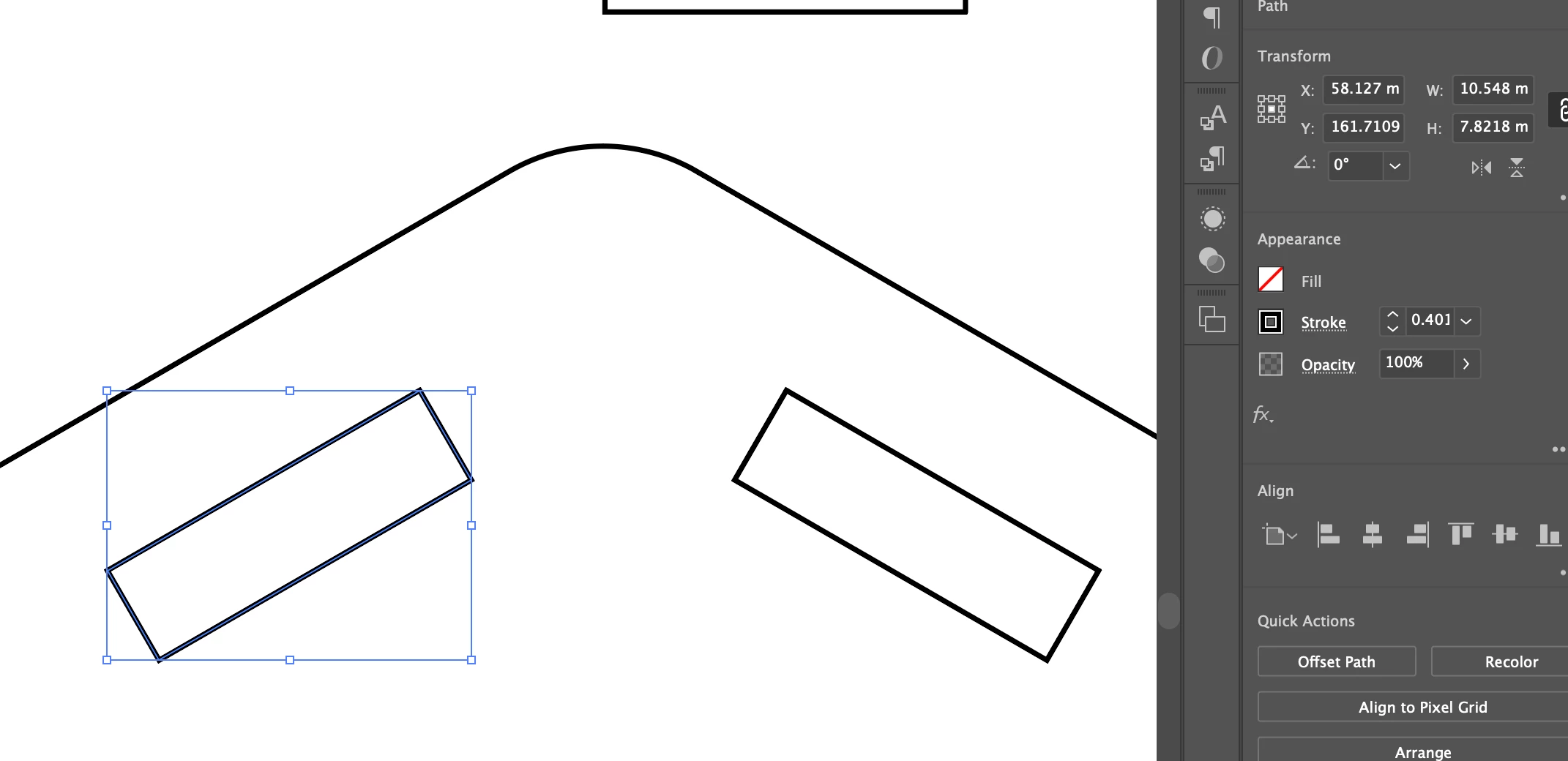
Hopefully I can make this question make sense.  I need to change the size of the shortest edge of this object. However, because the bounding box is rotated, I'm not able to do it. Clicking "reset bounding box doesn't do anything. Is it possible to make this to where I can just type in th 3.15mm height I need to change the shape?
869918iA2DE973458EF0BDD.png

1 reply

CarlosCanto
Community Expert
Community Expert
December 16, 2025

1. go to Object->Shape->Convert to Shape

2. once it's a Shape, change the height (or width) in the Transform Panel

869936i21D9C76A2C6CC4F4.png


Participating Frequently
December 17, 2025

Thanks...that didn't change anything though. It's already a shape it seems. It seems the bounding box itself needs to be changed, because the measurements in transform are for the bounding box. 

Ton Frederiks
Community Expert
Community Expert
December 17, 2025

Did you use the Apperance Panel and the Rectangle Properties (unlinked)?