
Known Participant
August 23, 2024
Answered

How to get individual stop-color offset in linear gradient using extendscript?

  • August 23, 2024
  • 1 reply
  • 603 views

Hi,

I need to get linear gradient individual stop-color offset using extendscript.

I try like this

var doc = app.activeDocument;
var selectedItems = doc.selection;
var getShape = selectedItems[0];
var getGrad = getShape.fillColor.gradient;
alert(getGrad.gradientStops.length);

The above alert returns 5 but when i export SVG using extendscript it returns 11 spot color with offset.

<linearGradient id="SVGID_1_" gradientUnits="userSpaceOnUse" x1="0" y1="45.3543" x2="269.2914" y2="45.3543">
<stop offset="0" style="stop-color:#DADBDC"/>
<stop offset="0.0685" style="stop-color:#BABBBE"/>
<stop offset="0.1716" style="stop-color:#909294"/>
<stop offset="0.222" style="stop-color:#808285"/>
<stop offset="0.4173" style="stop-color:#E9E9EA"/>
<stop offset="0.6182" style="stop-color:#B6B8BA"/>
<stop offset="0.7777" style="stop-color:#939598"/>
<stop offset="0.8156" style="stop-color:#A4A6A9"/>
<stop offset="0.8969" style="stop-color:#C5C7C9"/>
<stop offset="0.9612" style="stop-color:#DADCDD"/>
<stop offset="1" style="stop-color:#E2E3E4"/>
</linearGradient>
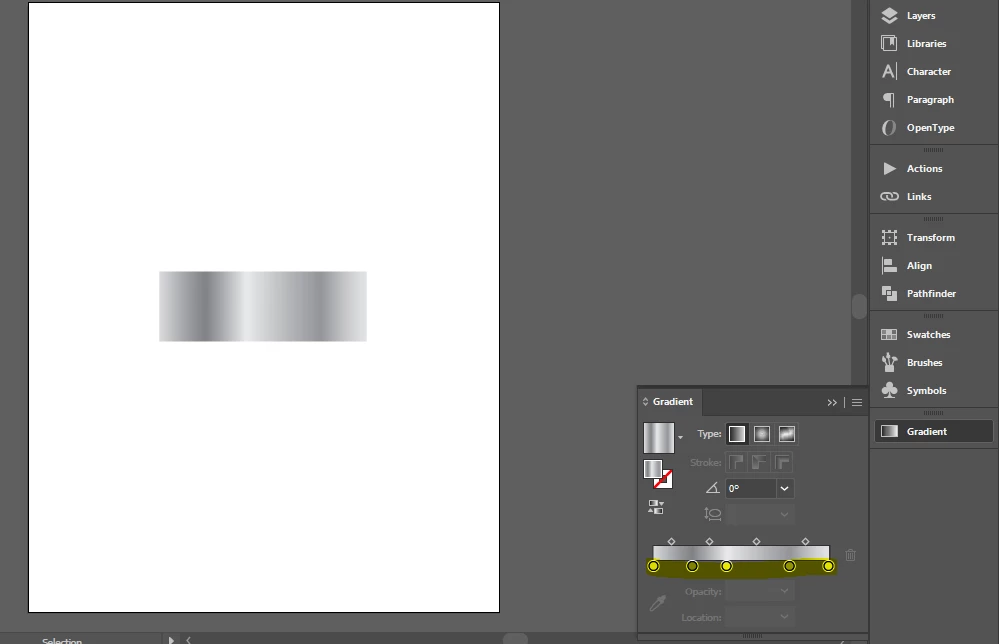
 

Please help.

Correct answer m1b

Hi @Arunkumar25715058ufpl


The gradient stops we get via the API (or via the UI, for that matter) do not correlate exactly with the <LinearGradient> stops generated by the svg exporter. The reason is (I guess) that the svg exporter calculates the stops based on the gradient's stops *and* the ramp point (called "location" in the UI). I would guess that it is generating multiple linear stops to simulate a non-linear gradient in Illustrator.


Do this example:

1. make a normal grad and export to svg 1.1 — you will get two stops.

2. now move the ramp point / location from 50% (ie. linear) to somewhere else, eg. 80% (so now non-linear) and export the gradient again — you will get more than two stops (I got 9 <stop> elements).


So, what do you exactly need to do? If you were willing to keep within the svg exporter's constraints, then keep all locations at 50% and the svg should have the same number of stops as the UI. But otherwise, we may need to find a creative approach.

- Mark

1 reply

m1b
Community Expert
m1bCommunity ExpertCorrect answer
Community Expert
August 23, 2024

Hi @Arunkumar25715058ufpl


The gradient stops we get via the API (or via the UI, for that matter) do not correlate exactly with the <LinearGradient> stops generated by the svg exporter. The reason is (I guess) that the svg exporter calculates the stops based on the gradient's stops *and* the ramp point (called "location" in the UI). I would guess that it is generating multiple linear stops to simulate a non-linear gradient in Illustrator.


Do this example:

1. make a normal grad and export to svg 1.1 — you will get two stops.

2. now move the ramp point / location from 50% (ie. linear) to somewhere else, eg. 80% (so now non-linear) and export the gradient again — you will get more than two stops (I got 9 <stop> elements).


So, what do you exactly need to do? If you were willing to keep within the svg exporter's constraints, then keep all locations at 50% and the svg should have the same number of stops as the UI. But otherwise, we may need to find a creative approach.

- Mark

Known Participant
August 23, 2024

Hi @m1b,


Thanks, I need to calculate offset for stop-color.