Participant
March 9, 2020
Answered

How to get rid of percentage bar next to ruler in Illustrator?

  • March 9, 2020
  • 1 reply
  • 520 views

Hello, 

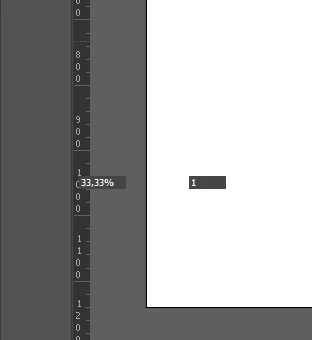
I recently noticed that Illustrator displays a percentage bar at the bottom next to the vertical ruler. What is the purpose of this percentage bar? I can't find a way to close it.

Is there any way to get rid of it?


Thanks!


This topic has been closed for replies.
Correct answer Doug A Roberts

That's the zoom percentage that should be at the bottom of the application window. What happens if you resize the window?

1 reply

Doug A Roberts
Community Expert
Doug A RobertsCommunity ExpertCorrect answer
Community Expert
March 9, 2020

That's the zoom percentage that should be at the bottom of the application window. What happens if you resize the window?

Participant
March 9, 2020

I just resized the window, and that seemed to work! I work on a laptop and also a seperate larger screen, maybe that has something to do with it (resizing the window, etc..).


Anyway, thanks for your help! 🙂