Trevor:
Legend
June 22, 2015
Answered

how to get the "pathPoints" coordinates of a textFrameItem?

  • June 22, 2015
  • 2 replies
  • 1102 views

Hi all,

Yes I know that textFrameItems don't have pathPoints but..

How can I get the x, y coordinates of the corner points of a rotated textFrameItem.

I know that I can get the angle of rotation by asin(myTextFrameItem.matrix.mValueA) etc.

My guess would be that one should be able to use the mValueTX and mValueTY to help but those values are very confusing and change dramatically on applying even a small rotation.

If anyone has some ideas preferably mathematically based and not API base please let me know.

It is very late by me now and I suspect I must be missing the obvious, I would think such a function must of been made.

Thanks

Trevor

P.s. A solution to the same problem in InDesign would also be appreciated

This topic has been closed for replies.
Correct answer Trevor:

Hi all,

I didn't try the DOM method as I figured out the mathematical method.

I won't give great results if a shear has been applied but that doesn't bother me as I am not applying shears

I got from http://stackoverflow.com/questions/9971230/calculate-rotated-rectangle-size-from-known-bounding-box-coordinates a useful formula

y = (1/(Math.cos(a) * Math.cos(a) - Math.sin(a) * Math.sin(a))) * (- w * Math.sin(a) + h * Math.cos(a));

where y is the height of the inner box when no rotation is applied to it and a is the angle of rotation and w is the width.

I had figured out for myself a different formula but got stuck when getting to rotations outside the 90 degree range i.e. -1 degree or 91 degrees.

The same problem occurred with this method so a made the following fix.

a = rads ((360 + degs(a)) % 90);

I did the temporary conversion to degrees as I seem to remember problems with applying Mod by a fraction, I think Ariel had a thread on that in the indesign forum.

These are the results of the script
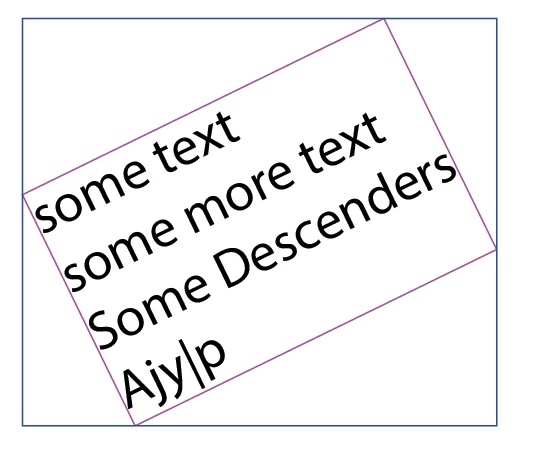
// draw a text box and rotate it before running the script

// By Trevor www.creative-scripts.com (sorry still not too much there)

// https://forums.adobe.com/message/7678561#7678561

// With a little bit of help from http://stackoverflow.com/questions/9971230/calculate-rotated-rectangle-size-from-known-bounding-box-coordinates

function main () {

var doc = app.documents.length && app.activeDocument,

    itext = doc && doc.textFrames[0];

if (!itext) {

    alert ("Sorry mate,\nI need a document with a textFrameItem on it or there's not much for me to do");

    return "twit";

}

var gb = itext.geometricBounds,

    imatrix = itext.matrix,

    p1X, p1Y, p2X, p2Y, p3X, p3Y, p4X, p4Y,

    a, h, w, x, y, hyp, op, adj,

    noColor = new NoColor(),

    rgbColor = new RGBColor(),

    newShape = doc.pathItems.add(),

    rect;

;

// Do the maths

a = Math.atan2 (imatrix.mValueB, imatrix.mValueA); // get the angle of the textFrameItem

a = rads ((360 + degs(a)) % 90); // make sure it's positive otherwise the result will get messed up

w = gb[2] - gb[0]; // Width of outer enclosing box

h = gb[1] - gb[3]; // Height of outer enclosing box

/* x = (1/(Math.cos(a) * Math.cos(a) - Math.sin(a) * Math.sin(a))) * (w * Math.cos(a) - h * Math.sin(a)); // Width of inner enclosed box, this is not needed for this script */

y = (1/(Math.cos(a) * Math.cos(a)- Math.sin(a) * Math.sin(a))) * (- w * Math.sin(a) + h * Math.cos(a)); // Height of inner enclosed box

op = Math.sin(a) * y; // this is the x coordinate offset

adj = Math.cos(a) * y; // this is the y coordinate offset

// calculate the points of the inner enclosed box

p1X = gb[0] + op; // left bottom

p1Y = gb[3];

p2X = gb[0]; // left top

p2Y = gb[3] + adj;

p3X = gb[2] - op; // right top

p3Y = gb[1];

p4X = gb[2]; // right bottom

p4Y = gb[1] - adj;

// Draw outer box

rgbColor.blue = 255;

rect = doc.pathItems.rectangle(gb[1], gb[0], gb[2]-gb[0], Math.abs(gb[3]-gb[1]) );

rect.fillColor = noColor;

rect.strokeColor = rgbColor;

// Draw inner box

newShape.setEntirePath([[p1X, p1Y], [p2X, p2Y], [p3X, p3Y], [p4X, p4Y], [p1X, p1Y]]);

rgbColor.red = 255;

newShape.strokeColor = rgbColor;

newShape.fillColor = noColor;

// Helper functions

function rads (x) {return x * (Math.PI / 180);}

function degs (x) {return x * (180 / (Math.PI));}

}

main()

Hi Uwe,

It was late but I don't know how I missed the path object. Getting old!

A good thing I didn't post it on the InDesign forum, at least here I can expect less sniggers for such a dumb look-over than I would get in the InDesign forum

Either-way thanks to you both, regards,

Trevor

2 replies

Community Expert
June 23, 2015

Hi Trevor,

in InDesign you definitly have a path object with text frames.

And with the path object you have access to its path points.

I think, we should discuss InDesign matters in the InDesign Scripting Forum.

Uwe

Trevor:
Trevor:AuthorCorrect answer
Legend
June 23, 2015

Hi all,

I didn't try the DOM method as I figured out the mathematical method.

I won't give great results if a shear has been applied but that doesn't bother me as I am not applying shears

I got from http://stackoverflow.com/questions/9971230/calculate-rotated-rectangle-size-from-known-bounding-box-coordinates a useful formula

y = (1/(Math.cos(a) * Math.cos(a) - Math.sin(a) * Math.sin(a))) * (- w * Math.sin(a) + h * Math.cos(a));

where y is the height of the inner box when no rotation is applied to it and a is the angle of rotation and w is the width.

I had figured out for myself a different formula but got stuck when getting to rotations outside the 90 degree range i.e. -1 degree or 91 degrees.

The same problem occurred with this method so a made the following fix.

a = rads ((360 + degs(a)) % 90);

I did the temporary conversion to degrees as I seem to remember problems with applying Mod by a fraction, I think Ariel had a thread on that in the indesign forum.

These are the results of the script
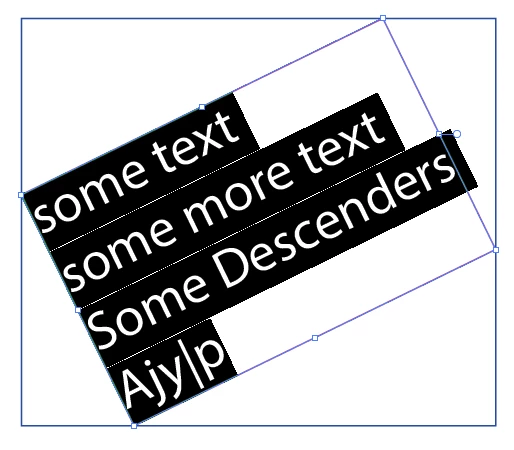
// draw a text box and rotate it before running the script

// By Trevor www.creative-scripts.com (sorry still not too much there)

// https://forums.adobe.com/message/7678561#7678561

// With a little bit of help from http://stackoverflow.com/questions/9971230/calculate-rotated-rectangle-size-from-known-bounding-box-coordinates

function main () {

var doc = app.documents.length && app.activeDocument,

    itext = doc && doc.textFrames[0];

if (!itext) {

    alert ("Sorry mate,\nI need a document with a textFrameItem on it or there's not much for me to do");

    return "twit";

}

var gb = itext.geometricBounds,

    imatrix = itext.matrix,

    p1X, p1Y, p2X, p2Y, p3X, p3Y, p4X, p4Y,

    a, h, w, x, y, hyp, op, adj,

    noColor = new NoColor(),

    rgbColor = new RGBColor(),

    newShape = doc.pathItems.add(),

    rect;

;

// Do the maths

a = Math.atan2 (imatrix.mValueB, imatrix.mValueA); // get the angle of the textFrameItem

a = rads ((360 + degs(a)) % 90); // make sure it's positive otherwise the result will get messed up

w = gb[2] - gb[0]; // Width of outer enclosing box

h = gb[1] - gb[3]; // Height of outer enclosing box

/* x = (1/(Math.cos(a) * Math.cos(a) - Math.sin(a) * Math.sin(a))) * (w * Math.cos(a) - h * Math.sin(a)); // Width of inner enclosed box, this is not needed for this script */

y = (1/(Math.cos(a) * Math.cos(a)- Math.sin(a) * Math.sin(a))) * (- w * Math.sin(a) + h * Math.cos(a)); // Height of inner enclosed box

op = Math.sin(a) * y; // this is the x coordinate offset

adj = Math.cos(a) * y; // this is the y coordinate offset

// calculate the points of the inner enclosed box

p1X = gb[0] + op; // left bottom

p1Y = gb[3];

p2X = gb[0]; // left top

p2Y = gb[3] + adj;

p3X = gb[2] - op; // right top

p3Y = gb[1];

p4X = gb[2]; // right bottom

p4Y = gb[1] - adj;

// Draw outer box

rgbColor.blue = 255;

rect = doc.pathItems.rectangle(gb[1], gb[0], gb[2]-gb[0], Math.abs(gb[3]-gb[1]) );

rect.fillColor = noColor;

rect.strokeColor = rgbColor;

// Draw inner box

newShape.setEntirePath([[p1X, p1Y], [p2X, p2Y], [p3X, p3Y], [p4X, p4Y], [p1X, p1Y]]);

rgbColor.red = 255;

newShape.strokeColor = rgbColor;

newShape.fillColor = noColor;

// Helper functions

function rads (x) {return x * (Math.PI / 180);}

function degs (x) {return x * (180 / (Math.PI));}

}

main()

Hi Uwe,

It was late but I don't know how I missed the path object. Getting old!

A good thing I didn't post it on the InDesign forum, at least here I can expect less sniggers for such a dumb look-over than I would get in the InDesign forum

Either-way thanks to you both, regards,

Trevor

Trevor:
Trevor:Author
Legend
June 23, 2015

I majorly forgot to mention that the above script is for the point type of text frames.

For line or area frames one would use the textPath property which contains the pathPoints

CarlosCanto
Community Expert
Community Expert
June 23, 2015

mathematically, we'll run into the same issues as if the text frame was un-rotated (ascenders, descenders).

with DOM calls, I would duplicate the text Frame, convert to Area Text, get the textPath, then its Anchor Points.

...I have not tried this.

Trevor:
Trevor:Author
Legend
June 23, 2015

Thanks Carlos,

I shall try it out in the afternoon and get back