
Participant
September 21, 2021
Answered

How to have a radial pattern without one object always on top

  • September 21, 2021
  • 3 replies
  • 500 views

Hi all, 

I am trying to create a flower pattern, but the one petal is always on top, which is making it stand out like a sore thumb! Is there a way around this? I have tried a series of processes making the object drop down a level, go to the back, or to the top, and have not been able to figure out how to do this. 
Is there a way to make that top petal slip behind the one petal to the side, but remain on top of the petal in the other side? 
Thanks! Any help with this would be greatly appreciated! 
This topic has been closed for replies.
Correct answer tromboniator

I’d like to augment Jacob’s advice, if I may:


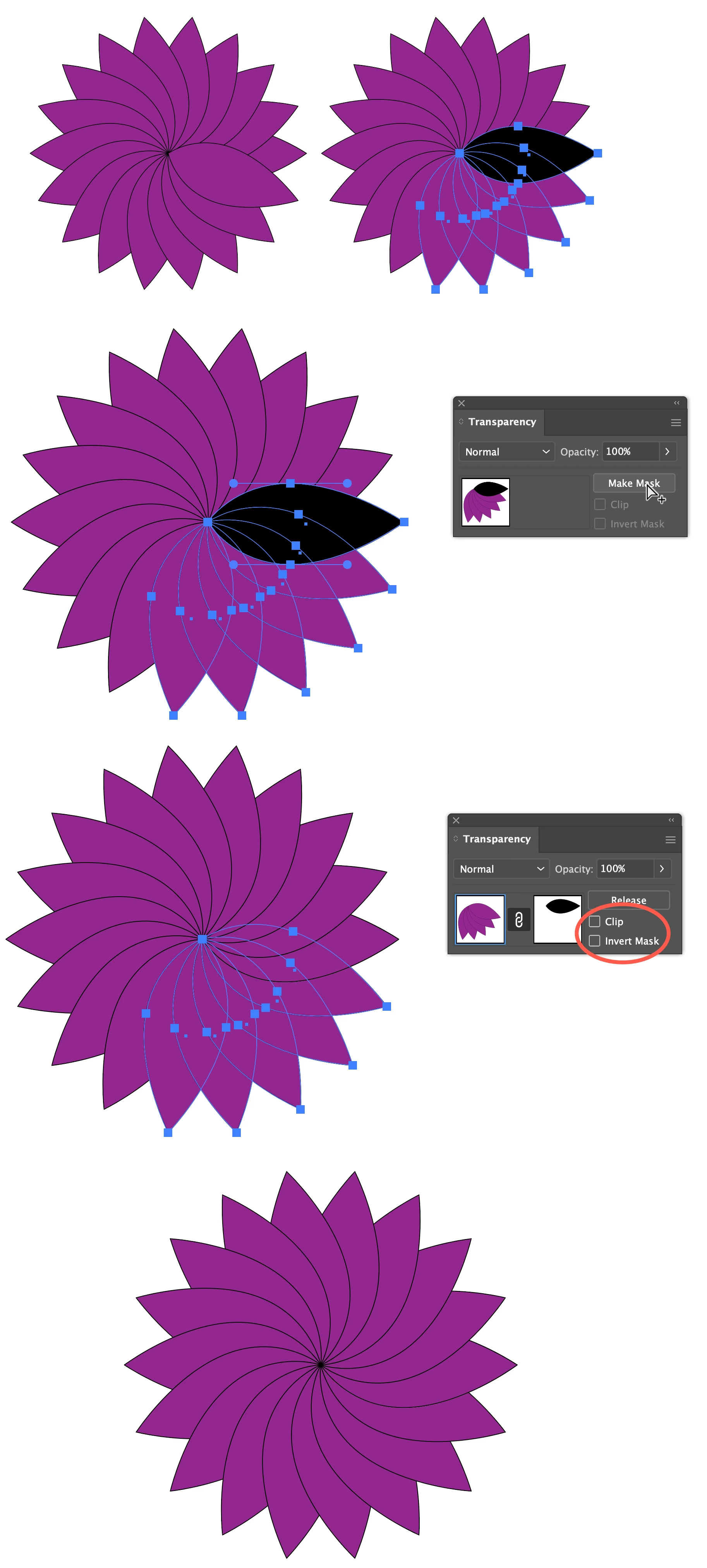
When you have completed the circle of petals, do as Jacob suggests and generate a copy of the bottommost petal at the very top of the stack, and make both the fill and stroke black, with the stroke of the same weight as the original.


With the black petal selected (but NOT the original bottommost petal) also select the original topmost petal AND all other petals that intersect the black one. Then proceed with Make Mask with Clip and Invert Mask deactivated.


Peter


3 replies

tromboniator
Community Expert
tromboniatorCommunity ExpertCorrect answer
Community Expert
September 22, 2021

I’d like to augment Jacob’s advice, if I may:


When you have completed the circle of petals, do as Jacob suggests and generate a copy of the bottommost petal at the very top of the stack, and make both the fill and stroke black, with the stroke of the same weight as the original.


With the black petal selected (but NOT the original bottommost petal) also select the original topmost petal AND all other petals that intersect the black one. Then proceed with Make Mask with Clip and Invert Mask deactivated.


Peter


MezmerArtAuthor
Participant
September 22, 2021

Brilliant! Thanks for your help Peter! 

michelew83603738
Community Expert
Community Expert
September 21, 2021

Masking the unwanted part is really the easiest way to accomplish this.

Jacob Bugge
Community Expert
Community Expert
September 21, 2021

defaultiny,


A simple way is to:


1) Move a copy of the bottommost petal to the very top, then set both the stroke and the fill to black,

2) Select both the black petal from 1) and the topmost petal, then in the Transparency panel (flyout) Make (Opacity) Mask with both Clip and Invert Mask unticked (in the main panel).


That ought to hide the unwanted part.


MezmerArtAuthor
Participant
September 22, 2021

Thank you for your assistance! This is working 🙂