
Inspiring
August 16, 2022
Answered

How to highlighted select a specified layer?

  • August 16, 2022
  • 1 reply
  • 2751 views

How to select a specified layer with a script? For the same effect as clicking with the mouse, this layer must be highlighted.
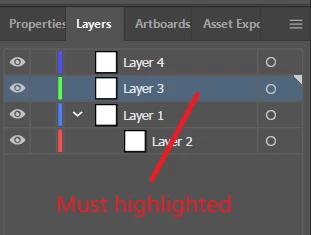
I have tried the following methods, which are not always feasible:

app.activeDocument.activeLayer=app.activeDocument.layers[0]

app.activeDocument.layers[0].hasSelectedArtwork=true

When running the script, if a layer (highlighted) has been selected, they are feasible, but when running the script, if the specified layer had selected but not highlighted ( the mouse focus is not on the layer panel ), they are not feasible (or they have run correctly and selected the specified layer, but the layer is not highlighted).


So, the focus of my question is how to highlight select layers, for the same effect as clicking with the mouse. I do this mainly to run the "Duplicate Layer" command in the layer panel menu. If the layer is not highlighted, the "Duplicate Layer" command is not available even though the layer is already selected.


Looking forward to your response and many Thx for help and ideas.

This topic has been closed for replies.
Correct answer Silly-V

Oh, this just IN! A brand-new technique which uses more actions to highlight any layer.

What it does is put a temporary path item to your desired layer and selects that item, then runs an action which uses "Locate Object" from the layers' panel to bring a highlighted selection to that item. Apparently the behavior of Illustrator is to automatically highlight the parent layer of an object that has recently exited the Isolation Mode!

This actually works really conveniently for this situation, so much so that this method and action is probably usable for all-time.

  /**
	 * Highlights any layer by inserting a temporary item into it and using an action which enters and exists the isolation mode.
	 * Afterwards, this item is removed.
   * @9397041 {Layer} targetLayer
   */
  function highlightLayerInContainer (targetLayer) {
		var someTempPath = targetLayer.pathItems.rectangle(0, 0, 200, 200);
    someTempPath.name = "TEMP [for highlighting]";
		app.activeDocument.selection =  null;
		someTempPath.selected = true;
		app.doScript("target layer", "Test Set 2");
		someTempPath.remove();
  }

	highlightLayerInContainer(app.activeDocument.layers.getByName("Layer 5").layers.getByName("Layer 7"));

	// app.doScript("DupeLayer", "Test Set 2"); // * Do custom processing on the layer when it is highlighted.
/version 3
/name [ 10
	54657374205365742032
]
/isOpen 1
/actionCount 2
/action-1 {
	/name [ 9
		447570654c61796572
	]
	/keyIndex 0
	/colorIndex 0
	/isOpen 1
	/eventCount 1
	/event-1 {
		/useRulersIn1stQuadrant 0
		/internalName (ai_plugin_Layer)
		/localizedName [ 5
			4c61796572
		]
		/isOpen 1
		/isOn 1
		/hasDialog 0
		/parameterCount 2
		/parameter-1 {
			/key 1836411236
			/showInPalette -1
			/type (integer)
			/value 1
		}
		/parameter-2 {
			/key 1851878757
			/showInPalette -1
			/type (ustring)
			/value [ 19
				4475706c69636174652053656c656374696f6e
			]
		}
	}
}
/action-2 {
	/name [ 12
		746172676574206c61796572
	]
	/keyIndex 0
	/colorIndex 0
	/isOpen 1
	/eventCount 3
	/event-1 {
		/useRulersIn1stQuadrant 0
		/internalName (ai_plugin_Layer)
		/localizedName [ 5
			4c61796572
		]
		/isOpen 0
		/isOn 1
		/hasDialog 0
		/parameterCount 2
		/parameter-1 {
			/key 1836411236
			/showInPalette -1
			/type (integer)
			/value 19
		}
		/parameter-2 {
			/key 1851878757
			/showInPalette -1
			/type (ustring)
			/value [ 13
				4c6f63617465204f626a656374
			]
		}
	}
	/event-2 {
		/useRulersIn1stQuadrant 0
		/internalName (ai_plugin_Layer)
		/localizedName [ 5
			4c61796572
		]
		/isOpen 0
		/isOn 1
		/hasDialog 0
		/parameterCount 1
		/parameter-1 {
			/key 1836411236
			/showInPalette -1
			/type (integer)
			/value 24
		}
	}
	/event-3 {
		/useRulersIn1stQuadrant 0
		/internalName (ai_plugin_Layer)
		/localizedName [ 5
			4c61796572
		]
		/isOpen 0
		/isOn 1
		/hasDialog 0
		/parameterCount 1
		/parameter-1 {
			/key 1836411236
			/showInPalette -1
			/type (integer)
			/value 25
		}
	}
}

1 reply

Silly-V
Legend
August 16, 2022

The highlighting of a layer is a big problem because with ExtendScript there's no way to do so. However, what you can do is cause a condition which brings this about. Some sitations could be, adding a new layer for example. Its' behavior is to be automatically highlighted. Another nuance of this behavior is that if a layer happened to be deleted, the layer below it becomes highlighted. So we could apparently use enough redraws during a script which adds and removes a new layer, to cause the highlighting to both appear and stay. However there is a little issue with not being able to highlight a layer whose index is not 0 in the case of there not being a highlight on any layer in the first place, unless beforehand one ensures to highlight the layer at the very top and then do so to their intended layer.
This is an experimentation method which highlights my layers according to the code, let me know if it ends up working for you.

  /**
   * 0-based index Highlights a layer by adding and removing a temporary layer.
   * @9397041 {number} layerIndex
   */
  function highlightLayerAtIndex (layerIndex) {
    var doc = app.activeDocument;
    if (layerIndex >= doc.layers.length) {
      throw new Error("The layer index (" + layerIndex + ") is out of bounds (0-" + (doc.layers.length - 1) + ")");
    }
    var indexLayer = doc.layers[layerIndex];
    var tempLayer = doc.layers.add();
    app.redraw();
    tempLayer.move(indexLayer, ElementPlacement.PLACEBEFORE);
    app.redraw();
    tempLayer.remove();
    app.redraw();
  }

	// Ensure a highlight for any scenario.
  highlightLayerAtIndex(0);
	// Highlights the 4th layer.
  highlightLayerAtIndex(3);

This is de facto really undo-heavy, as in how the app.redraw() causes an undo point each time it is used.

Nevertheless, when used along with an action which duplicates a layer, this will create the duplication per Illustrator rules and appends " copy" after the name. It then also removes the highlighting. -- not a problem for us, as the same highlight method can surely rehighlight it.

Inspiring
August 16, 2022

Thank you @Silly-V  for helping me out on this. This is worked within the scope of doc.layers.


I tried to highlight a sub layer (sub layer under layer 0 ) with the following code, but it didn't work! How can it be changed to highlight a sub layer? 


function highlightLayerAtIndex (layerIndex) {
    var doc = app.activeDocument;
    if (layerIndex >= doc.layers[0].layers.length) {
      throw new Error("The layer index (" + layerIndex + ") is out of bounds (0-" + (doc.layers[0].layers.length - 1) + ")");
    }
    var indexLayer = doc.layers[0].layers[layerIndex];
    var tempLayer = doc.layers[0].layers.add();
    app.redraw();
    tempLayer.move(indexLayer, ElementPlacement.PLACEBEFORE);
    app.redraw();
    tempLayer.remove();
    app.redraw();
  }

  highlightLayerAtIndex(0);  // This also highlights the first layer in the document(doc.layers[0]), Not doc.layers[0].layers[0]


Many Thx for help and ideas.


Silly-V
Legend
August 16, 2022

Yea, this is where I think the magic sort of ... stops. The issue is of course that the automatic behavior of Illustrator has stopped accommodating ourthese-here work-arounds.

Well, here's what I think: if the objective is to trigger some Illustrator action which specifically works on layers in a highlighted state at least we can move the things from one layer into a top-level layer, then run the procedure to highlight and do whatever-else such as duplicate, then move the new duplicated layer to the new spot.

Maybe this will still be applicable to you?