
Participating Frequently
November 5, 2022
Question

How to increase brightness in mutliple files to same extent

  • November 5, 2022
  • 2 replies
  • 187 views

Hey guys, I have about 10 different files containing the same base logo but with little deviations and different color hilights. I printed these files, but unfortunately the appear to be a little to dark after printing.


Therefore, I want to increase the general brightness of all shapes in my logo. Important is that the increase should be the same in every file. The only way I'm aware of is to select the logo and navigate through the menu until:
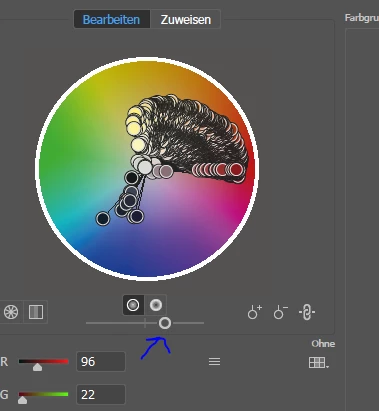
Using this slider I can change the brightness. However, as I do not see any stepwise increase or increase over percentage, there is no way to guarantee the same increase across my files. Is there another option you might see here?


Thanks!

This topic has been closed for replies.

2 replies

michelew83603738
Community Expert
Community Expert
November 9, 2022

I don't know if you resolved your problem, but AstuteGraphics has a plug-in that allows you to do things like adjust levels and curves of a vector object (without changing it to a rastor object) and it is called Phantasm. You can try it out for free I believe for 14 days.

Ton Frederiks
Community Expert
Community Expert
November 5, 2022

You could try to use Edit > Edit Colors > Adjust Color Balance with equal percentages.

Micha5E6DAuthor
Participating Frequently
November 9, 2022

thanks for the answer. however, i basically want to keep the balance and just adjust the brightness 😕😕