

templatemaker-nl
Inspiring
June 25, 2021
Answered

How to iterate over items within a group using JSX?

  • June 25, 2021
  • 3 replies
  • 5210 views

I have around 160 groups of objects in my AI file.

I would like to perform an action ("Expand stroke, pathfinder Boolean Add and similar) on all object together within one group.
So, I'm writing a script to do just that. I'm stuck quite early in the process.


I can find all 'groups' within my current selection. However, I can't access the separate items within each group. The documentation (Adobe Illustrator CC 2017 Scripting Reference: JavaScript) says that a GroupItem should have GroupItems and PathItems. However, these properties do not exist (undefined). When I create a list of properties, indeed, these are not listed. All I get back from the script is:


clipped typename uRL note layer locked hidden selected position width height geometricBounds visibleBounds controlBounds name uuid blendingMode opacity isIsolated artworkKnockout zOrderPosition absoluteZOrderPosition editable sliced top left visibilityVariable pixelAligned wrapped wrapOffset wrapInside parent


So, where are the items within my group?


For context, a screenshot:
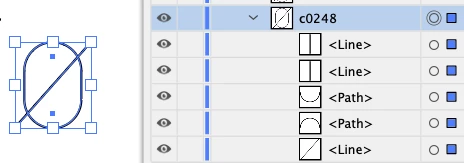
And my piece of Javascript:

    for (var i = 0; i < sel.length; i++) {
        var a = "";
        for (var key in grp) {
            a += key + "\n";
        }
        alert(a);
    }


(I have to use 'alert()' because Adobe's ExtendScript Toolkit is impossibly sluggish to work with)

This topic has been closed for replies.
Correct answer Disposition_Dev

Illustrator's DOM is pretty similar to a browser DOM if you're familiar with that. They pretty much follow the same tree shape. So, consider that there are effectively 2 types of items.. a discreet item, and a container item. Discreet items (pathItem,textFrameItem,placedItem, etc) can only go inside container items (groupItem,compoundPathItem,layer,document).


Each container item has a few properties that describe its child elements. so for example, a groupItem has some array properties like groupItem.pageItems (this is all children of the container, including other containers... except for layers), groupItem.compoundPathItems (this is just top level compound paths that exist in groupItem), groupItem.pathItems (this is any top level simple path items like polygons), etc.


So, to answer your question, to access the items of a given group, you just need to determine what KIND of items you want to identify, then use that property to access the array of child elements. So let's look at a use case example for finding and manipulating all the simple pathItems of each group in the selection:


#target Illustrator
function test()
{
	var doc = app.activeDocument;
	var sel = doc.selection;
	if(!sel.length)
	{
		alert("Please make a selection first.");
		return;
	}


	function doSomething(item)
	{
		//do something to the item here
	}

	function loopPathItems(group)
	{
		for(var p=0;p<group.pathItems.length;p++)
		{
			doSomething(group.pathItems[p]);
		}
	}


	for(var x=0;x<sel.length;x++)
	{
		if(sel[x].typename === "GroupItem")
		{
			loopPathItems(sel[x]);
		}	
	}
	
}
test();


3 replies

femkeblanco
Legend
June 25, 2021

Just to add to what's already been said, items within container items are not enumerable with a "for ... in" loop.  

Disposition_Dev
Legend
June 25, 2021

good point Femke.


container objects ARE objects... they're just not javascript objects. the Ilustrator API needs to be used in order to access these items.

Disposition_Dev
Disposition_DevCorrect answer
Legend
June 25, 2021

Illustrator's DOM is pretty similar to a browser DOM if you're familiar with that. They pretty much follow the same tree shape. So, consider that there are effectively 2 types of items.. a discreet item, and a container item. Discreet items (pathItem,textFrameItem,placedItem, etc) can only go inside container items (groupItem,compoundPathItem,layer,document).


Each container item has a few properties that describe its child elements. so for example, a groupItem has some array properties like groupItem.pageItems (this is all children of the container, including other containers... except for layers), groupItem.compoundPathItems (this is just top level compound paths that exist in groupItem), groupItem.pathItems (this is any top level simple path items like polygons), etc.


So, to answer your question, to access the items of a given group, you just need to determine what KIND of items you want to identify, then use that property to access the array of child elements. So let's look at a use case example for finding and manipulating all the simple pathItems of each group in the selection:


#target Illustrator
function test()
{
	var doc = app.activeDocument;
	var sel = doc.selection;
	if(!sel.length)
	{
		alert("Please make a selection first.");
		return;
	}


	function doSomething(item)
	{
		//do something to the item here
	}

	function loopPathItems(group)
	{
		for(var p=0;p<group.pathItems.length;p++)
		{
			doSomething(group.pathItems[p]);
		}
	}


	for(var x=0;x<sel.length;x++)
	{
		if(sel[x].typename === "GroupItem")
		{
			loopPathItems(sel[x]);
		}	
	}
	
}
test();


templatemaker-nl
Inspiring
June 25, 2021

Thank you, @Disposition_Dev Your script worked liked a charm!…

…and so did mine, when I finally discovered that although GroupItem is written with a capital 'G', pathItems is written with a lower case 'p'... (sigh).

Thanks also for the clear explanation on the hierarchy of the Document Object Model analog and the very legible script.

Still I wonder, why is 'pathItems' (and friends) not listed as a property when I iterate through the GroupItem properties? Would you happen to know?

Disposition_Dev
Legend
June 25, 2021

That's a good question that i don't really know the answer to.. But suffice it to say, we're not working with ES6 JavaScript here. This is "ExtendScript" which is basically a clone of ES3 JavaScript. But as far as i know it's not an exact copy. There are things you can do in the javascript web environment that you just can't do in ExtendScript (and to be clear, i'm not talking about ExtendScript Toolkit the IDE, I'm talking about the language that illustrator scripts are built on).


Even if you add a breakpoint in VSCode.. You can step through the code and view the properties of any object you like, but the pageItems/groupItems/pathItems/etc arrays don't show up. you have to log them to the console or alert them if you want to see them.


Try out this function. This will give you a clean javascript array (rather than whatever kind of "collection" it is when you just access groupItem.pathItems or similar. in some way or other, those aren't true arrays and they can behave oddly) so that you can process the array of pageItems however you would normally process an array. You'll also be able to loop the array to give you whatever proprties you want for each item. just pass in 


https://github.com/wdjsdev/public_illustrator_scripts/blob/master/array_from_container.js

rcraighead
Legend
June 25, 2021

ExtendScript Toolkit is defunct. You should be using Microsoft VSCode.

templatemaker-nl
Inspiring
June 25, 2021

Okay, thanks.