
DigitalChickster
Legend
May 15, 2018
Answered

How to join a line and shape... to get rid of pointy corners

  • May 15, 2018
  • 4 replies
  • 1672 views

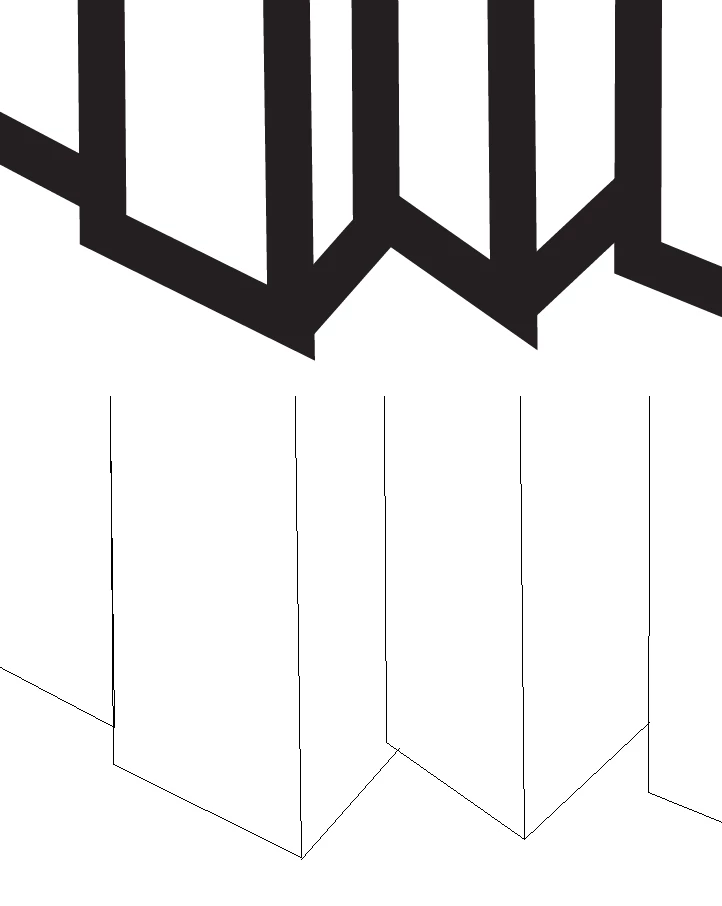
Hi all! I'm trying to draw simple shapes that look like books lined up. I start with a rectangle (as the spine), then add some lines to make it look like a book. My problem  is that I have a 3pt stroke on all the shapes and lines. So I'm getting some weird, pointy corners. I can't figure out how to join a line to a rectangle shape (now a trapezoid). I'm attaching a picture to show you how it looks when I draw it (top) and how it looks when I view it as outlines.
    This topic has been closed for replies.
    Correct answer Monika Gause

    you can't join 3 segments into a point . Apply round corners instead.

    4 replies

    sishamIAGD
    Community Expert
    Community Expert
    May 15, 2018

    You could always do this...

    tromboniator
    Community Expert
    Community Expert
    May 15, 2018

    Results can also depend on how you draw the shapes:

    Theresa J
    Community Expert
    Community Expert
    May 15, 2018

    You can’t join 3 endpoints but you can join the lines that make up the bottom V shapes. I would temporarily hide the two vertical lines in the center. Then use the direct select tool to select the end points that come together at the bottom of the V shape. Use Command(mac) or Control(PC) ‘J’ to join the points.

    Monika Gause
    Community Expert
    Monika GauseCommunity ExpertCorrect answer
    Community Expert
    May 15, 2018

    you can't join 3 segments into a point . Apply round corners instead.