
Participant
August 2, 2017
Answered

How to maintain page size when saving as pdf?

  • August 2, 2017
  • 4 replies
  • 17971 views

I am having some trouble with maintaining page size (artboard size?) of .pdf's that I create using Illustrator.  I made an illustrator document with an artboard size of 57.5 x 12.5 inches, and I need it to be printed at that exact size.  However, when I save as a .pdf and view the page size in adobe reader, it says the page size 22.64 x 4.93 inches.  What am I missing when I am saving my file as a pdf that is causing the page size to change?  Thanks in advance!
This topic has been closed for replies.
Correct answer Rosemary3689117608kz

I found a solution after spending hours trying to work out why the exported PDF was printing smaller than the original. I'd removed any marks/bleeds; that wasn't the problem.

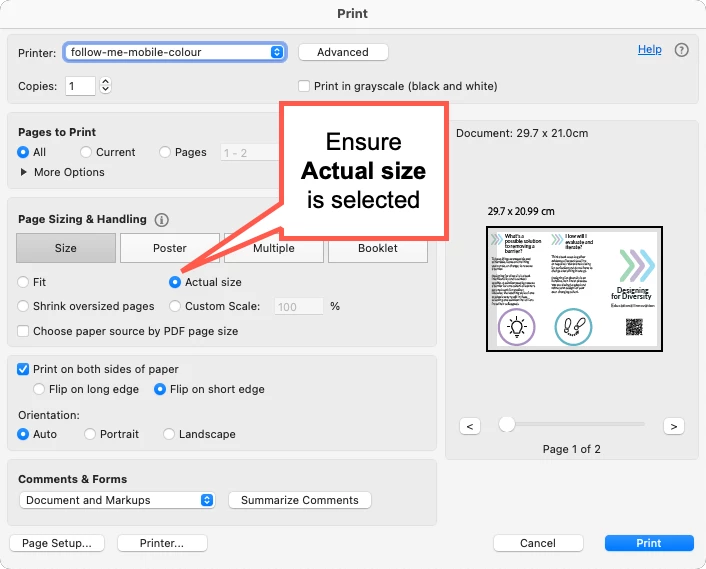
Eventually I noticed that when I went to print the file in Acrobat, that the size had defaulted to Fit. Selecting Actual size solved the problem 🙂

4 replies

Rosemary3689117608kzCorrect answer
Participant
November 14, 2024

I found a solution after spending hours trying to work out why the exported PDF was printing smaller than the original. I'd removed any marks/bleeds; that wasn't the problem.

Eventually I noticed that when I went to print the file in Acrobat, that the size had defaulted to Fit. Selecting Actual size solved the problem 🙂

Luke Jennings
Inspiring
August 3, 2017

I think your Adobe Reader units preference is set to Centimeters, or vice versa.

FYI, here is some good info about the various PDF boxes:

Thinking outside the page box: a guide to PDF page boxes | Enfocus

Inspiring
August 7, 2017

Nice catch -

I'm sure you are right - 57.5 cm = 22.64 inches

And 12.5 cm = 4.92 inches

schroef
Inspiring
May 28, 2020

Im running into this same issue. Im using metric and using cm. I need to deliver a file in 1/10 scale. Though all measurements are correct. When the PDF is saved without Bleed, the pagesize in Acrobat is suddenly changed.

In illustrator the dimension are 32.21 x 3.44cm but in Acrobat they are 30.206 x 3.440 cm. Some how its adds a 3rd decimal and numbers arent rounded anymore?

Ill check what happens when I work in MM, perhaps that helps.

barbara_a7746676
Community Expert
Community Expert
August 2, 2017

If you are choosing File > Save As, Adobe PDF, Make sure that no Marks or Bleeds are turned on.

If you are choosing File > Print, make sure that Scaling is set to Do Not Scale. Your dialog box may look somewhat different.

ShivendraAgarwal
Community Manager
Community Manager
August 2, 2017

there can be many reasons.. may be you can check your pdf settings and specially see if there are any abnormal bleeds added.

for us to understand better, please share your ai and pdf files.

bkomarAuthor
Participant
August 2, 2017

I've never posted here before, what's the best way to share my files? 

I only have the pdf at the moment but it still contains all the layer information, etc.

Monika Gause
Community Expert
Community Expert
August 2, 2017

Please upload to Dropbox or the like and share a link here