


Participant
February 7, 2021
Answered

How to make a paint stroke/slash dsdfsd

  • February 7, 2021
  • 2 replies
  • 1907 views

Hello everyone. So, I am currently in the midst of making some sort of paint scratches/strokes/slashes. 


I want to get something as close as possible to this: 
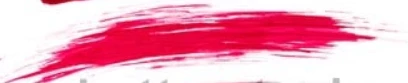
 

I tried to use the Artistic Paintbrush tool, but as you can see: 
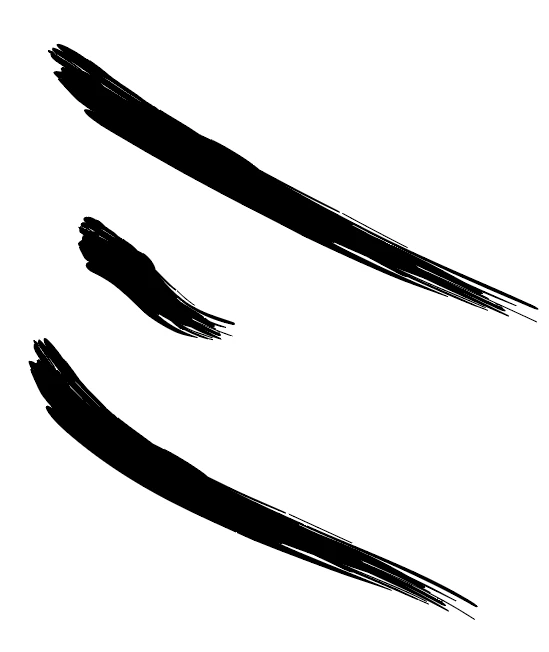
 

They are a little too "full" for me, like, the only are scarce with "paint" at the end of the stroke. Whilst I want it to be more like the stroke in red, where you can see that the whole paint stroke is a little scarcely painted. Like, Imagine you have a paint brush that's not been recently dipped in paint and you slash it across a board pretty hard to get those last rests of paint of the brush. Well, a little hard to explain but something like this (same picture as above):


I am very thankful for any help, and if you have any questions please tell me! Thanks. 


This topic has been closed for replies.
Correct answer Ton Frederiks

You can try to edit one of the existing brushes (drag them from the brushes panel to the artboard an delete the invisible rectangle) or you can use a real brush and paint , take a picture or scan the result vectorize it and create your own.

2 replies

Ton Frederiks
Community Expert
Ton FrederiksCommunity ExpertCorrect answer
Community Expert
February 7, 2021

You can try to edit one of the existing brushes (drag them from the brushes panel to the artboard an delete the invisible rectangle) or you can use a real brush and paint , take a picture or scan the result vectorize it and create your own.

ceyhun_akgun
Legend
February 7, 2021

Search it on Google. Import a Brush view of your choice into Illustrator.

Trace it and make sure it is vectorial.
Create as Brush with New Brush command in the Brush panel.
Alternative:
After the trace process, you can give a different look with Distort and thin the ends. Afterwards, you can get a brush with fine-looking tips with New Brush.


Graphic Designer Educator / PrePress Consultant