
How to make an arrowhead start on the dash of a stroke instead of the gap?
- February 17, 2021
- 1 reply
- 442 views
Hi:
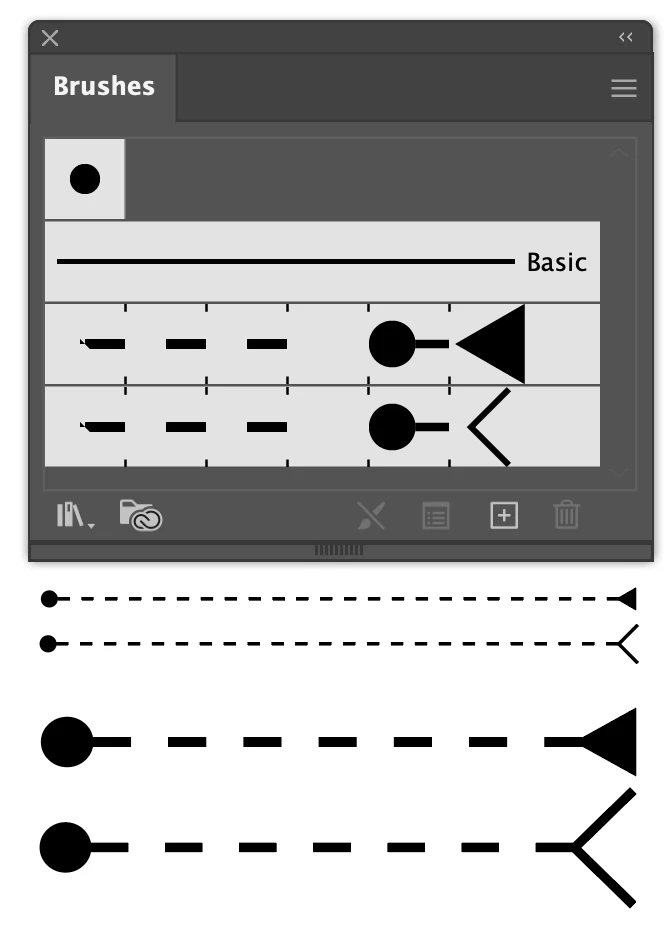
Is there a setting or tip/trick I've missed to get a circular arrowhead to start at the beginning of the first dash of a dashed stroke instead of starting at the gap of the stroke? The stroke ending arrowhead attaches to the last dash, but try as I may, I cannot get the start arrowhead to connect to a dash.
In the attached pictures, the top line with dashed stroke (4 pt) shows the problem on the left: the circle arrowhead is "attached" to a gap (whitespace) whereas the filled triangle arrowhead to the right is attached to a dashed. The bottom line is a 3-piece version in which I manually placed a circle and rotated "V".
I did find by trial and error that a 2pt dash and 12 pt dash connected to the circle arrowhead, but those dashes and gaps are not appropriate for the illustrations 😞
For reference, I need to draw neurons that will NOT follow straight paths (pen tool and beziers), and having the circular arrowhead at the start and a custom arrowhead (already have done this in arrowheads.ai file) will save an immense amount of time.
Thanks!
Scott
 AdChoices