
Inspiring
April 26, 2022
Question

How to make flags on a line (rotating objects along a path)

  • April 26, 2022
  • 5 replies
  • 1267 views

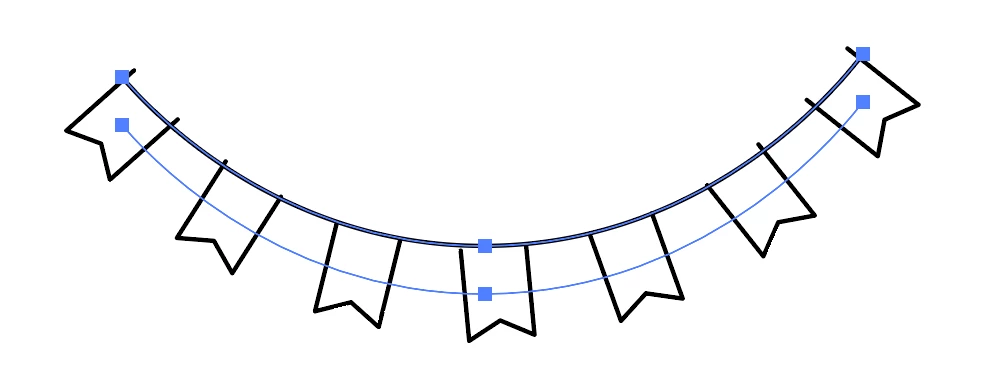
I've been trying to make a graphic like this:

But putting my flag shapes along a curve has proven to be really tricky. I tried making a scatter brush, but since the scatter brush aligns to the center of the flags, the top part of the flag (that is on the "rope") has a tighter curve than the path I originally set them on (the "rope").
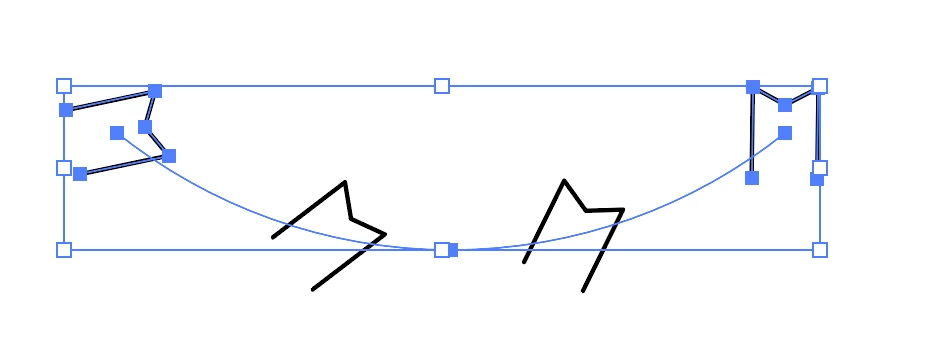
I also tried to do a blend with the spine replaced, but the flags rotate the wrong way than what I'm intending.
If anyone has any solutions other than microadjusting until it looks approximately right, that would be appreciated!

This topic has been closed for replies.

5 replies

Mike_Gondek10189183
Community Expert
Community Expert
April 27, 2022

There are also scatter brushes


Use scatter fixed & change the value (use cursor keys while cursor is editing value)to get it to align to top of rope rather than center.


kphotopage
Legend
April 27, 2022

Alyssa, Hi


As always there are many methods to do things with Adobe.


I did similar as Barbara but I used Effects>Transform.

Expand, Rotate.


One thing I would do, Step 1, Create Symbols of your flags.

You can easily replace those Symbols.

You only need to create one, then duplicate, replace your flags.


K

Ton Frederiks
Community Expert
Community Expert
April 26, 2022

To let the top of the flag align to the path, you may want to add an invisible rectangle 2x the size of the flag before creating the flag.

barbara_a7746676
Community Expert
Community Expert
April 26, 2022

Another way would be to draw a very large circle. For example, below is a large circle on an 8.5 x 11 inch artboard, and a small flag at the bottom.

Switch to View > Outline so that you can see the center point of the circle even when it is not selected.

Select the flag.

Select the Rotate tool and Option or Alt click the center point of the circle. The Rotate dialog box will appear. 

Type in the rotation that you want, and click Copy.

Command-d (Mac) or Control-d (Windows) to repeat the transformation until you get the number of flags that you need.

Now you can delete the circle. Move or rotate the flags as needed.


Mohammad.Harb
Community Expert
Community Expert
April 26, 2022

objet -> Envelope distort -> Make with Warp