Vectfarm
Participant
Oct 27, 2026 11:51 AM UTC
Answered

How to make houndstooth pattern seamless/tileable?

I have already make the base shape but cannot make it tileable/seamless. Anyone can help? Thanks so much!



    Mike27729831yz2hCorrect answer
    Participant
    Oct 27, 2026 6:00 PM UTC

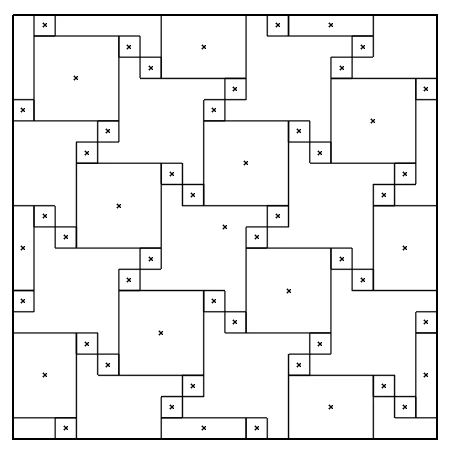
    You can do this with 55 rectangles. 20 in x 20 in document with 1 in squares and others:

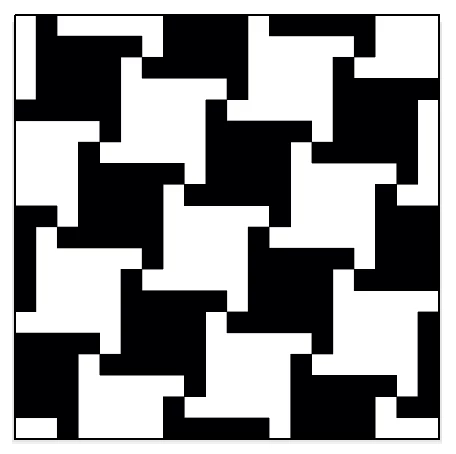
    Here it is in Preview:

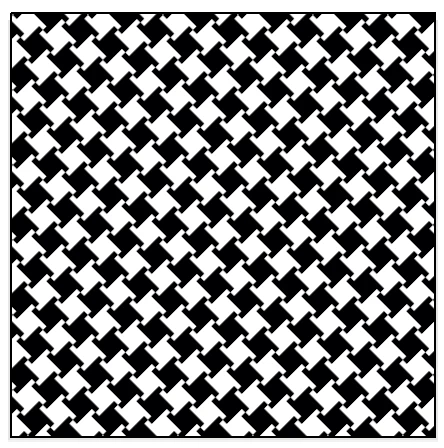
    Saved as a pattern, scaled pattern only 25%, rotated 45°:


    7 replies

    Mike27729831yz2hCorrect answer
    Participant
    Oct 27, 2026 6:00 PM UTC

    You can do this with 55 rectangles. 20 in x 20 in document with 1 in squares and others:

    Here it is in Preview:

    Saved as a pattern, scaled pattern only 25%, rotated 45°:


    Translate
    Vectfarm
    VectfarmAuthor
    Participant
    Oct 28, 2026 1:29 AM UTC

    Thanks! It was short and on point :D

    Translate
    Ares Hovhannesyan
    Community Expert
    Community Expert
    Oct 27, 2026 4:38 PM UTC

    You can use Object→ Repeat>Grid and then locate them as you want. Then you can create pattern.


    Translate
    Ton Frederiks
    Community Expert
    Community Expert
    Oct 27, 2026 3:04 PM UTC

    ​@CORCTON34033231 You need a much larger tile than this single object to be able to repeat it as a seamless pattern. The easiest way to create the pattern is to make a horizontal repeat tile first.

    You can always rotate the pattern when you use it to any other angle.


    Translate
    Monika Gause
    Community Expert
    Community Expert
    Oct 27, 2026 1:31 PM UTC

    I’m not an expert in pattern design, but from what I see online houndstooth pattern looks differently. The pattern you want, can be achieved by copying, moving and rotating with transform effects. 

    But is this really the pattern you want to have or do you want to have what is considered houndstooth pattern by all the others?


    Translate
    CORCTON34033231
    Community Expert
    Community Expert
    Oct 27, 2026 11:57 AM UTC

    Hi! The easiest way is to turn your base shape into a Pattern swatch, instead of copying it by hand:


    1. Select your base shape.

    2. Go to Object > Pattern > Make.

    3. In Pattern Options, keep Tile Type as Grid, and turn on Show Tile Edge if you want to check the tile.

    4. Click Done — the pattern is added to the Swatches panel.

    5. Draw a shape and click that pattern swatch to fill it; it will repeat as a seamless tile.


    If you still see a gap or a cut at the edge, select the pattern in the Swatches panel to edit it, then adjust Width, Height, H Spacing and V Spacing in Pattern Options until the tiles meet cleanly, then click Done again.


    Official guide: https://helpx.adobe.com/illustrator/desktop/paint-and-fill/create-and-edit-patterns/create-patterns.html

    Translate
    Monika Gause
    Community Expert
    Community Expert
    Oct 27, 2026 1:25 PM UTC

    That will not work

    Translate