


laurelly
December 30, 2025
解決済み

How to make my graphic warp to the shape of a number

  • December 30, 2025
  • 返信数 5.
  • 381 ビュー

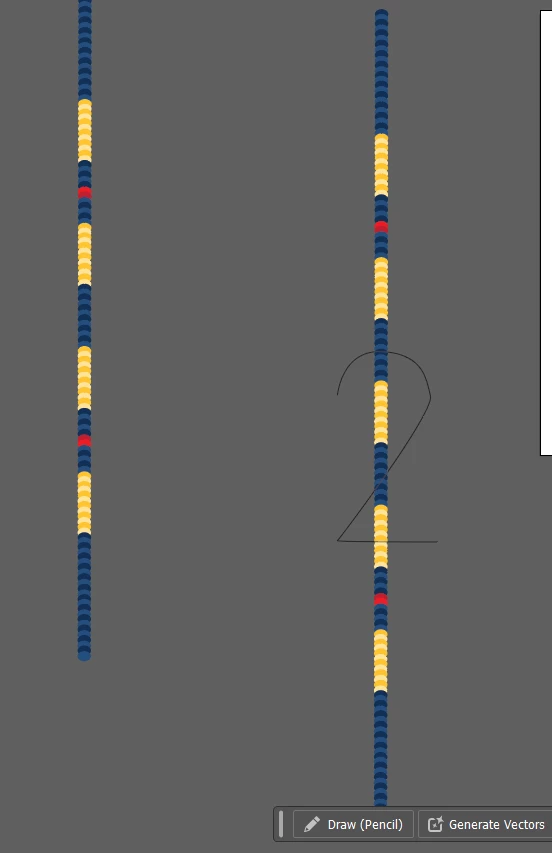
Hi! I am trying to help my friend with a project for her kids graduating class of 2026, and they are swimmers. I created a laneline graphic, and I want to be able to make it curve into the shape of a 2. I thought maybe there woud be a way to do this by making a 2-shaped path, or maybe envelope distort, and I don't know if its because the laneline graphic is not one entity (it is still just all of the separate ellipses I made grouped together; when I tried to convert to shape, it refused, and of course when I tried to just make a compound path it turned them all the same color)? Or if there is a different way it can be done? I swear there is a way to make it into one shape/object, but honestly I forget how. Any help on this would be greatly appreciated. I tried to search, but couldn't find anything except for how to get repeating shapes on a path, which isn't what I'm looking for. Thank you!

Screenshot 2025-12-29 194450.png

解決に役立った回答 Monika Gause

You could try an art brush. make the dotted line into a brush and apply that to the 2

返信数 5

Kurt Gold
Community Expert
Community Expert
December 30, 2025

You may also attach the objects to the paths (42) with the Object on a Path tool and thus prevent any possible distortions at the corner points.


42_001.png

Community Expert
December 30, 2025

The Objects on Path tool is probably the approach I would choose. To get fine tune control of how the ball objects align perfectly with corners I'd break individual line segments of the "4" and 2" apart. Then I would adjust the number of balls needed according to each segment's path length. That would make the balls touch or overlap a consistent amount across the entire numeral. But it does involve using the Objects on Path command multiple times for each numeral.

laurelly
laurelly作成者
January 1, 2026

Thank you both, I'll give this a shot also and see how it comes out!

Kurt Gold
Community Expert
Community Expert
December 30, 2025

.

Monika Gause
Community Expert
Community Expert
December 30, 2025

If you do not like the corners of your numbers you can always expand the brush, delete those distorted corners and then arrange them amnually. This is what you can get without investing a lot of manual work:


Bildschirmfoto 2025-12-30 um 15.08.43.png

laurelly
laurelly作成者
January 1, 2026

Thank you so much, the art brush tip was super helpful and worked like a charm! Much appreciated.

Jacob Bugge
Community Expert
Community Expert
December 30, 2025

laurelly,


In addition to what Monika said in order to make an Art Brush work properly in your case, there are a few crucial parts, see the image below with a simplified Art Brush which can be seen at 4 times the original size for detail:


1) An Art Brush really dislikes sharp corners, so a crucial part of making an Art Brush work properly is to round the sharp corner, very little rounding will do as shown to the right in the image below. Otherwise the corner will look like a Bevel Join with a spike as shown in the middle in the image below.


2) Another crucial part of making an Art Brush work properly is to either roughly adapt the total length of the Art Brush/laneline graphic to equal the length of the number 2 path (you can see them in Document Info), or to make the Art Brush Proportional (this will change the thickness of the number, maybe undesiredly). Otherwise the nice circular roundings will be distorted; you will probably be happier with the shorter version to the left in your image. An adapted length is applied in the image below.


3) The basic appearance of An Art Brush is designed for a Stroke Weight of 1pt.


4) You can change the size of the number and keep the proportions if you apply Object>Expand Appearance first. *** Remember to keep a backup of the unexpanded artwork ***


Click to get closer, Click again to get closer still

Monika Gause
Community Expert
Monika GauseCommunity Expert解決!
Community Expert
December 30, 2025

You could try an art brush. make the dotted line into a brush and apply that to the 2