
francesvief
Participant
April 30, 2020
Answered

How to make overlapping illustrations transparent

  • April 30, 2020
  • 1 reply
  • 736 views

Hi, I'm fairly new to Illustrator and I just got the hang of the pen tool. I wanted to make a cool design for a t-shirt and drew some cars. I colored both cars white and add each car with a seperate layer so that the illutrations didn't colide with eachother. I actually want the cars to be transparent so that you"ll only see its black lines. Any way to make it transparent?
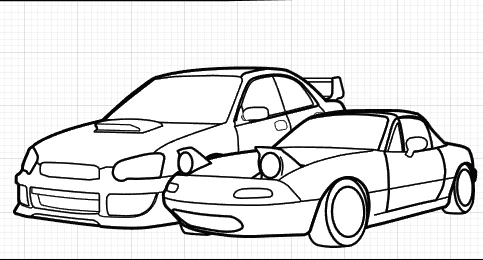
 

this is how I want it to be but transparent.
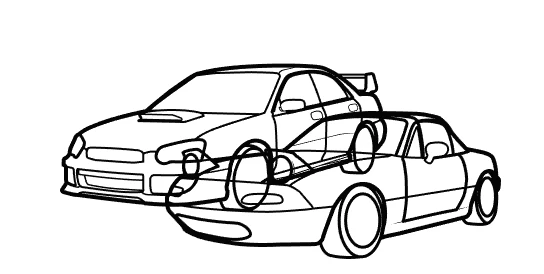
this is what I want to prevent from happening.

And like I said before, I'm new to illustrator and I only know a few tools so please explain it to me as if im a 6 y/o child 😜


Big thanks!!!

This topic has been closed for replies.
Correct answer Ton Frederiks

You could first make a copy of your file and work on the copy.

Select the cars as seen in the first picture.

Choose Object > Path > Outline Stroke.

While still selected, click the Merge option from the Pathfinders in the Pathfinder panel.

With the Direct Selection tool click on a white filled area.

Choose Select > Same > Same Fill Color

Hit Delete

1 reply

Ton Frederiks
Community Expert
Ton FrederiksCommunity ExpertCorrect answer
Community Expert
April 30, 2020

You could first make a copy of your file and work on the copy.

Select the cars as seen in the first picture.

Choose Object > Path > Outline Stroke.

While still selected, click the Merge option from the Pathfinders in the Pathfinder panel.

With the Direct Selection tool click on a white filled area.

Choose Select > Same > Same Fill Color

Hit Delete

francesvief
Participant
April 30, 2020

did you mean selecting both illustrations? I first selected one, followed all the steps, got a big black square, I couldn't seem to select anything with the direct selection tool (which i already found odd), hit delete and it just deleted the whole illutration...


EDIT: I figured it out, but it still makes the illutrations collide with eachother

EDIT 2.0


Okay selecting both cars seem to do the trick (sorry im a slow learner) Thank you very much!!


Ton Frederiks
Community Expert
Community Expert
April 30, 2020

Good to hear that worked!