So you want to make a clipping mask for hiding the outside parts of a phoyo and use the picture of a heart as a background.
Keep that picture of a heart as it is. What you need is a (vector) path to use (on top of ) the family picture.
That path would have a heart shape.
You could use a copy of your picture of the heart and Trace it, but it is somewhat complex and may take you some time if you have not made it before.
Thus either use the Pen Tool or the Curvature Tool to make, it takes some practice,
Or even easier I think reshape an ellipse as follows:
Select the Elipse Tool (L) and draw an elipse or even a circle.
Do not worry about the size or proportions, leave it to the end.
Just draw the ellipse and now select the Anchor Point Tool (Shift+C)
Click on bottom node. You may notice it loses its handles
Select with the direct selection tool (A) the bottom node and move it down using the arrow keys of the keyboard.
Do the same with the toip one that has two handles, opposite (pointing left and right), stop when is nearly aligned with the left and right nodes of the circle.
Now comes the difficult task: You need to set those handles indepently (as now they move together) with the left and right Handle ends pointing slightly upwards.
To do that use the Anchor Point Tool and click and drag the ends of each handle, simmetrically as possible.
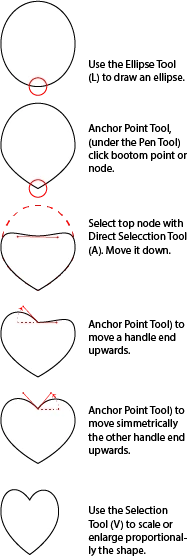
That's all, now with the Selection Tool (V) you can scale and adjust it (proportionally) to the shape and size of your picture.
Place it on top of both pictures, select the family picture and the heart shape or path and choose; Object>Clipping Path Make


 AdChoices