Known Participant
September 17, 2020
Question

How to make railway stations by script ?

  • September 17, 2020
  • 23 replies
  • 3392 views

Hello,

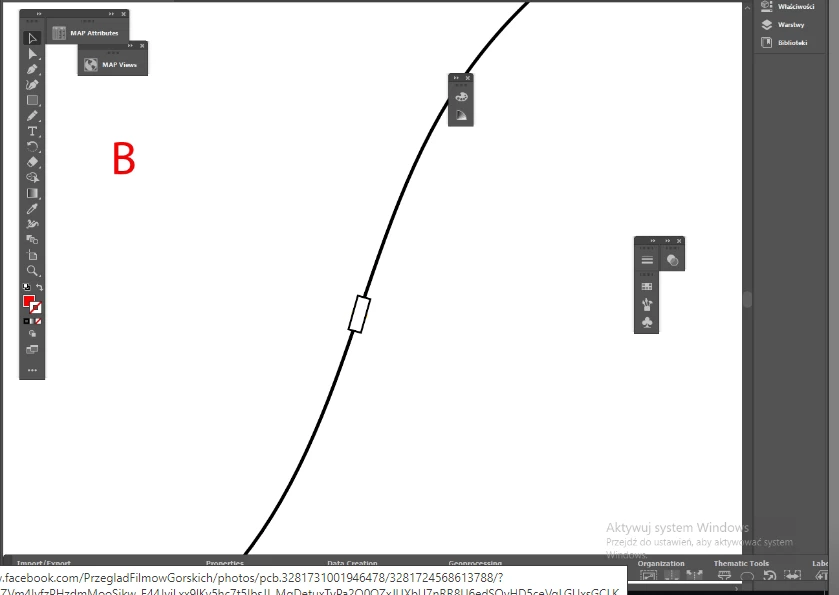
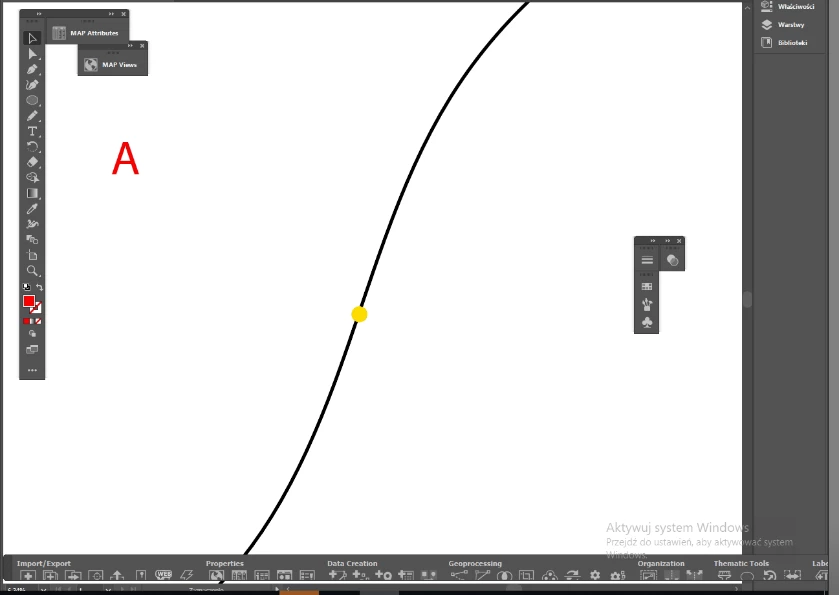
I have question: simply how having what is on pic. A to make what is on pic. B by script ?

I guess it is not so easy so I can pay for making this.


----

More explanation: I have railways as lines and railway stations as dots. I can easy make stations with a proper symbol (white rectangle), but it should to be aligned along the railway. And I have many stations like these.


Thank you,
 

This topic has been closed for replies.

23 replies

Kurt Gold
Community Expert
Community Expert
September 30, 2020

A)

Yes, the dimensions are variable. You can have any size you need. What is your desired size?


B)

I think that is possible as well, but I'm not quite sure if I completely understood your request in that case.

BeffAuthor
Known Participant
October 6, 2020

I think It is okay. I can work with this. Thank you, Kurt 🙂

Kurt Gold
Community Expert
Community Expert
September 27, 2020

This is an approach that uses actions. You can download the following file:


https://drive.google.com/file/d/1_t-4KQgya6nP13GJa5j8QgZFI3kwlLyF/view?usp=sharing


It contains a sample Illustrator file (jacob_stations_001.ai) and an action set file (jacob_station_maker.aia).


Instructions:


- Open the sample Illustrator file. Don't select anything.

- In the Actions palette, load the action set file.

- Play back the action called "chord_preparer" and take notice of the message at the end of the action.

- Then play back the action called "make_jacob_stations".


BeffAuthor
Known Participant
September 30, 2020

Very interesting approach, Kurt.

You divide a curve to the segments, and later make stations from selected parts.

But I have two questions:

A. Can I make the shorter segments to scale up the size of the stations ?

B. In my geographical programs, when I have two layers with vector objects, I can "transfer selection" from one layer to the second, to the objects which lay under. And can I make such "transfer of selection" also in AI ? Then I could automate it more -> I make dots bigger an bigger to be tangent to the line or even crossing the line. Then I select the "dots layer" and transfer the selection to the parts, which are under. And voila!

Kurt Gold
Community Expert
Community Expert
September 26, 2020

I think I have a (probably) promising idea to at least semi-automate the creation of the nice stations, in the meantime better known as the Jacob stations.


Let's see what may happen.

BeffAuthor
Known Participant
September 27, 2020

They can be Jacob_Rene_Kurt stations 😉

BeffAuthor
Known Participant
September 27, 2020

or different according to alphabethical order. No offence to anybody.

Jacob Bugge
Community Expert
Community Expert
September 26, 2020

Beff,


I agree with Kurt and René that the files are inferior, and I believe that it would be better to start over.


The angular shape (polylines) is particularly outstanding in the left side of the bottom curve, and I believe that alone would make the map unusable; passengers might wonder whether they would need crash helmets and/or seat belts.


Moreover, there are numerous paths (190 or more in the three versions), and the length of the straight segments are quite different, and varying within each path, so there are many inconsistencies; also some (not quite) overlapping parts.


If you could get/create a better and more consistent single path, preferably curved, otherwise with segments short enough to make the angularity (sufficiently) inconspicuous, that would be the right start.


Possibly, the only/most viable way would be to redraw the railway line from the map in AI, the map forming the (locked) template (layer).


If you must, you can:

A) Delete the wrong paths,

B) Change from polylines to curved paths, maybe as a combination of simplifying and rounding corners (differently for different paths), undo being your friend,

C) Join the paths into one path.


Whichever way you (can) choose, to answer your two latest placing/rotating questions:


"... how you make them according to the dot, which may be aside of railway line ?"


No need for this if you redraw and snap the centre of the station (and no need to start with a dot).


Otherwise, it depends on the accuracy of the lengthways position of the dot: is it sloppily placed or displaced from the line at a right angle?


If it is sloppily placed, just move it to where it fits with the real station (you will need the map underneath).


If it is displaced from the line at a right angle, and if


If it is displaced from the line at a right angle, there are different ways, one (set) for curved paths and one (set) for polylines.


"... how you do it by Tangent ? You mean this Plug-in of Astute ?"


I am referring to the tangent formed by the Handles of a (newle created) Anchor Point on a curved path; but that Anchor Point is unneeded if you use the station end centre way (with chords as Kurt mentions).


BeffAuthor
Known Participant
September 27, 2020

Jacob, but it is like this which I get on input. It is not perfect.

What I can do with it more ? Union them into one path and get rid of service paths.

Redrawing it's a manual work.


I will prepare you one bezier curve. It is not a problem.


BeffAuthor
Known Participant
September 25, 2020

And here is a start: https://we.tl/t-nw2KgbhCHV

renél80416020
Inspiring
September 26, 2020

Beff,

Je suis entièrement en accord avec Jacob, un grand ménage s'impose.

Un peu comme ci dessous:

https://share.orange.fr/#UmTPZ4gGeJ3cc00c318a

PS Je travaille avec la version CS6, ce n'est pas évident de pouvoir ouvrir ton fichier...

Conseil, Pour présenter un exemple toujours enregistrer (si c'est possible) sous une version plus ancienne.

Mon script place une station (symbole N°6 dans la liste des symboles) à chaque point sélectionné.

René


BeffAuthor
Known Participant
September 27, 2020

Magnifique, as always, Rene.

Sure, I can union all fragments to make them one.

Also, I can extract a "main" line when there is a big density, also service lines. It is not a problem.

I can do it before processing.

BeffAuthor
Known Participant
September 25, 2020

OK, so here it goes the .ai which is done.

And yes, I use 500cm format for any trials with maps.

https://we.tl/t-eM0WrIj8Dm

Kurt Gold
Community Expert
Community Expert
September 23, 2020

I'm pretty sure that there may be some other useful approaches to build the stations.


At least if one or a couple of useful sample files were provided.

Jacob Bugge
Community Expert
Community Expert
September 22, 2020

Beff,


I have added a part to the previous drawing, roughly corresponding to the curve at the station in Roppen.


BeffAuthor
Known Participant
September 24, 2020

Jacob, your stations look beautifully, but how you make them according to the dot, which may be aside of railway line ?

Kurt Gold
Community Expert
Community Expert
September 21, 2020

Thanks for the sample file, Beff.


I'm not quite sure if we are now perhaps talking about a completely different situation. As René already mentioned, none of your (fragmented) railway paths are smooth curves. They all consist of straight segments.


Moreover, the four stylised stations (dot symbol instances) are located beside the rails and not centred on top of them.


Don't you have a nicer file that may be a bit more in tune with your initial request? In my view, your current sample file is pretty bleak.

Luke Jennings3
Community Expert
Community Expert
September 22, 2020

If this is what you are working with, you can simplify the curves to some extent (Path> Simpify) but you might introduce some errors to the exact location of the tracks. The size of the artboard is 500 cm, is this what you want?

Jacob Bugge
Community Expert
Community Expert
September 22, 2020

Luke,


If the rectangle to the left is the station, there seems to also be an introduction of fancy architecture.


Jacob Bugge
Community Expert
Community Expert
September 21, 2020

Beff,


I can see from the map that many of the curves are much sharper than the ones I drew (radius 14 x the station length), about twice as sharp at the very station in Roppen, and I believe that a stretch like the one to the west of Landeck may hit a station somewhere with a much sharper curve.


And unless the stations get their own colour I am afraid they would become even more difficult to spot without the rigid rectangle shape.


BeffAuthor
Known Participant
September 24, 2020

The station may be on curve. Nothing bad in that. But I see when it is not a curve, but straight fragments, may cause a problem. Damn it.


I expected it would be tough, but it is more tough than I expected.


That's why I wrote I could pay for it.