Known Participant
September 17, 2020
Question

How to make railway stations by script ?

  • September 17, 2020
  • 23 replies
  • 3392 views

Hello,

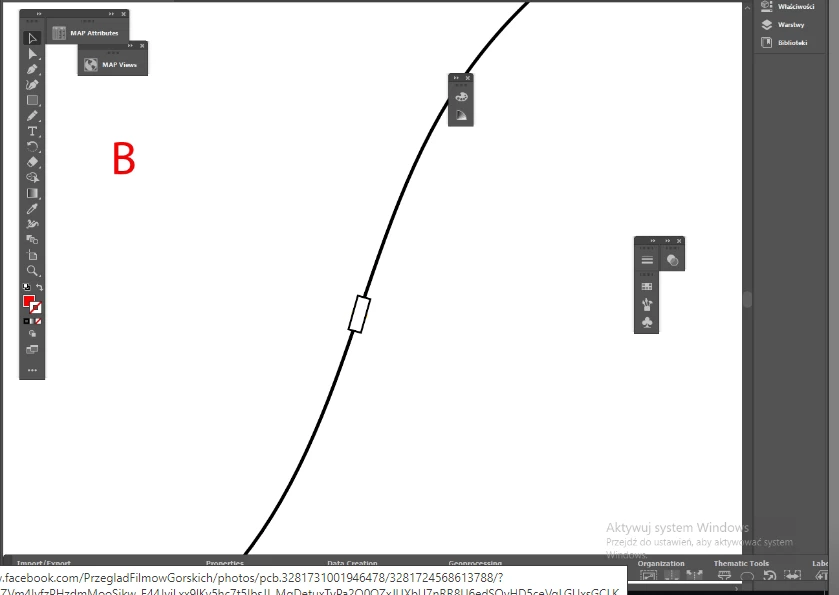
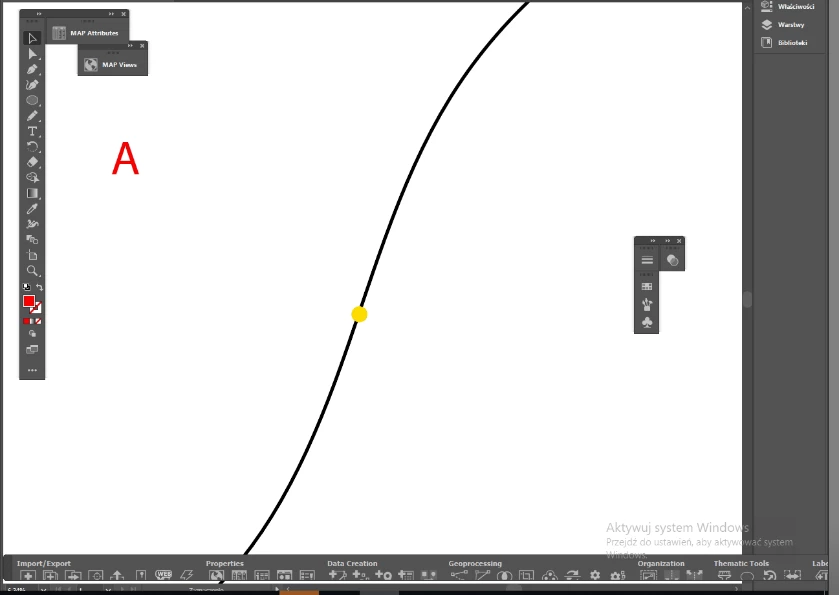
I have question: simply how having what is on pic. A to make what is on pic. B by script ?

I guess it is not so easy so I can pay for making this.


----

More explanation: I have railways as lines and railway stations as dots. I can easy make stations with a proper symbol (white rectangle), but it should to be aligned along the railway. And I have many stations like these.


Thank you,
 

This topic has been closed for replies.

23 replies

Jacob Bugge
Community Expert
Community Expert
September 18, 2020

Beff,


As Femke said, the right rotation is crucial.


In addition to that, I believe the right visual appearance is also crucial, and I believe that includes your positioning the rectangle so that both midpoints of the end segments of the station rectangle are exactly over the line path.


I would suggest a two step procedure based on a rectangle (symbol) that has an actual Anchor Point at each of the end segment midpoints, Smart Guides being your friends:


1) Once the dot has been replaced by the rectangle (symbol), with the Rotate Tool simply rotate the rectangle by one of the midpoints to snap to the line path; if the line path is straight (or has an unusual line shape with an inflexion at the station centre and identical curvatures on either side) you are done already;

2) Select the point from 1) as the rotation centre and rotate the rectangle by the other midpoint to snap it to the line path.


This would give you the (fake) appearance of the rectangle being centred on the line path, by the centring of its end midpoints, which obviously means that in most cases the station centre will (normally) be moved a wee bit sideways from the line path (and often (much less) along the line path).


I (also) believe that Kurt has something like/unlike that in mind already and wishes to give you the best/easiest way depending on version and what you have in your document alreadey.


femkeblanco
Legend
September 18, 2020

The crux is getting the tangent of the curve where there's a rectangle and therefore the angle of rotation of the rectangle, so that the two are "aligned".  

Kurt Gold
Community Expert
Community Expert
September 17, 2020

Which version of Illustrator are you using?


Also, can you share a sample .ai file, so one may have a look at it?