Answered
How to make these nice gaps and what is this method called?
Hi, as as circled in the photo, i want to learn how to make these gap. I saw a video but unfortunetly forgot what this method is called. thanks in advance.


Hi, as as circled in the photo, i want to learn how to make these gap. I saw a video but unfortunetly forgot what this method is called. thanks in advance.
TOLGA,
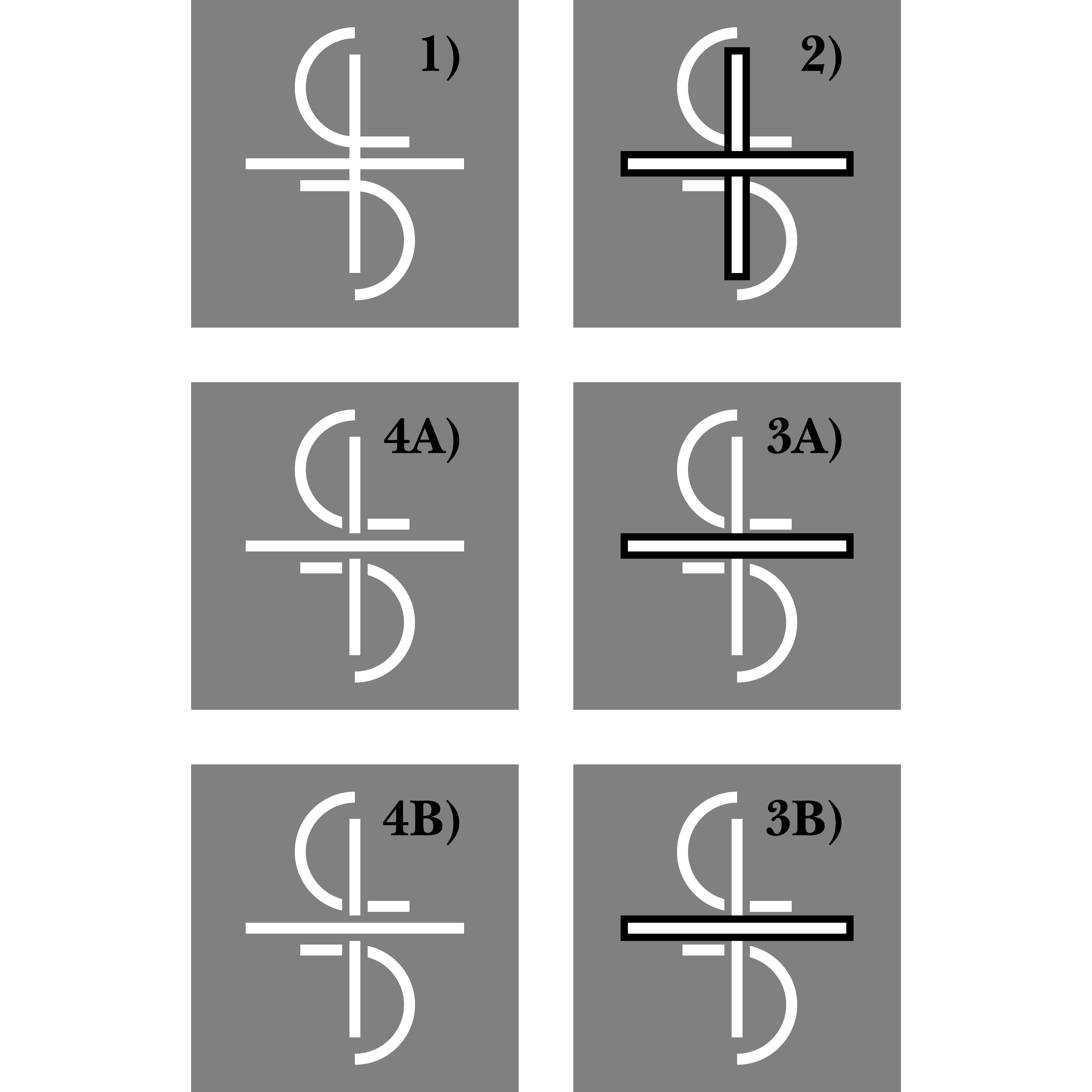
Presuming vector paths (rather than raster or live Type), you can proceed in a rather simple way, either leading to simple paths visible in front of whichever background you choose and especially suitable for a logo consisting of just the white paths (involving a simple Pathfinder operation), or leading to a similar appearance with masking (involving a simple Opacity Mask), shown below in a simplified form in the steps 1) - 4A/4B):
1) Make sure the double S shape forms a Compound Path and is beneath the I shape at the bottom of the stacking order (Layers palette), and make sure the L shape (just shown as a horizontal line) is at the very top;
2) Click the I shape to select it and use Object>Path>Offset Path with an offset equalling the desired gap on either side of the I, then change the colour of the Offset Path (which is beneath the original I shape) to black; then repeat for the L shape;
3A) For the appearance with masking, ShiftClick the black offset path of the I shape and the double S hape to select both parts, then in the Transparency palette Click Make (Opacity) Mask; this will give the apparent gaps on either side of the I shape;
4A) Repeat 3A), only selecting the L shape and the I shape;
3B) For simple paths with real gaps, ShiftClick the black offset path of the I shape and the double S hape to select both parts, then use Pathfinder> Minus front; this will give real gaps on either side of the I shape;
4B) Repeat 3B), only selecting the L shape and the I shape.
Both 4A and 4B look the same, and they correspond to the Editable/Destructive approaches mentioned by pixxxelschubser.
Click to get closer, Click again to get closer still
Already have an account? Login
No account yet? Create an account
Enter your E-mail address. We'll send you an e-mail with instructions to reset your password.


 AdChoices