


Inspiring
August 23, 2026
Question

how to make this design

  • August 23, 2026
  • 8 replies
  • 86 views

Hello,

I would like to make a design of a wall (containing some stairs), like this :
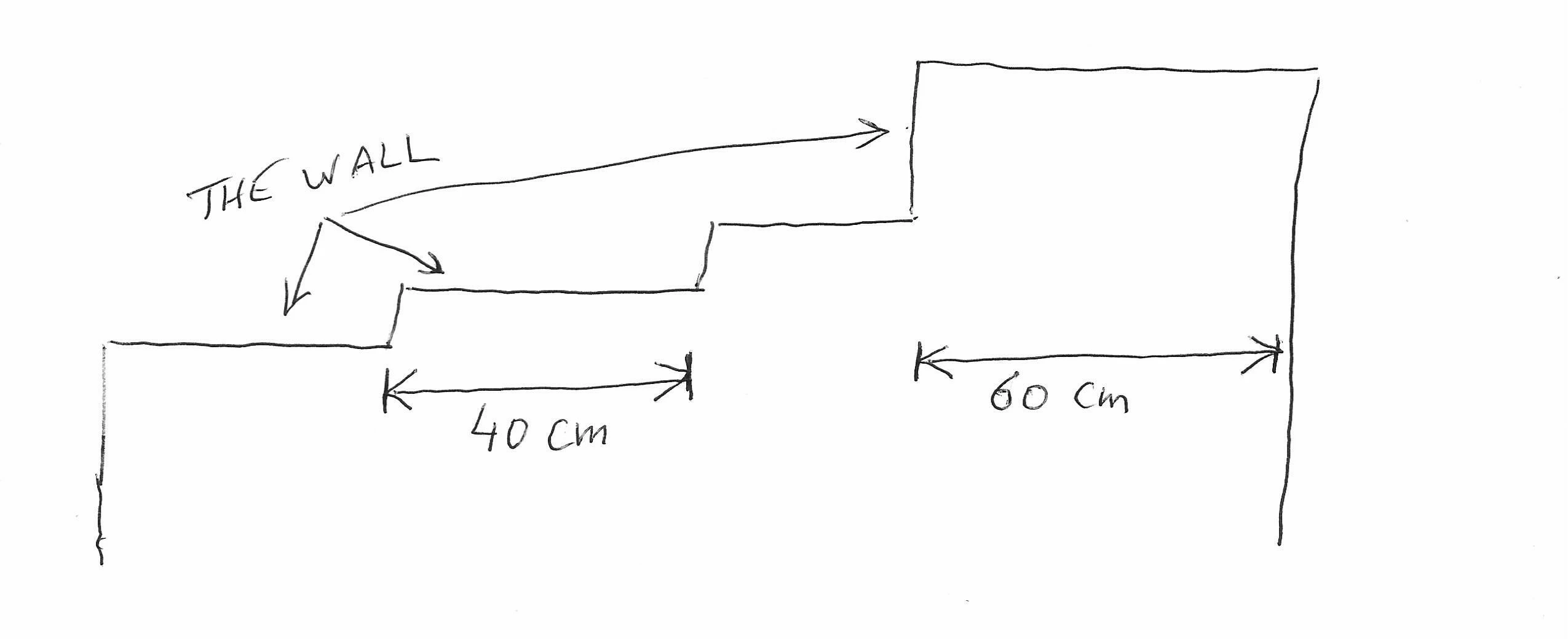
I would like to put the design on this wall on an A4 page in landscape mode.

The problem is :

  1. I need to have the exact length for each stair of the wall.
  2. I need to have this type of arrow to indicate the length of each stair.

Does Illustrator is the best adobe tool in order to do that, and how to do it exactly (step by step) ?

    8 replies

    Jacob Bugge
    Community Expert
    Community Expert
    August 27, 2026

    Pierre,


    If you have identical stairs, it is very easy to create the wall in a few simple steps without actually drawing anything.


    Jacob Bugge
    Community Expert
    Community Expert
    August 24, 2026

    Pierre,


    As Ton said, work in 1:100, corresponding to 1cm = 1 m, and a very simple scale that fits well, the 18 m being 18 cm out of the 29.7 cm width of A4 Landscape.


    The most convenient way to draw the  stepwise wall depends on the actual height(s) of the steps.


    Are they the same or differ? Can you give the value(s)?

    Also are all steps 180 cm long or do they vary? Can you give the value(s)?

    It seems that everything is quite different to what you drew to start with, different heights and lengths.


    RvdT
    Legend
    August 24, 2026

    Hi, Adobe Illustrator has a maximum document/artboard size of 577.95 cm. (5779 cm in newer versions).
    So you would have to draw in scale.
    A4 is approx 30x21 cm.
    You could start with a new Document and fill in a custom size:
    (you can change the size with the artboard tool afterwards)

    Use the Line tool to draw lines in scale. Just click on the artboard … 
     

    I recommende using the ‘Essentials Classic’ workspace so you can change the width and height of your (selected) shapes.
     

    Also turning on your rulers can be helpful.


    Make sure your lines have a color:

    you can add arrowheads to your lines:


    Ton Frederiks
    Community Expert
    Community Expert
    August 23, 2026

    @pierret18811376 If you want to fit all of those on an A4, use the Dimension Tool scale 1:100 so 1,8 cm equals 180 cm.  So when you create an object just divide the real size by 100.

    Ton Frederiks
    Community Expert
    Community Expert
    August 23, 2026

    @pierret18811376 You can work on scale, otherwise it will never fit on an A4 page.

    You can double click the Dimension tool in the Toolbar to set the scale.

    1:10 makes measure 18 cm as 180 cm.

    Inspiring
    August 23, 2026

    @Ton Frederiks 

    My goal is to put 10 walls of 180 cm one after the other (on a single line) on the same page A4 (landscape mode). But I don’t understand how to scale.

    Inspiring
    August 23, 2026

    @Ton Frederiks 

    In my actual project I have to design a wall of 18 meters, on an A4 page.

    This wall is made of 10 stairs of 180 cm length.

    So, I have set my project on “A4 / Unit : cm” , but I don’t succeed to put the first line of 180 cm on my A4 page (this line overflows te page). Why ?