Inspiring
August 18, 2022
Answered

How to move and align objects with scripts?

  • August 18, 2022
  • 2 replies
  • 4945 views

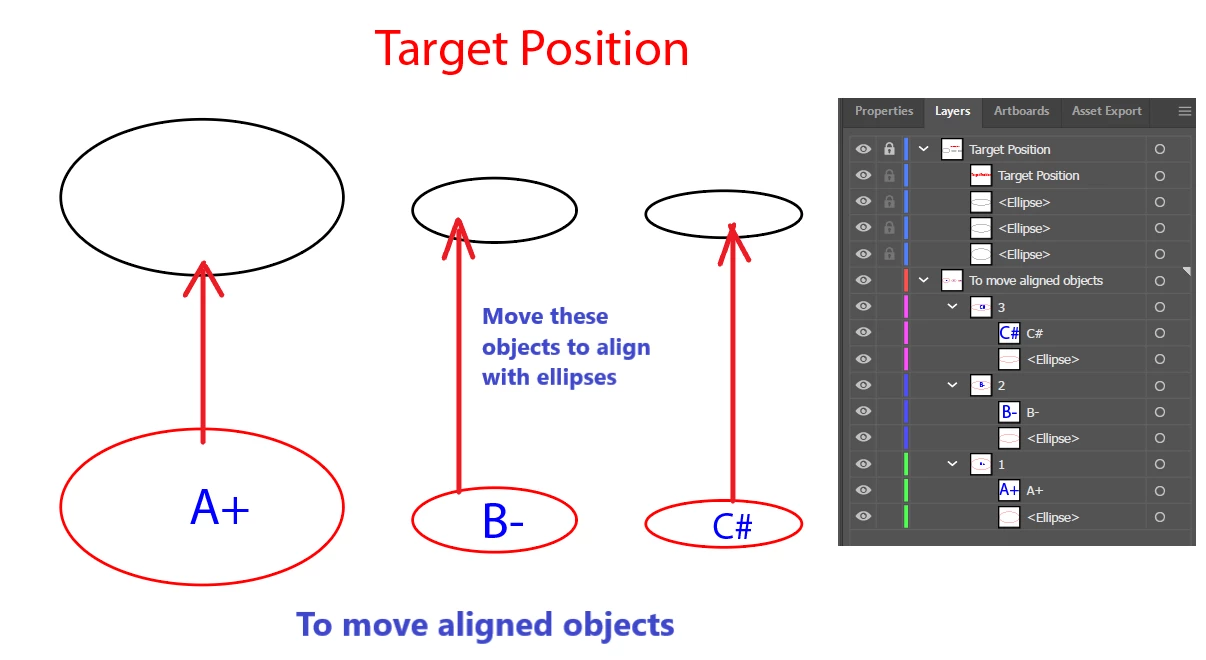
How to automatically move and align objects with scripts as below shown? Any help would be greatly appreciated, Thanks in advance!


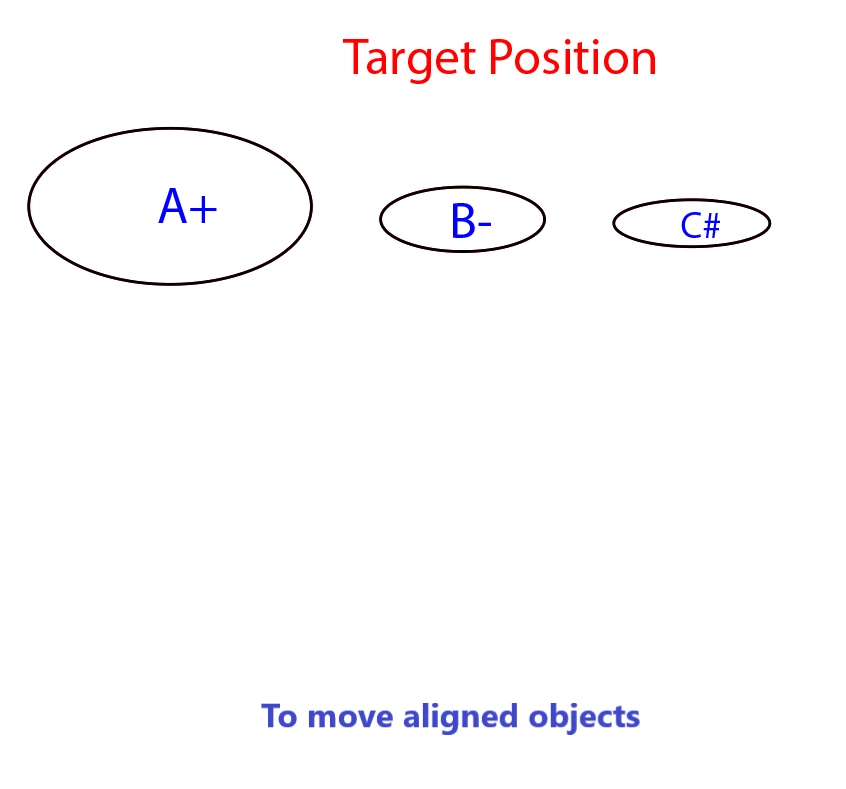
Final effect:
Correct answer Disposition_Dev

I actually created some alignment utilities for public use a while back. Given a "key object" and an array of objects you want to align, it handles all the positioning quirks (including the visible bounds thing that @jduncan mentioned).


The initial implementation was pretty clunky and awfully repetitive. So I just took some time and simpilified it. It used to be discreet functions for each different alignment option... silly. So i condensed it all down to one function called align() which takes 3 required arguments: align(key:any pageItem or artboard, otherObjects: array of pageItems you want to align, alignType: string representing the alignment option(s).


Key objects can be an artboard, pageItem, pathItem, groupItem, compoundPathItem, placedItem, linkedItem, etc. any item that falls under the umbrella of Document.pageItems.


The array of otherObjects can contain one or more pageItems. (no support for artboards yet.. i don't know if it's necessary?).


The alignType string can be one of the following: "center", "vcenter", "vtop", "vbottom", "hcenter", "hleft", "hright", "botleft", "botright", "topleft", "topright", "leftcenter", "rightcenter", "topcenter", "botcenter"


source code located here:

https://github.com/wdjsdev/public_illustrator_scripts/blob/master/alignment_functions.js


and the dependency code here:

https://github.com/wdjsdev/public_illustrator_scripts/blob/master/object_bounds_data.js

This is the code that handles the visible bounds quirks that vasily and josh mentioned. 

2 replies

Disposition_Dev
Disposition_DevCorrect answer
Legend
August 18, 2022

I actually created some alignment utilities for public use a while back. Given a "key object" and an array of objects you want to align, it handles all the positioning quirks (including the visible bounds thing that @jduncan mentioned).


The initial implementation was pretty clunky and awfully repetitive. So I just took some time and simpilified it. It used to be discreet functions for each different alignment option... silly. So i condensed it all down to one function called align() which takes 3 required arguments: align(key:any pageItem or artboard, otherObjects: array of pageItems you want to align, alignType: string representing the alignment option(s).


Key objects can be an artboard, pageItem, pathItem, groupItem, compoundPathItem, placedItem, linkedItem, etc. any item that falls under the umbrella of Document.pageItems.


The array of otherObjects can contain one or more pageItems. (no support for artboards yet.. i don't know if it's necessary?).


The alignType string can be one of the following: "center", "vcenter", "vtop", "vbottom", "hcenter", "hleft", "hright", "botleft", "botright", "topleft", "topright", "leftcenter", "rightcenter", "topcenter", "botcenter"


source code located here:

https://github.com/wdjsdev/public_illustrator_scripts/blob/master/alignment_functions.js


and the dependency code here:

https://github.com/wdjsdev/public_illustrator_scripts/blob/master/object_bounds_data.js

This is the code that handles the visible bounds quirks that vasily and josh mentioned. 

Inspiring
August 19, 2022

Thank you @Disposition_Dev  very much for your explanation! You are my idol! 😊

Ali Oliya
Inspiring
January 9, 2023

I don't know anything about Java and scripting. Does this work on below sample? 

Your help would be greratly appreciated.

Silly-V
Legend
August 18, 2022

Given simple line-art you can simply loop the items to correct their .top and .left properties. As these objects are the same dimensions with the example they will by definition already be aligned centrally to the targets.

Assuming that your layers are just as you have them:
var targetObjects = doc.layers.getByName("Target Position").pathItems;
var objectsToMove = [
  doc.layers.getByName("To move aligned objects").layers[0].pathItems[0],

  doc.layers.getByName("To move aligned objects").layers[1].pathItems[0],

  doc.layers.getByName("To move aligned objects").layers[2].pathItems[0]
];

for (var i = 0; i < objectsToMove.length; i++) {

  objectsToMove[i].top = targetObjects[i].top;

  objectsToMove[i].left = targetObjects[i].left;

}


This is a very rudimentary example and it can work with your specific situation because of the object dimensions and the order of target and source items is the same. The order actually does not have to be the same in the layers, as long as you ensure to put them into the same order within your code so when the loop runs, it will be directed to match the proper target and source items.


jduncan
Community Expert
Community Expert
August 18, 2022

As @Silly-V noted, if the objects are simple it's the script can be simple. When I tackled this a while back, I found the objects I needed to align are rarely simple so I wrote MatchObjects.jsx. Basically, you pick a source object (either the top or bottom object of your selection) and choose how to "match" all of the other objects in your selection to it. It does more than just aligning, but it may get you headed in the right direction. @Disposition_Dev helped with some edge cases for the `getVisibleBounds()` that help with matching complex objects.

Inspiring
August 19, 2022

Thank you @jduncan very much for your explanation! I also found many useful scripts on your GitHub project, especially the rename layers JSX, it may solve a problem that has troubled me for a long time, in the following post. I need some time to learn how to use your script. Thank you again for sharing this.👍👍
