


Participant
October 1, 2025
Answered

How to perfectly align the ends of two lines.

  • October 1, 2025
  • 4 replies
  • 230 views

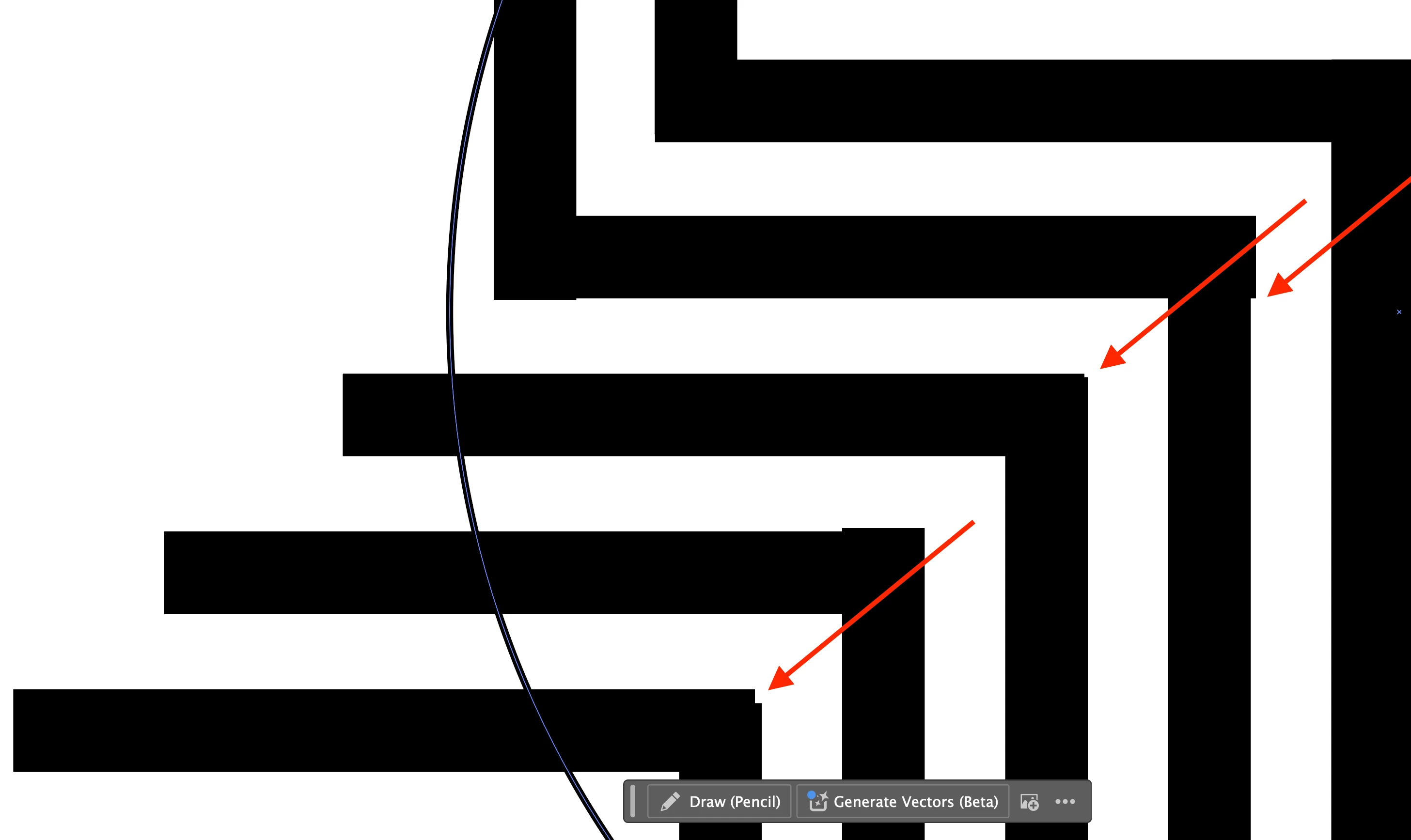
I have multiple lines where the corners need to meet and perfectly align, but I can't get them to perfectly line up. I tried snap to pixel and tried using the smart guides. I tried moving the objects as well as grabbing the ends of the lines to make them longer, but I can't get these to perfectly line up.  Any suggestions would be greatly appreciated.
 

Correct answer Kurt Gold

Another reason why Smart Guides may fail could be that your strokes are set to Butt Caps in the Stroke panel. In that case using Projecting Caps is more promising when you try to align precisely.


If you have to use Butt Caps you can also use the Align panel while the "Use Preview Bounds" option is turned on in the flyout menu of the Align panel.

4 replies

Jacob Bugge
Community Expert
Community Expert
October 1, 2025

Are your lines made of stroked paths or as rectangles made by outlining stroked paths?


In the former case I agree with Kurt about the projecting Caps, or you can snap the end Anchor Points which looks awful with Butt Caps, and then Join the stroked paths.


In the latter case you ought to be able to snap the corresponding outer Anchor Points.


Edit: Hi Kurt.


Participant
October 6, 2025

Thanks for all the suggestions. @Kurt Gold I switched the stroke to Projecting Cap instead of Buttcap and that did the trick. And @Tina_Irvine  I then double checked the X/Y coordinates on each node to confirm they were the same.

Appreciate the help!

Tina_Irvine
Community Expert
Community Expert
October 1, 2025

Hi @David31361641o9z1,

Check out your X and Y specs. You can click on each node and adjust the increments this way.

Kurt Gold
Community Expert
Kurt GoldCommunity ExpertCorrect answer
Community Expert
October 1, 2025

Another reason why Smart Guides may fail could be that your strokes are set to Butt Caps in the Stroke panel. In that case using Projecting Caps is more promising when you try to align precisely.


If you have to use Butt Caps you can also use the Align panel while the "Use Preview Bounds" option is turned on in the flyout menu of the Align panel.

Jacob Bugge
Community Expert
Community Expert
October 1, 2025

It ought to work fine and be easy with Smart Guides.


But if Snap To Grid or Snap to Pixels is on, Smart Guides will fail to guide you, however smart they are.


You can read more about Smart Guides here, including Smart Guides preferences:

https://helpx.adobe.com/illustrator/using/rulers-grids-guides-crop-marks.html