Hi @andyf65867865, just further to what @renél80416020 already showed you, have a look at this experiment:
I start with a new document which has one 100x100pt artboard (see attached demo.pdf), and run this script:
/**
 * Experiment showing positions using different
 * coordinate systems and ruler origins.
 *
 * Note that the `position` of each of the four
 * triangles is set to [0,0].
 * @author m1b
 * @discussion https://community.adobe.com/t5/illustrator-discussions/how-to-place-an-object-at-specified-document-coordinates/m-p/14897332
 */
(function () {

    var doc = app.activeDocument,
        layer = doc.activeLayer,
        artboard = doc.artboards[0];

    // make some triangles just for showing positions
    var docTriangle = drawTriangle(layer),
        docTriangleZeroed = drawTriangle(layer),
        artboardTriangle = drawTriangle(layer),
        artboardTriangleZeroed = drawTriangle(layer);

    // give colors to distinguish
    docTriangle.fillColor = doc.swatches[4].color;
    docTriangleZeroed.fillColor = doc.swatches[5].color;
    artboardTriangle.fillColor = doc.swatches[6].color;
    artboardTriangleZeroed.fillColor = doc.swatches[7].color;

    // keep these so we can clean up afterwards
    var originalCoordinateSystem = app.coordinateSystem,
        originalDocRulerOrigin = doc.rulerOrigin,
        originalArtboardRulerOrigin = artboard.rulerOrigin;

    // position the document coordinates triangle
    app.coordinateSystem = CoordinateSystem.DOCUMENTCOORDINATESYSTEM;
    doc.rulerOrigin = [30, 20];
    docTriangle.position = [0, 0];

    // position the artboard coordinates triangle
    app.coordinateSystem = CoordinateSystem.ARTBOARDCOORDINATESYSTEM;
    artboard.rulerOrigin = [30, 20];
    artboardTriangle.position = [0, 0];

    // position the document coordinates (zeroed) triangle
    app.coordinateSystem = CoordinateSystem.DOCUMENTCOORDINATESYSTEM;
    doc.rulerOrigin = [0, 0];
    docTriangleZeroed.position = [0, 0];

    // position the artboard coordinates (zeroed) triangle
    app.coordinateSystem = CoordinateSystem.ARTBOARDCOORDINATESYSTEM;
    artboard.rulerOrigin = [0, 0];
    artboardTriangleZeroed.position = [0, 0];

    // clean up (leave document settings how we found it)
    app.coordinateSystem = originalCoordinateSystem;
    doc.rulerOrigin = originalDocRulerOrigin;
    artboard.rulerOrigin = originalArtboardRulerOrigin;

})();

/**
 * Makes a right-angle triangle path item.
 * @param {Document|Layer|GroupItem} container - where to put triangle.
 * @param {Number} size - the size, in points, of the triangle.
 * @returns {PathItem}
 */
function drawTriangle(container, size) {
    size = size || 10;
    var triangle = container.pathItems.add();
    // note y-axis goes negative in Illustrator
    triangle.setEntirePath([[0, 0], [size, 0], [0, -size]]);
    triangle.closed = true;
    triangle.filled = true;
    triangle.stroked = false;
    return triangle;
};
I get this result:
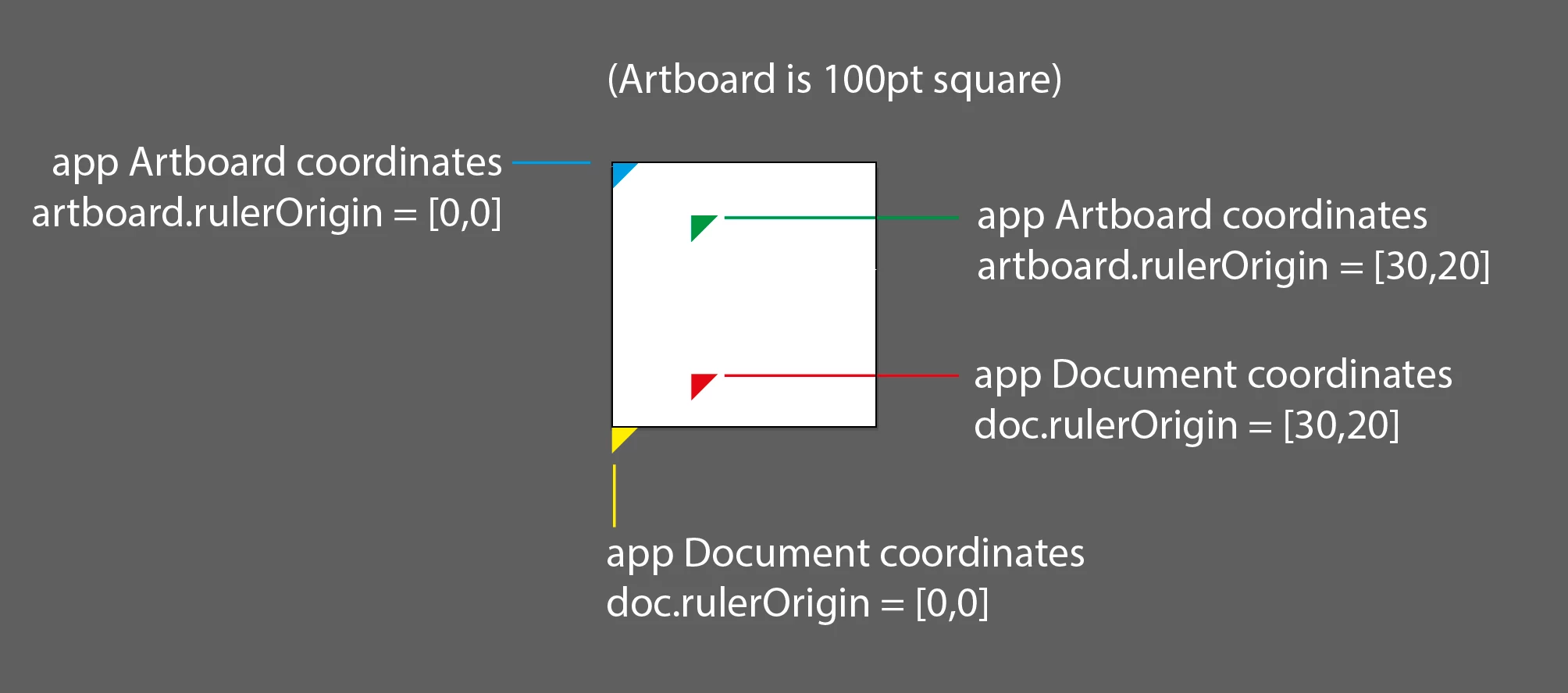
If you have a careful look at that you will see that artboard coordinates go from topleft [0,0] with positive Y down, but document coordinates go from bottom left [0,0] with positive Y up. Note that each time I have set the position of each triangle to [0,0], so the change in positions is solely due to coordinateSystem and rulerOrigin.
In your own scripts, my suggestion is—just as my script does here—to explicitly control both the app.coordinateSystem, and either the doc.rulerOrigin, or the artboard.rulerOrigin (depending on the coordinateSystem you choose). And don't forget to clean up afterwards!
- Mark



 AdChoices