
Jim_Palik
Inspiring
May 1, 2021
Question

How to proportionally resize a set of rectangles

  • May 1, 2021
  • 2 replies
  • 394 views

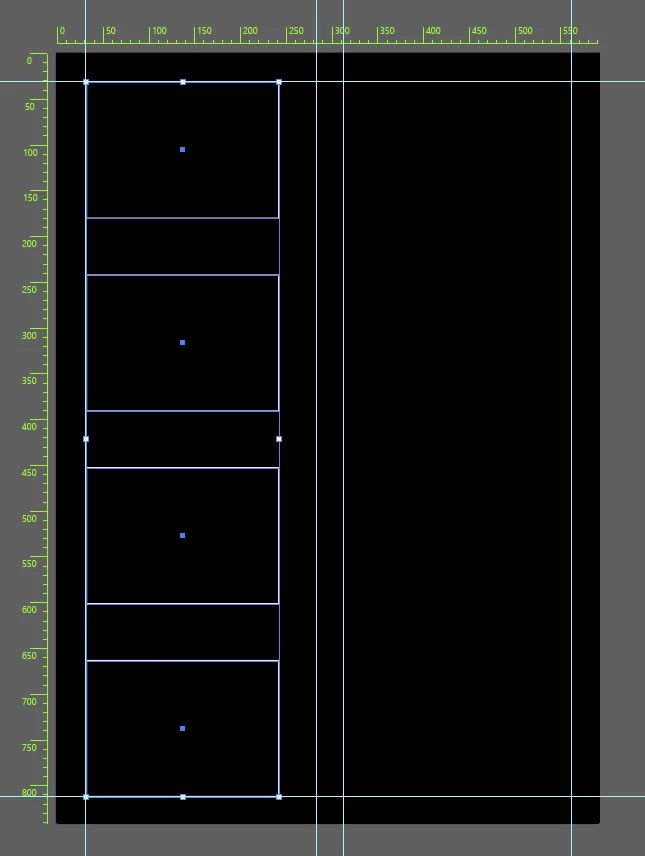
I have a set of  four rectangles aligned to a the left vertical guid with even spacing between rectangles. Is there a way proportionally increase the sizes of the set of rectangles while letting the horizontal space between them contract to align while aligning them to the a second vertical guid.

See the example below.
 

This topic has been closed for replies.

2 replies

Jacob Bugge
Community Expert
Community Expert
May 1, 2021

Jim,


As I (mis)understand it, how about Tranform>Transform Each?

Jim_Palik
Jim_PalikAuthor
Inspiring
May 1, 2021

Jim again, Somehow I managed to hide the two center guides for the above question. They show in the layers but I cannot get them to display. I have tried Ctrl+;  I have tried turning the locks on and off. I saved the file and closed Illustrator and reopened it. Nothing I do will all me to display them. the show hide eye does nothing. Anyone have an idea.

Jim (I hate being a nubie).

[please refrain from PII and 3rd party URLs in this area - Moderator]
barbara_a7746676
Community Expert
Community Expert
May 1, 2021

The command you probably want, after selecting all rectangles, is Object > Transform > Transform Each. Using the proxy in the lower left you can specify which edge should not move.

Jim_Palik
Jim_PalikAuthor
Inspiring
May 1, 2021

Hi Barbara, thank you for your suggestion. I will try it after I take a break. Do you have any idea how I managed to hide my two center guides.


Thank you in advance, Jim

[please refrain from PII and 3rd party URLs in this area - Moderator]