
dublove
Legend
February 25, 2024
Question

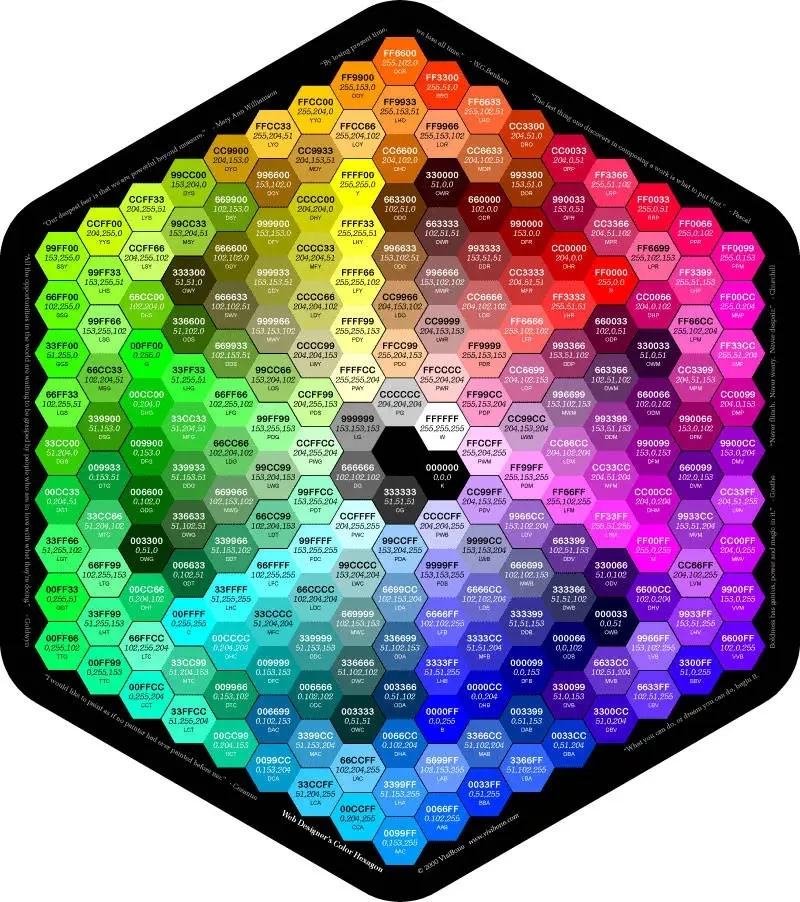
How to quickly draw this shape?Is there a high-definition version that can be shared?
  • February 25, 2024
  • 6 replies
  • 739 views

It's so troublesome to draw

Who has the high-definition version of this color ring? Can you share it?

 

This topic has been closed for replies.

6 replies

femkeblanco
Legend
February 27, 2024

var d = 15;  // tile width (points)
var colors = [
    "999999", "CCCCCC", "FFFFFF", "000000", "333333", "666666", "CCFF99", "FFFFCC", 
    "FFCC99", "FFCCCC", "FF99CC", "FFCCFF", "CC99FF", "CCCCFF", "99CCFF", "CCFFFF", 
    "99FFCC", "CCFFCC", "99CC66", "CCCC99", "FFFF99", "CC9966", "CC9999", "FF9999", 
    "CC6699", "CC99CC", "FF99FF", "9966CC", "9999CC", "9999FF", "6699CC", "99CCCC", 
    "99FFFF", "66CC99", "99CC99", "99FF99", "669933", "999966", "CCCC66", "FFFF66", 
    "996633", "996666", "CC6666", "FF6666", "993366", "996699", "CC66CC", "FF66FF", 
    "663399", "666699", "6666CC", "6666FF", "336699", "669999", "66CCCC", "66FFFF", 
    "339966", "669966", "66CC66", "66FF66", "336600", "666633", "999933", "CCCC33", 
    "FFFF33", "663300", "663333", "993333", "CC3333", "FF3333", "660033", "663366", 
    "993399", "CC33CC", "FF33FF", "330066", "333366", "333399", "3333CC", "3333FF", 
    "003366", "336666", "339999", "33CCCC", "33FFFF", "006633", "336633", "339933", 
    "33CC33", "33FF33", "66CC00", "333300", "666600", "999900", "CCCC00", "FFFF00", 
    "CC6600", "330000", "660000", "990000", "CC0000", "FF0000", "CC0066", "330033", 
    "660066", "990099", "CC00CC", "FF00FF", "6600CC", "000033", "000066", "000099", 
    "0000CC", "0000FF", "0066CC", "003333", "006666", "009999", "00CCCC", "00FFFF", 
    "00CC66", "003300", "006600", "009900", "00CC00", "00FF00", "99FF33", "CCFF66", 
    "99CC33", "669900", "996600", "CC9933", "FFCC66", "FF9933", "FF9966", "CC6633", 
    "993300", "990033", "CC3366", "FF6699", "FF3399", "FF66CC", "CC3399", "990066", 
    "660099", "9933CC", "CC66FF", "9933FF", "9966FF", "6633CC", "330099", "003399", 
    "3366CC", "6699FF", "3399FF", "66CCFF", "3399CC", "006699", "009966", "33CC99", 
    "66FFCC", "33FF99", "66FF99", "33CC66", "009933", "339900", "66CC33", "99FF66", 
    "99FF00", "CCFF00", "CCFF33", "99CC00", "CC9900", "FFCC33", "FFCC00", "FF9900", 
    "FF6600", "FF3300", "FF6633", "CC3300", "CC0033", "FF3366", "FF0033", "FF0066", 
    "FF0099", "FF00CC", "FF33CC", "CC0099", "9900CC", "CC33FF", "CC00FF", "9900FF", 
    "6600FF", "3300FF", "6633FF", "3300CC", "0033CC", "3366FF", "0033FF", "0066FF", 
    "0099FF", "00CCFF", "33CCFF", "0099CC", "00CC99", "33FFCC", "00FFCC", "00FF99", 
    "00FF66", "00FF33", "33FF66", "00CC33", "33CC00", "66FF33", "33FF00", "66FF00"
];

var doc = app.activeDocument;
var centres = [];
var hexagon = draw(doc.width / 2, -doc.height / 2);
hexagon.filled = false;
for (var i = 0; i < 8; i++) {
    var replica = hexagon.duplicate();
    replica.resize(100 * (i + 1) * Math. sqrt(3), 100  * (i + 1) * Math. sqrt(3));
    replica.rotate(-90);
    for (var j = 0; j < replica.pathPoints.length; j++) {
        centres.push(replica.pathPoints[j].anchor);
        if (j + 1 < replica.pathPoints.length) {
            centres = centres.concat(findMidPoints(
                replica.pathPoints[j].anchor, replica.pathPoints[j + 1].anchor, i));
        } else {
            centres = centres.concat(findMidPoints(
                replica.pathPoints[j].anchor, replica.pathPoints[0].anchor, i));
        }
    }
    replica.remove();
}

for (var i = 0; i < centres.length; i++) {
    var hexagon = draw(centres[i][0], centres[i][1]);
    var RGB = hexToRGB(colors[i]);
    var color = new RGBColor();
    color.red = RGB[0], color.green = RGB[1], color.blue = RGB[2];
    hexagon.fillColor = color;
    addText(centres[i], colors[i], RGB);
}
function draw(x, y) {
    return doc.pathItems.polygon(x, y, d, 6);
}
function findMidPoints(p1, p2, n) {
    if (n == 0) return [];
    var midPoints = [];
    var dX = p2[0] - p1[0];
    var dY = p2[1] - p1[1];
    for (var i = 1; i <= n; i++) {
        var x = p1[0] + i * dX / (n + 1);
        var y = p1[1] + i * dY / (n + 1);
        midPoints.push([x, y]);
    }
    return midPoints;
}
function hexToRGB(hex){
    return [parseInt(hex.substr(0,2), 16),
            parseInt(hex.substr(2,2), 16),
            parseInt(hex.substr(4,2), 16)]
}
function addText(point, contents1, contents2) {
    var text = doc.textFrames.pointText([point[0], point[1] + d / 4]);
    text.contents = contents1 + "\n" + contents2;
    text.textRange.textFont = textFonts["ArialMT"];
    text.textRange.size = d / 4;
    text.textRange.justification = Justification.CENTER;
}
Ton Frederiks
Community Expert
Community Expert
February 27, 2024

That is a very quick way to draw that shape, femkeblanco!!

Community Expert
February 28, 2024

How much time did it take to write that code? Nice though.

femkeblanco
Legend
February 25, 2024

It should be doable with a script.  If I have time in the next couple of days, I'll look into it. 

pixxxelschubser
Community Expert
Community Expert
February 25, 2024

If you want to understand the construction - you only need three transformation effects for the basic structure.


Community Expert
February 25, 2024

That hexagon pattern is pretty easy to duplicate using Smart Guides. Create your initial polygon (and any lines of point text inside of it). Turn Smart Guides off/on by toggling the Ctrl+U keyboard shortcut or going to the View menu and clicking Smart Guides there. Hold the Alt key to click-drag a copy of the first hexagon and snap the copy to a corner of the first hexagon. Press Ctrl+D to repeat the drag and copy transform action 9 times to fill one half of the row. Do the same thing going the other direction. Then make copies downward. You can also use the Transform>Move command to numerically move new copies or whole rows of hexagons. That whole pattern of hexagon shapes can be created in less than a minute.


You can use the eyedropper tool to copy the colors from the original source image to the vector-based hexagons. Obviously this will take more time than making the initial copies of the hexagon shapes.

Kurt Gold
Community Expert
Community Expert
February 25, 2024

Is that just an example that shows how you would like to arrange a greater number of polygons?

Monika Gause
Community Expert
Community Expert
February 25, 2024

THose are the websafe colors. That it a 1990ies concept that never even really worked.

dublove
dubloveAuthor
Legend
February 26, 2024

Hi~Monika Gause

Are you saying that this color theory is not good?

Is there anything better or more advanced that can be recommended?

Community Expert
February 26, 2024

Like Monika said, those are "web safe" colors. They're from a time long ago when many computers and computer monitors could display no more than 256 common colors. But there were differences between the Mac and PC platforms that cut the number of "safe" colors to just 214. These limitations were overcome around 20 or so years ago. Just about any new computer or mobile device can display at least 16.7 million colors or even more.