Participant
August 21, 2023
Question

How to read rasterItem (embedded image) size via script?

  • August 21, 2023
  • 1 reply
  • 240 views

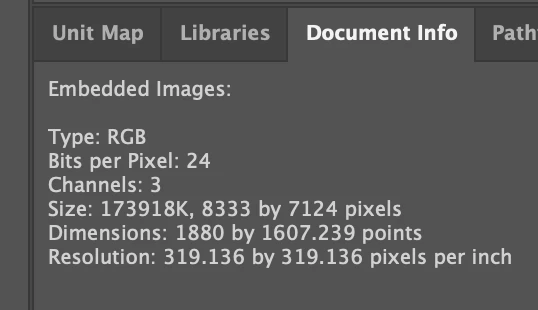
I can view the embedded file size in Illustrator via Document Info > Embedded Images, but how can I read this property using a script? 
 

This topic has been closed for replies.

1 reply

m1b
Community Expert
Community Expert
August 21, 2023

Hi @hmcnulty, you can use the length property of File object. Here is an example of getting file size of first placedItem in document:

(function () {

    var file;

    try {
        file = app.activeDocument.placedItems[0].file;
    } catch (error) { }

    if (file)
        alert('File size: ' + file.length + ' bytes (' + (Math.round((file.length / 1024) * 10) / 10) + 'k)');

})();
hmcnultyAuthor
Participant
August 22, 2023

Hey thanks, but unfortunately it looks like this is for placed items (linked), when I need it for page items (embedded) so it's coming back as null 

m1b
Community Expert
Community Expert
August 22, 2023

Oops, very sorry! I didn't read your post properly. My technique won't work if there is no File object.


One (long-winded) workaround could be to "unembed" the raster item (eg. see my script here) and check the size of the unbedded file. You could do this on a duplicate if you didn't want to unembed the raster item and then remove it afterwards? Sorry not a very neat solution. Also that will give you the file size of the image saved as .psd, so that may be no good for you.


Or do you want to calculate an uncompressed file size, ie. regardless of the file format? You could do that based on the information available in the rasterItem object I think, by using channels, bitsPerChannel, boundingbox and matrix properties. It would be a bit of a challenge though.

- Mark
