
Inspiring
November 20, 2024
Answered

How to record the selected action in the form of commands and codes?

  • November 20, 2024
  • 1 reply
  • 251 views

Where does the sequence of commands and codes come from, such as in this line (this is just for example and this is the entry that is written to the .aia file when used in a script) ?

"/version 3 /name [ 7 466c617474656e ] /isOpen 1 /actionCount 1 /action-1 { /name [ 20 466c617474656e205472616e73706172656e6379 ] /keyIndex 0 /colorIndex 0 /isOpen 1 /eventCount 2 /event-1 { /useRulersIn1stQuadrant 0 /... }"

Is it possible to get such a line for the selected action from the action panel?
This topic has been closed for replies.
Correct answer CarlosCanto

it's hard to tell when the Action is already stringyfied. 


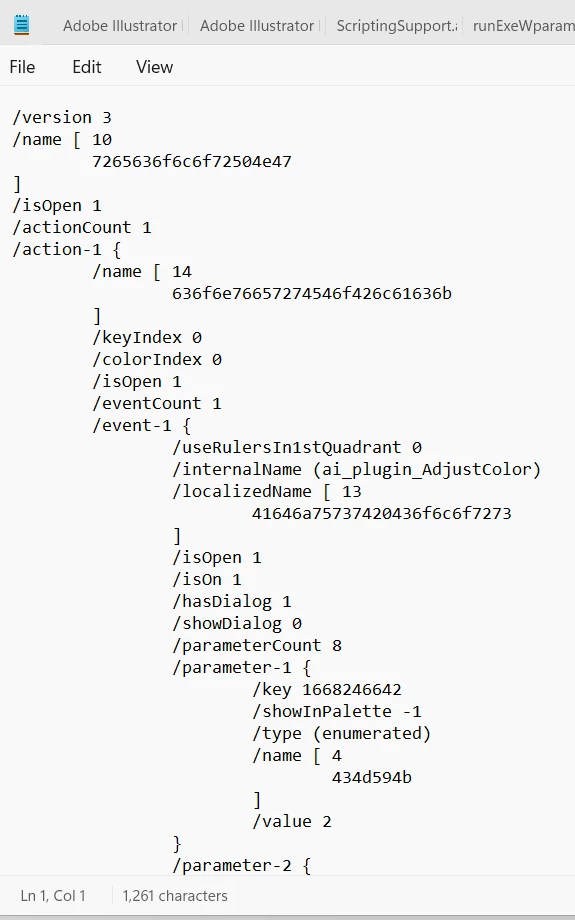
to have a better idea of the process, record an action with one or two steps, export, then open it with a text editor.


As you can see in this example, it's indented, it's easier to see when each block starts and ends


1 reply

CarlosCanto
Community Expert
CarlosCantoCommunity ExpertCorrect answer
Community Expert
November 20, 2024

it's hard to tell when the Action is already stringyfied. 


to have a better idea of the process, record an action with one or two steps, export, then open it with a text editor.


As you can see in this example, it's indented, it's easier to see when each block starts and ends