ashimg23377171
Inspiring
June 26, 2020
Answered

how to recreate this image in Illustrator.

  • June 26, 2020
  • 1 reply
  • 1280 views

Hello everyone

I wish to recreate the following in Illustrator:
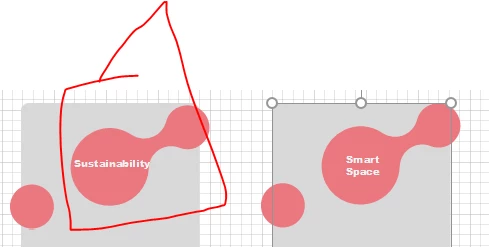
I tried to do it myself using 2 circles and a rectanble. and then using the 'Unite' command in Pathfinder to join the three elements, but i do not get the nice curves that are in the source file.
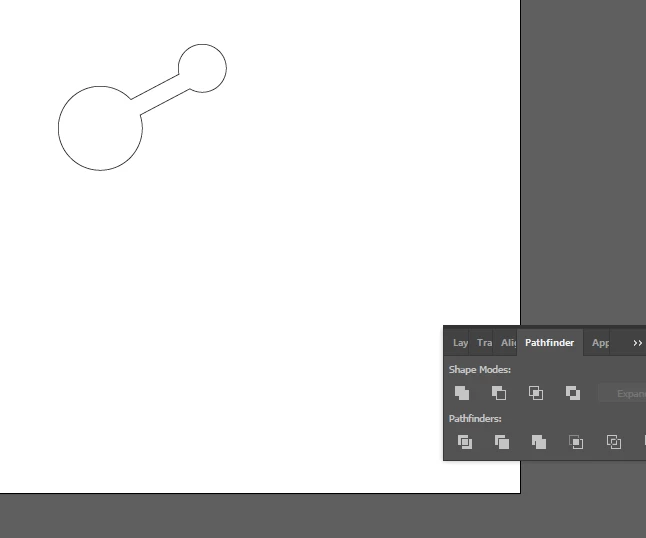
 

Can you please guide me how i can accomplish this. Disclaimer: my Illustrator skillset is of a basic level.


Regards

This topic has been closed for replies.
Correct answer Monika Gause

There is a script that does this: Metaball http://shspage.com/aijs/en/#metaball

1 reply

Monika Gause
Community Expert
Monika GauseCommunity ExpertCorrect answer
Community Expert
June 26, 2020

There is a script that does this: Metaball http://shspage.com/aijs/en/#metaball

ashimg23377171
Inspiring
July 2, 2020

Hi Monika

Thanks v much for weighing in.

I did not download the script, but i accomplished the same by doing the following:

  • Create two circles stacked over each other with a rectangle sandwiched between them
  • Align all the objects. (Shift+F7)
  • Then select all the objects and using the Pathfinder tool, and click, ‘Unite’
  • Then select all the objects, and using the Direct selection tool, add curves
  • Then rotate the shape as required.