
How to remove overlapping paths for laser cutting
Hi there.
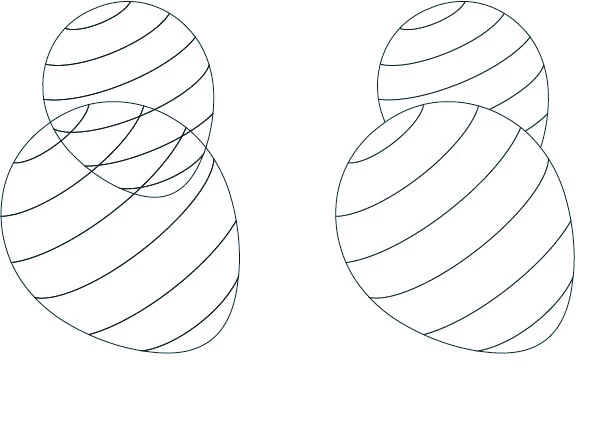
Thanks to the forum I have been able to do the design to the left, where each stripe of the balloon shape is it's own shape. They can be cut on a laser cutter then put together again like a puzzle. Now I am creating a laser cut design with overlapped shapes, and I need to remove the paths in the overlapping parts so that the final cuts would look like the picture on the right, where I simply used fills to hide the overlaps. I have tried all of the path tools, plus shape builders and I can't seem to cut out those stripes from the lower balloon in the overlap. I managed to do it once, but I worked on it for hours and it was a fluke I can't repeat;)
I need all of these separate shapes (including the truncated stripes) so I can enlarge each piece to account for kerf on the cutter.
Any help would be greatly appreciated!
Thanks
Sue


 AdChoices