jggdsgsgfgd
Participant
October 10, 2017
Answered

How to remove the area type cursor when selecting text?

  • October 10, 2017
  • 2 replies
  • 2001 views

I've looked into the Illustrator preferences and couldn't find anything to remove this.

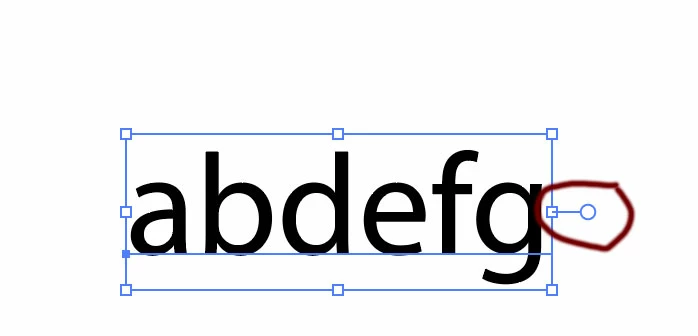
After typing something out and then selecting it, the area type appears.

How can I remove this?
    This topic has been closed for replies.
    Correct answer Bill Silbert

    That handle on the bounding box for the text is just there so that if you wish to convert the text to area text you can by double-clicking on it. Otherwise the text remains as point type. Note that there is still a point next to the first letter typed.

    2 replies

    Bill Silbert
    Community Expert
    Bill SilbertCommunity ExpertCorrect answer
    Community Expert
    October 10, 2017

    That handle on the bounding box for the text is just there so that if you wish to convert the text to area text you can by double-clicking on it. Otherwise the text remains as point type. Note that there is still a point next to the first letter typed.

    jggdsgsgfgd
    Participant
    October 10, 2017

    Someone used my work pc and adjusted the settings in Illustrator CC. The handle on the bounding box was never there prior to that. When I'm using the Illustrator on my home pc, those handles aren't there. It seems to be the default on the work pc. I've tried resetting the preferences but that doesn't seem to work.

    It doesn't allow centering objects b/c of the handle there and I would like to do so w/o creating outlines for the text.

    Bill Silbert
    Community Expert
    Community Expert
    October 10, 2017

    As far as I recall that handle was added to the bounding box for text in CC 2014. As far as any tests that I've done it does not affect how objects center with one another. If you are not seeing it on your home pc perhaps that is because you have the Bounding Box turned off (this can be done under the View Menu—Show/Hide Bounding Box) or your version at home is prior to CC 2014. If you are having a problem centering can you post screen shots with an explanation as to what steps you took to center your objects.

    Kanikas
    Community Manager
    Community Manager
    October 10, 2017

    Moving to Illustrator