Participant
May 5, 2023
Answered

How to remove these little stray marks when adding stroke to my text?

  • May 5, 2023
  • 2 replies
  • 914 views

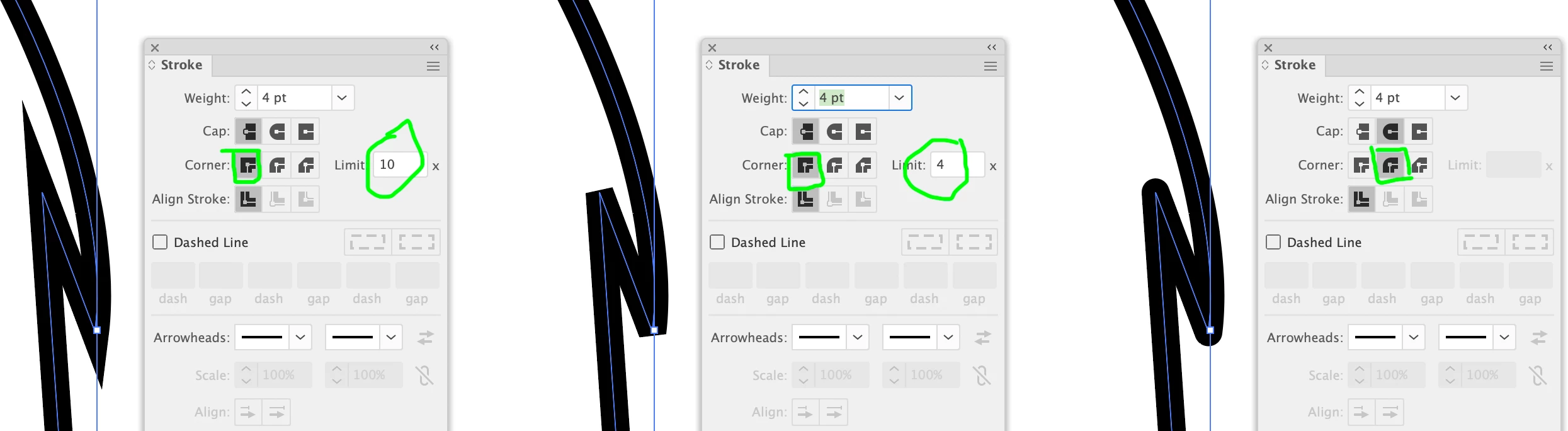
Whenever I add a stroke to my text, if I enlarge the stroke, these little triangle stray marks pop out in some places. I have no idea why and how to edit or remove them. Any ideas?

This topic has been closed for replies.
Correct answer Brad @ Roaring Mouse

This a mitre limit issue. You can reduce it my reducing the mitre limit on your strokes, or change your design to rounded or bevel corners which would eliminate the issue altogether

2 replies

Brad @ Roaring Mouse
Community Expert
Brad @ Roaring MouseCommunity ExpertCorrect answer
Community Expert
May 5, 2023

This a mitre limit issue. You can reduce it my reducing the mitre limit on your strokes, or change your design to rounded or bevel corners which would eliminate the issue altogether

Participant
May 5, 2023

Wow, I literally figured it out right as soon as I posted this *slaps forehead* I had to click on stroke and then choose round join as the corner. 

Brad @ Roaring Mouse
Community Expert
Community Expert
May 5, 2023

Ha! there ya go!