


derp-tron-2000
Participant
August 25, 2015
Answered

How to remove weird blue dots/hashtags added to text in Illustrator?
  • August 25, 2015
  • 5 replies
  • 104755 views

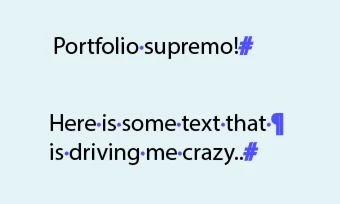
As you can see in the image, this particular file I'm working with in illustrator keeps adding these blue dots between words, hashtags at the ends of sentences, and the paragraph symbol at line breaks. They're not actually part of the text though, if I were to print this file, or export to .pdf, the dots, hashtags and paragraph symbol are not there. It's only in this particular file, and I've checked all the type/character/paragraph settings, but I can't figure it out, help please! Thanks!

Correct answer Larry G. Schneider

Turn off the toggle Show/Hide Hidden Characters in the Type menu. Cmd(Ctrl)-Opt(Alt)-I is the Keyboard Shortcut.

5 replies

Participant
June 28, 2025

Ctrl+Alt+I

Thanks dear

Participant
October 26, 2022

Thank you so much it took us like 5 minutes to figure out but in the end it worked!!!

Participant
July 2, 2020

Sweet mercy. Thank you.

Participant
June 2, 2020

Thanks 

Larry G. Schneider
Community Expert
Larry G. SchneiderCommunity ExpertCorrect answer
Community Expert
August 25, 2015

Turn off the toggle Show/Hide Hidden Characters in the Type menu. Cmd(Ctrl)-Opt(Alt)-I is the Keyboard Shortcut.

derp-tron-2000
Participant
August 26, 2015

Thanks so much!