
Participant
May 19, 2022
Answered

How to remove white space above and below the logo in SVG file

  • May 19, 2022
  • 2 replies
  • 10216 views

Hi,


I am having issues with exporting an image to SVG format.  I tried: 


  1. Object --> Fit To Artwork Bounce
  2.  Object -> Path Clean Up
  3.  Checked with Outline tool if there are any hidden objects.


Nothing helped.
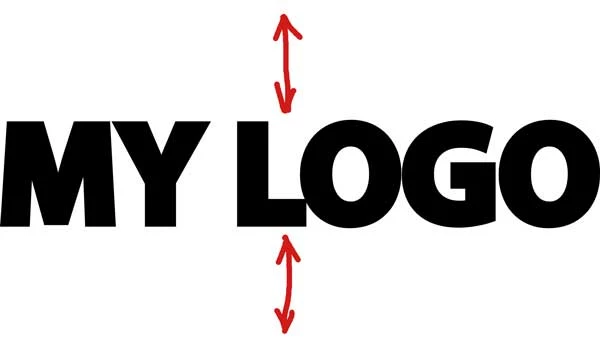
 

Any suggestions?
 

This topic has been closed for replies.
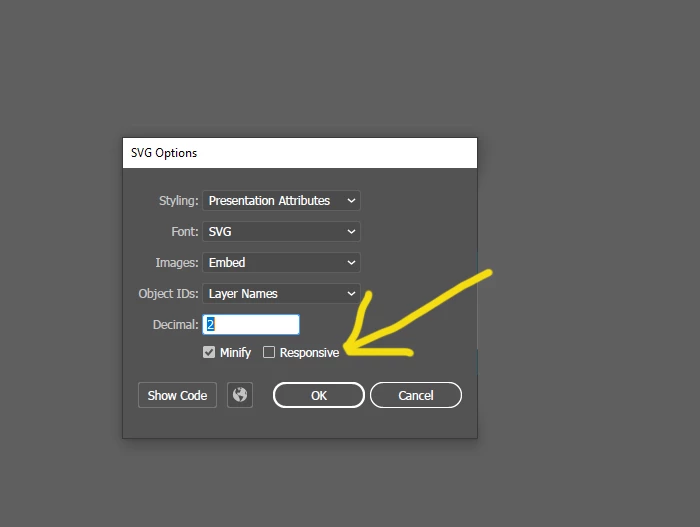
Correct answer help2013

Mike, yes that was a typo.  So... I found a solution that worked for me.  All you need is to uncheck the Responsive box: 

2 replies

Mike_Gondek10189183
Community Expert
Community Expert
May 20, 2022

Not sure if you had a typo or translation issue as Object --> Fit To Artwork Bounce does not exist, but follow this 

  • Select Artboard tool, then choose Fit to Artwork Bounds
  • File >> Export As > SVG > Enable Use Artboards


help2013AuthorCorrect answer
Participant
May 20, 2022

Mike, yes that was a typo.  So... I found a solution that worked for me.  All you need is to uncheck the Responsive box: 

Inspiring
May 20, 2022

Try reducing the vertical size of your artboard.