Klаus
Inspiring
January 4, 2026
Answered

How to rotate Effect / Texture / Grain?

  • January 4, 2026
  • 1 reply
  • 146 views

Hi everybody!

A simple rectangle, filled with Effect / Texture / Grain / Horizontal. When rotating that rectangle by let’s say 20°, the mentioned effect seems to stay unrotated, so its orientation is no longer aligned with the orientation of the (now rotated) rectangle.

What to do in order to rotate the mentioned effect according to its object?

Thanks a lot!

Correct answer Ton Frederiks

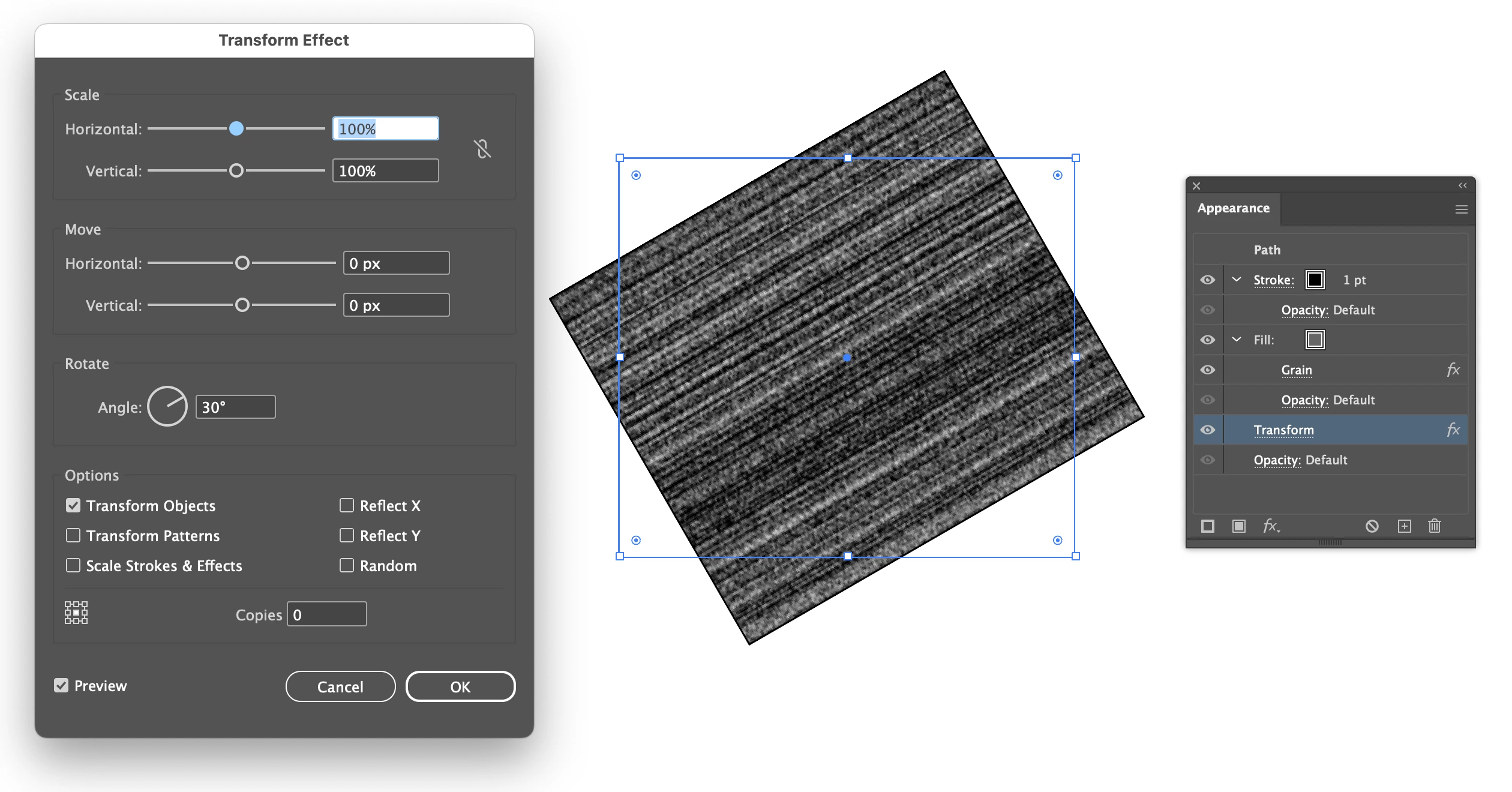
You can apply a Transform Effect:

Screenshot 2026-01-04 at 21.06.41.png

1 reply

Ton Frederiks
Community Expert
Ton FrederiksCommunity ExpertCorrect answer
Community Expert
January 4, 2026

You can apply a Transform Effect:

Screenshot 2026-01-04 at 21.06.41.png

Klаus
KlаusAuthor
Inspiring
January 4, 2026

Now, that was new to me: A transformation as an Appearance feature ... Thank you!

Ton Frederiks
Community Expert
Community Expert
January 4, 2026

Good to hear that helped.