Participating Frequently
June 28, 2021
Answered

How to scale multiple paths without affecting distance between them

  • June 28, 2021
  • 1 reply
  • 564 views

Hey,


I'm trying to set up some guides for a radial grid. The concentric circles need to be exactly 4mm apart which I can do with offset path. However when I scale all the cirlces the distance between them enlarges too, which makes sense. Is there any way to make a system where I can scale this setup without the distance between each path changing?


That would make it a lot quicker and easier to make adjustments.


Thanks for any suggestions! 
This topic has been closed for replies.
Correct answer Ton Frederiks

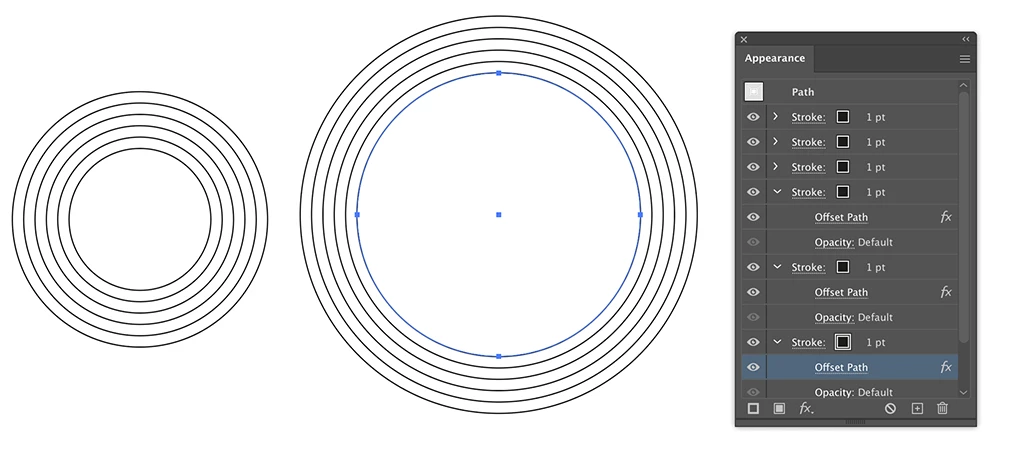
You can use the Appearance panel to add multiple strokes with different Offset Path effects.

When scaling, turn off Scale Strokes & Effects.

1 reply

Ton Frederiks
Community Expert
Ton FrederiksCommunity ExpertCorrect answer
Community Expert
June 28, 2021

You can use the Appearance panel to add multiple strokes with different Offset Path effects.

When scaling, turn off Scale Strokes & Effects.

frig2Author
Participating Frequently
June 28, 2021

That did the trick, thank you so much! 

Ton Frederiks
Community Expert
Community Expert
June 28, 2021

Good to hear that helped.

Once setup you can save the appearance as a Graphic Style for future use.

If you want to use the result as guides, you will need to Expand the Appearance.