Inspiring
September 20, 2019
Question

How to Script Proportionally Fit Selected Group to Object with Attribute?

  • September 20, 2019
  • 4 replies
  • 1781 views

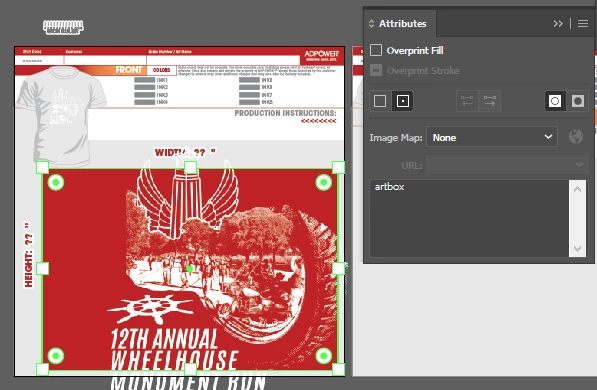
Hello, I'm trying to figure out how to script fitting a selected group of objects to an empty bounding box with the preset attribute "artbox". I don't know where to start... I usually start with someone else's script and then edit it to fit my needs, but I haven't found any similar script yet. But this is what I want the script to do in screenshots: 


Here's the "artbox"
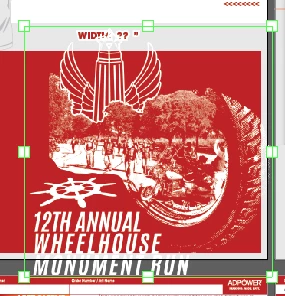
Here's an example art group that will be selected: 
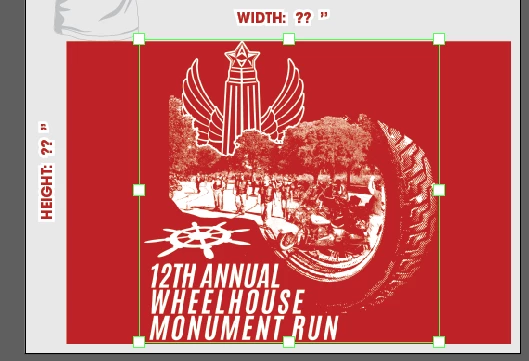
I want to automatically proportionally fit & center this selected art to the "artbox" like so: 
 

Also, how do you do an "align center left" and "align center top" via a script? Because I would also like to make a similar script that will do the same thing as above but instead of aligning center it will align center top and one that will align center left to the bounds of the original wheelhouse monument run, which I will assign attribute "thumbnail" to.


Thank you so much!!


This topic has been closed for replies.

4 replies

renél80416020
Inspiring
September 26, 2019

Salut!

Le problème n'est pas aussi simple que l'on pourrait penser.

J'ai édité un script qui fait ce travail, me contacter par mail.

Exemple:

Impossible de copier le lien vers mon fichier en ligne

René


renél80416020
Inspiring
September 26, 2019
Inspiring
September 26, 2019

Hello, I don't think the messaging function works on these forums anymore. I don't see the messages button or any way to message you. and i don't know how to find your email. Can you email it to me? logan (at) adpowerinc (dot) com

Ten A
Community Expert
Community Expert
September 26, 2019
Probably, you can select target object with artbox object.
var dc = app.activeDocument;
var tg = app.selection[0];
var rf = dc.pageItems[1];
if (tg.note=="artbox") {
rf = app.selection[0];
tg = dc.pageItems[1];
}
var cp =  [
(rf.geometricBounds[2]-rf.geometricBounds[0])/2
+ rf.geometricBounds[0],
(rf.geometricBounds[3]-rf.geometricBounds[1])/2
+ rf.geometricBounds[1]];
var sc = rf.width / tg.width;
if (tg.height*sc>rf.height) sc = rf.height / tg.height;

var currentboard = dc.artboards.getActiveArtboardIndex();

if (dc.artboards.getActiveArtboardIndex() == currentboard) {
tg.width = tg.width * sc;
tg.height = tg.height * sc;
tg.left = cp[0] - tg.width / 2;
tg.top = cp[1] + tg.height / 2;
}
Inspiring
September 26, 2019

Hello again! I was able to make this script you made work with the action to do what I needed:

var dc = app.activeDocument;
for (var i=0;i<dc.pageItems.length;i++) if (dc.pageItems[i].note=="artbox") break;

var tg = app.selection[0];
var rf = dc.pageItems[i];
var cp =  [
	(rf.geometricBounds[2]-rf.geometricBounds[0])/2
	+ rf.geometricBounds[0],
	(rf.geometricBounds[3]-rf.geometricBounds[1])/2
	+ rf.geometricBounds[1]];
var sc = rf.width / tg.width;
if (tg.height*sc>rf.height) sc = rf.height / tg.height;
tg.width = tg.width * sc;
tg.height = tg.height * sc;
tg.left = cp[0] - tg.width / 2;
tg.top = cp[1] + tg.height / 2;


But I noticed that when it resizes it, it doesn't scale strokes, effects, and corners correctly when resizing. Instead, appearance objects and things like that actually seem to disappear? Is there a way to fix this?

Thank you!

Ten A
Community Expert
Community Expert
September 25, 2019

It's hard to determine which artboard an object is on.
I think most easy way to do that, change each parent object's note.

Inspiring
September 25, 2019

Hmm, I think I may have a workaround... I'm thinking of only having 1 artbox on the whole template, then having the script resize it based on that, then align to current artboard via action (since this script will be called as part of an action anyway) and then move the art to the correct x & y position based on the center of the artbox area.


Is there any way you know of to transform the art to an x and y point based on the center point of the selected art as well as the rulers of the current artboard? Is this doable via action or only by script? Or can we transform>move a object based on center point? I'll have to do some testing...

Ten A
Community Expert
Community Expert
September 21, 2019

Here is a little snipet that adjust selected objects geometry refetrenced noted object.

var dc = app.activeDocument;
for (var i=0;i<dc.pageItems.length;i++) if (dc.pageItems[i].note=="artbox") break;

var tg = app.selection[0];
var rf = dc.pageItems[i];
var cp =  [
	(rf.geometricBounds[2]-rf.geometricBounds[0])/2
	+ rf.geometricBounds[0],
	(rf.geometricBounds[3]-rf.geometricBounds[1])/2
	+ rf.geometricBounds[1]];
var sc = rf.width / tg.width;
if (tg.height*sc>rf.height) sc = rf.height / tg.height;
tg.width = tg.width * sc;
tg.height = tg.height * sc;
tg.left = cp[0] - tg.width / 2;
tg.top = cp[1] + tg.height / 2;


Probably, it helps you... 

Inspiring
September 23, 2019

Hello, thank you soooo much! But, I've tried a bunch of different things and  I can't figure out how to limit the script to only work on the currently selected artboard. The template that we'll use this with has 4 artboards, each with this same artbox, and I need to limit it to only work on the current artboard. If I run it as is, it shifts the artwork to the last artboard with the artbox on it.


The thing I tried which I really thought would work was editing yours to


var dc = app.activeDocument;

for (var i=0;i<dc.pageItems.length;i++) if (dc.pageItems[i].note=="artbox") break;


var tg = app.selection[0];
var rf = dc.pageItems[i];
var cp =  [
    (rf.geometricBounds[2]-rf.geometricBounds[0])/2
    + rf.geometricBounds[0],
    (rf.geometricBounds[3]-rf.geometricBounds[1])/2
    + rf.geometricBounds[1]];
var sc = rf.width / tg.width;
if (tg.height*sc>rf.height) sc = rf.height / tg.height;

var currentboard = dc.artboards.getActiveArtboardIndex();

if (dc.artboards.getActiveArtboardIndex() == currentboard) {
tg.width = tg.width * sc;
tg.height = tg.height * sc;
tg.left = cp[0] - tg.width / 2;
tg.top = cp[1] + tg.height / 2;
}


But that didn't work at all.


Any guidance or clues? Thanks!