Known Participant
March 11, 2026
Answered

How to select only visible objects in a specific layer using script

  • March 11, 2026
  • 4 replies
  • 179 views

So I found this script

and the code works great, but I’m wondering how I can make it so it only selects the visible items on that specific layer? So I guess I need it to “target” instead of select. Maybe I just answered my own question, just not sure on what the code for that would be instead of hasSelectedArtwork


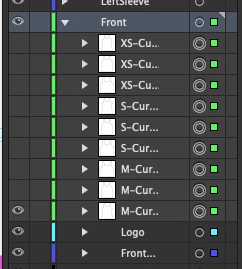
this is what currently happens if I use the script:


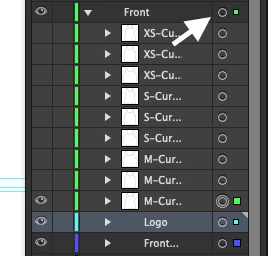
But I would like it to select only visible items like this, if I click here:


I need it to select this way so that I can create a clipping mask. 
Thanks all. 

    Correct answer CarlosCanto

    thanks for the sample file, it helps a lot. So the issue with the previous script is that you have sublayers in the Front layer that were not being accounted for.


    try this script to select both visible Groups and visible Sub Layers inside the Front layer

    // Select visible items in a layer named "Front"
    // also select items in sublayers if they are visible and not locked

    var doc = app.activeDocument;
    var targetLayer = null;

    // Find the layer named "Front"
    for (var i = 0; i < doc.layers.length; i++) {
    if (doc.layers[i].name === "Front") {
    targetLayer = doc.layers[i];
    break;
    }
    }

    if (targetLayer === null) {
    alert("Layer 'Front' not found.");
    } else {
    // Deselect all first
    doc.selection = null;

    // Select all visible items in the "Front" layer
    selectVisibleItems(targetLayer);

    // also process sublayers if needed
    for (var j = 0; j < targetLayer.layers.length; j++) {
    if (targetLayer.layers[j].visible && !targetLayer.layers[j].locked) {
    selectVisibleItems(targetLayer.layers[j]);
    }
    }

    alert("Selected visible items in 'Front' layer.");
    }

    function selectVisibleItems(layer) {
    for (var i = 0; i < layer.pageItems.length; i++) {
    var item = layer.pageItems[i];
    if (item.hidden === false && item.locked === false) {
    item.selected = true;
    }
    }
    }

     

    4 replies

    CarlosCanto
    Community Expert
    CarlosCantoCommunity ExpertCorrect answer
    Community Expert
    March 15, 2026

    thanks for the sample file, it helps a lot. So the issue with the previous script is that you have sublayers in the Front layer that were not being accounted for.


    try this script to select both visible Groups and visible Sub Layers inside the Front layer

    // Select visible items in a layer named "Front"
    // also select items in sublayers if they are visible and not locked

    var doc = app.activeDocument;
    var targetLayer = null;

    // Find the layer named "Front"
    for (var i = 0; i < doc.layers.length; i++) {
    if (doc.layers[i].name === "Front") {
    targetLayer = doc.layers[i];
    break;
    }
    }

    if (targetLayer === null) {
    alert("Layer 'Front' not found.");
    } else {
    // Deselect all first
    doc.selection = null;

    // Select all visible items in the "Front" layer
    selectVisibleItems(targetLayer);

    // also process sublayers if needed
    for (var j = 0; j < targetLayer.layers.length; j++) {
    if (targetLayer.layers[j].visible && !targetLayer.layers[j].locked) {
    selectVisibleItems(targetLayer.layers[j]);
    }
    }

    alert("Selected visible items in 'Front' layer.");
    }

    function selectVisibleItems(layer) {
    for (var i = 0; i < layer.pageItems.length; i++) {
    var item = layer.pageItems[i];
    if (item.hidden === false && item.locked === false) {
    item.selected = true;
    }
    }
    }

     

    Known Participant
    March 15, 2026

    I’m still getting the same error, “trying to select locked or hidden art” line 38 → item.selected = true

    CarlosCanto
    Community Expert
    Community Expert
    March 16, 2026
    1. are you running the script posted here? (I don’t think you’re copy/pasting portions of it into your own script but have to ask sorry)
    1. are you running the script on the same file you posted here?
    2. do you have anything locked at all?
    1. can you post a screen shot of your layers expanded after getting the error?


    Kurt Gold
    Community Expert
    Community Expert
    March 13, 2026

    You may also take a look at Isolation Mode for layers (see Layers panel menu) and then just do a Select all.

    CarlosCanto
    Community Expert
    Community Expert
    March 12, 2026

    Here you go, let me know if you have questions

    // Select visible items in a layer named "Front"
    var doc = app.activeDocument;
    var targetLayer = null;

    // Find the layer named "Front"
    for (var i = 0; i < doc.layers.length; i++) {
    if (doc.layers[i].name === "Front") {
    targetLayer = doc.layers[i];
    break;
    }
    }

    if (targetLayer === null) {
    alert("Layer 'Front' not found.");
    } else {
    // Deselect all first
    doc.selection = null;

    // Select all visible items in the "Front" layer
    selectVisibleItems(targetLayer);
    alert("Selected visible items in 'Front' layer.");
    }

    function selectVisibleItems(layer) {
    for (var i = 0; i < layer.pageItems.length; i++) {
    var item = layer.pageItems[i];
    if (item.hidden === false && item.locked === false){
    item.selected = true;
    }
    }
    }

     

    Known Participant
    March 13, 2026

    Thanks Carlos, I tried that but I got an error, which I’m guessing is because some of the objects are invisible.
    I found another script that works with specifying the artboard and I used that and it seems to work. Maybe that will be the best way with me having visible and invisible objects in the layer.

    CarlosCanto
    Community Expert
    Community Expert
    March 13, 2026

    Hi, what’s the error? the script should work with or without invisible objects

    Known Participant
    March 11, 2026

    This does exactly what I need


    I just need it to only do it for the “Front” layer, I’ve tried a few different ways to do this but I get errors with each loop I’ve tried.