


massimilianoa37992866
Participant
April 10, 2020
Answered

How to switch from Arabic type setting to English

  • April 10, 2020
  • 5 replies
  • 24004 views

Hi there,

suddenly and with no apparent reasons - my default type settings in illustrator 2020 are Arabic (RTL and Hindi digits ect etc) as per images attached
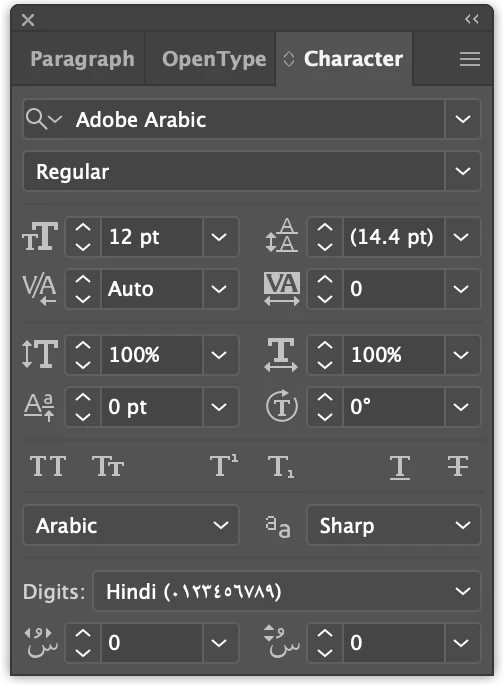
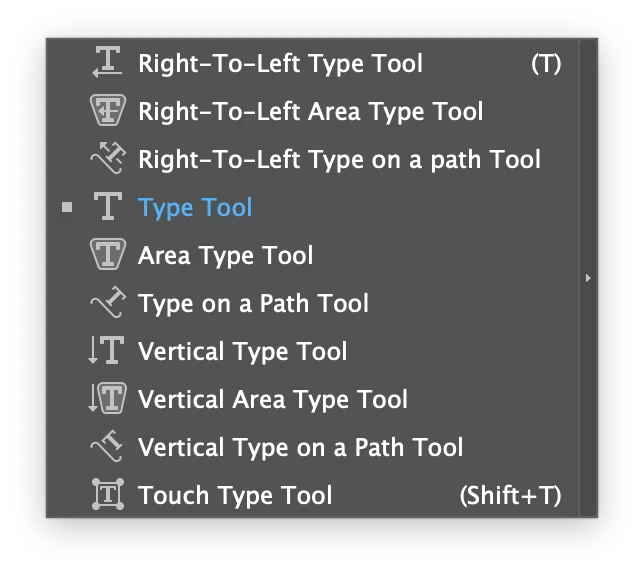


I'm living and working in UAE - but my language has always been set as English UK in the settng panel preferences and never had an issue before. Now i have to set manually the text tool everytime i want to use it - super annoying!


Does anyone know how to set English as default 


Thanks,


Max

 

Correct answer Zaid Al Hilali

@danielfeary You may consider installing two versions of Illustrator, one can be the Middle Eastern version for Arabic jobs, and the other version can be of a different language such as English for your regular jobs.

This way you don't have to bother about changing Ai profiles.

5 replies

Known Participant
June 23, 2023

I have this problem too: three years after your first post. Installed ME pack for job last year, now I can't stop AI from defaulting to Arabic. Frustrating. Will follow @Zaid Al Hilali video explainer…

Zaid Al Hilali
Community Expert
Zaid Al HilaliCommunity ExpertCorrect answer
Community Expert
June 23, 2023

@danielfeary You may consider installing two versions of Illustrator, one can be the Middle Eastern version for Arabic jobs, and the other version can be of a different language such as English for your regular jobs.

This way you don't have to bother about changing Ai profiles.

Participant
June 26, 2023

So we have to jump between Illustrators just because we want to write in Arabic ? Shouldn't there be an option to change the default language & font ?

Participant
February 2, 2023

I had the same problem it turned out to be keyboard preference language you can change it in the task bar, you will see ENG or AR open it it will open a small window then start typing in AI then when typing to hindi or arabic click small language window and select english and problem You will be solved

May 17, 2022

Hi! I had the same problem. In a past CC version, I did download InDesign for Arabic fonts. I remember setting this up in my Creative-Cloud downloader. - This isn't the case anymore. Any software version can have its language and style-writing altered without having to download a new version for it.


What did the trick for me is goign to InDesign Preferences

- Dictionnary

- Autocorrect

- Story Display Editor

and choosing: English


+

Advanced Type: 

Input Method Options

> deseclect "use inlien for non-Latin (=arabic,etc) text

Default Composer

> select: Adobe World-Ready single-line composer


Now I can finally write in English without gettign my text, numbers, paragraph and punctuation formated to Arabic. Yey


I sincerally hope this info can help other users further in their selecter Adobe softwares.


Zaid Al Hilali
Community Expert
Community Expert
April 10, 2020

In Adobe InDesign, we change application defaults by simply closing any open documents, change the font to Gill Sans, change paragraph directions, dictionary language, and any other formatting. From there on, any new document you create in InDesign will remember your new defaults that suit Latin language users, but this is only in InDesign.

In Illustrator however it is a longer issue, to my knowledge you need to change your file profile. For instance, if you use the "Print" profile, you will have to change all defaults in a new document, name this new document as Print.ai to replace the one that comes "out of the box" with Illustrator.

Check this link of how to change Illustrator defaults on your Mac or Windows machine. I also prepared a video a few years ago which may help you perform this task.


Another thing, if you don't use Arabic at all, you may as well remove existing Illustrator version, and download an International English version instead.

massimilianoa37992866
Participant
April 10, 2020

Hi Zaid,

thanks a lot i will follow your guide which seems very well done and clear.

I'm only surprise that there is no an easier way to set new type preferences and most importantly - why it happend to me all of the sudden.


Thanks,


Max


Anna Lander
Inspiring
April 10, 2020

Check Preferences > Hyphenation > Default Language


massimilianoa37992866
Participant
April 10, 2020

HI Anna,

thanks a lot for you reply - unfortunately i did already and nothing changed.


Hyphenation is set to English UK - but the default font still Adobe Arabic and the default type tool is set to Right to Left