



horaeng2
Participant
March 25, 2026
Answered

How-to Transform Each in Illustrator

  • March 25, 2026
  • 1 reply
  • 56 views

Hi, I’m having a persistent issue where I cannot resize the height of multiple selected objects (images) at once in Adobe Illustrator.
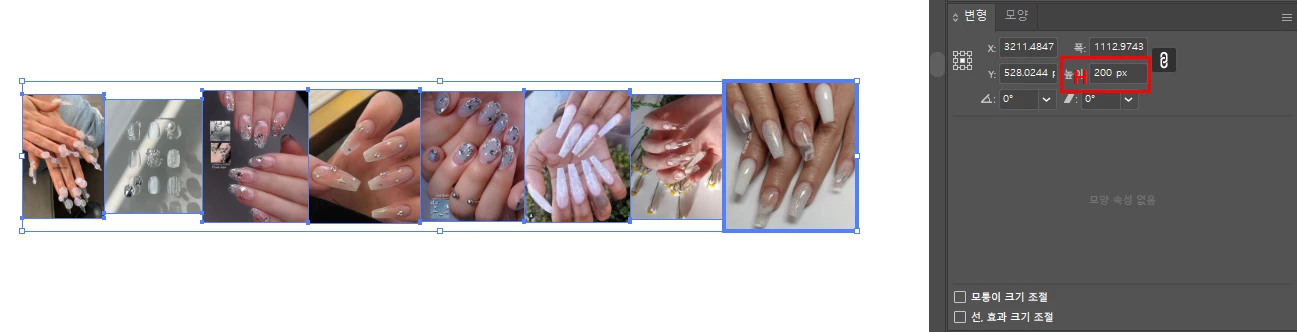
The Problem:

  • When I select multiple images (around 100) and try to change the height (H) value in the Transform/Properties panel, the value either reverts to the original or doesn't change at all.

  • Sometimes the bounding box appears much larger than the actual images.

  • Even with only 3 images selected, the numeric input in the Transform panel is often ignored or "jumps" back.

What I've already tried:

  1. Full Reinstall: Used the Adobe Creative Cloud Cleaner Tool to wipe everything and reinstalled on the C: drive.

  2. Snapping Settings: Disabled "Snap to Pixel," "Snap to Grid," and "Snap to Point."

  3. Reset Settings: Reset Illustrator preferences and deleted the AppData/Adobe folder.

  4. Artboard Check: Reset the bounding box and ensured objects are within the artboard area.

  5. Environment: Running on Windows 11.

Specific Symptoms:

  • The reference point (9-dot icon) is set to center.

  • Single object resizing works fine, but bulk resizing fails.

  • The issue persists even in a brand-new file with freshly imported images.

Does anyone know why Illustrator is ignoring numeric inputs for multiple selections? Is this a known bug in Windows 11 or a specific preference I'm missing? Any help would be greatly appreciated!

    Correct answer Kurt Gold

    Thanks for the sample file.


    That’s normal behaviour. Scaling through the Transform panel has always recognised the entire selection as one unit.


    That’s why I suggested to use Transform Each. There you can scale (ungrouped) selections individually and if you are using the latest Illustrator version (30.2.1) you can set the scaling to “Absolute” to scale the single objects to an absolute height (e.g. 100 mm).

    1 reply

    Kurt Gold
    Community Expert
    Community Expert
    March 25, 2026

    Sounds as if you are looking for Object menu > Transform > Transform Each.

    horaeng2
    horaeng2Author
    Participant
    March 25, 2026

    Thanks for the suggestion, but that’s not what I’m looking for. I am already aware of the "Transform Each" function.

    My issue is not about finding a specific menu; it's a technical bug where Illustrator ignores or reverts numeric inputs in the Transform/Properties panel when multiple objects are selected.

    As I mentioned in my original post, I have already tried a clean reinstallation and disabled all snapping options, yet the problem persists. I'm looking for a solution to why the software is failing to process batch numeric entries, not a basic usage guide.

    Kurt Gold
    Community Expert
    Community Expert
    March 25, 2026

    I obviously misunderstood your question. Sorry.


    Does this issue occur in all files? Does it also happen when just trying to scale three plain rectangles through the Transform panel?


    Also, can you provide a sample Illustrator file that shows the symptom for you, so one can test if it is a general problem?