
Answered
how to turn a solid circle into stroke without changing the size
The circle is in 0.65 in diameter. How can I change the circle from fill to stroke (0.1cm thick) without changing the diameter? Thanks!

The circle is in 0.65 in diameter. How can I change the circle from fill to stroke (0.1cm thick) without changing the diameter? Thanks!
Coye, Hi.
In Illustrator, I work with pt. as my units of measure.
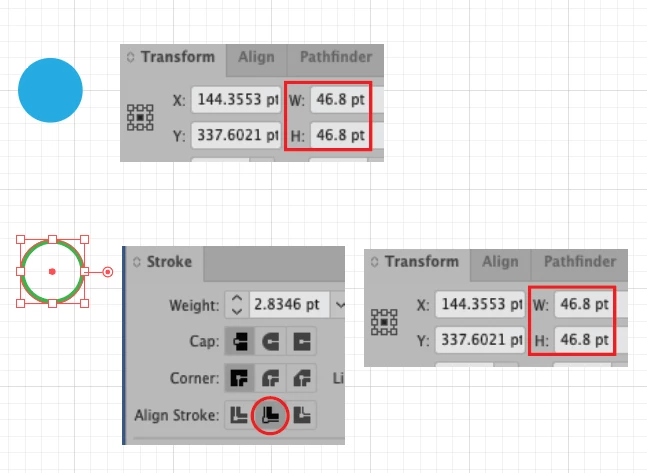
Shown here is a circle with a Fill. (I copied and pasted 0.65 in into Transform panel)
Next you want, no Fill but Stroke.
In your Stroke panel, I copied and pasted 0.1cm for stroke size. Click on Align Inside.
Shown in Green, the circle is same size, no Fill, the Stroke weight you requested.
K
Already have an account? Login
Enter your E-mail address. We'll send you an e-mail with instructions to reset your password.
 AdChoices