Participant
November 8, 2016
Answered

How to Uninstall Adobe 2017 Illustrator and return to my previous version of Illustrator

  • November 8, 2016
  • 3 replies
  • 5271 views

Hi ADOBE,

I was durrailed by an email you sent me, addressing that there were updates to the software I had and I hadn't updated the Master Collection all year, noticing some problems.  That might have been it.  So I updated my illustrator software and realized it will only work for 7 days.   Our annual subscription ends in January 2017.

Can you please tell me step by step how to uninstall illustrator 2017 without destroying the other software of the Master collection installed.   Then tell me how to get back this years software.

I thought I and my partner purchased the Master Collection for the whole year and should not encounter any trial versions of software for 7 days.

Maybe someone can explain this to me.

Thank you,

Ed Bangle

Web / Print Media Designer

Web Applications Specialist
    This topic has been closed for replies.
    Correct answer Doug A Roberts

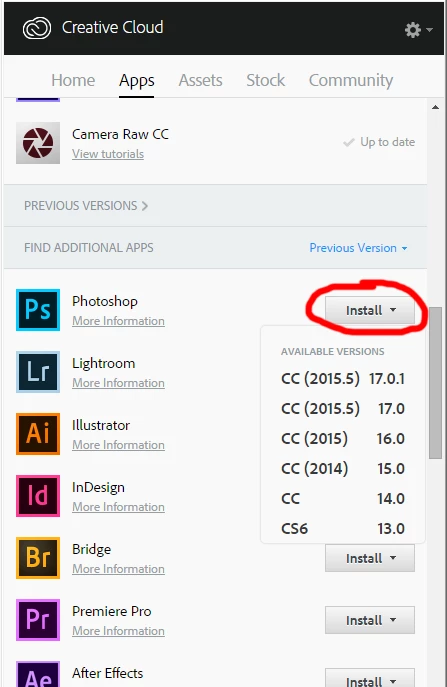
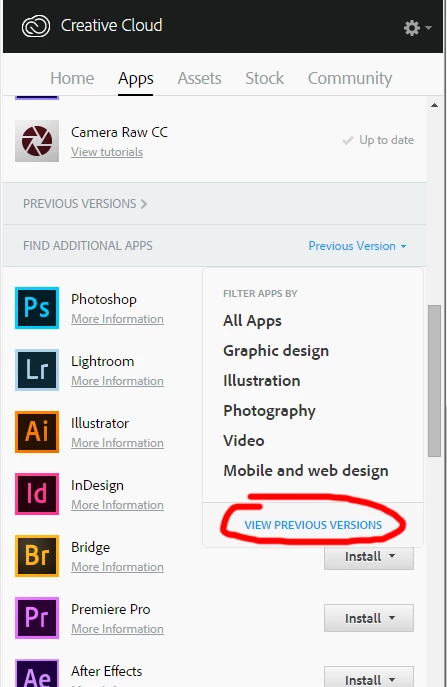
    can you see this option on the drop-down menu?

    then you'll be able to see this:

    3 replies

    Legend
    December 8, 2016

    I think we're a little confused by something you said. What we expect is:

    Master collection: Creative SUITE: out of support, permanent license, never expires.

    --or--

    Subscription: Creative CLOUD. 

    So, what do you have a license for? Creative Suite or Creative Cloud?

    Legend
    November 8, 2016

    If you purchased a year's subscription, then you should not be getting a Trial Version message. Your subscription covers all CC versions.  You should not need to uninstall cc2017.  See if the info in the link below is helpful.

    Stop Creative Cloud 2015 from reverting to trial mode

    Om Nath Jha
    Legend
    November 8, 2016

    Hi ITS,

    Please check the link below for step by step process to install the older version of Illustrator. You can uninstall the CC 2017 from the Creative Cloud app itself.

    How to Find and Install Previous Version of Adobe Apps in CC 2015 | Adobe Customer Care Team

    Regards,

    Om

    cifssu68291132
    Participant
    December 7, 2016

    It doesn't works.

    In "FIND ADDITIONAL APPS", there is no "VIEW REVIOUS VERSIONS".

    I only see Graphic design, Illustration, Photography, Video and Mobile and web design.

    So,

    do you have another step by step process?

    Thanks

    Monika Gause
    Community Expert
    Community Expert
    December 7, 2016

    Use the Creative Cloud app.