

j.khakase
Inspiring
February 15, 2025
Question

How to vary hues for dynamic shapes?

  • February 15, 2025
  • 1 reply
  • 581 views

Hello Community,

I need help on following situation:

I have created multiple text area types with dynamic shapes fill as shown below image the situation. I have prepared custom colors group and want to randomize all these selected dynamic shapes within created colors group.


is that possible with any trick or script
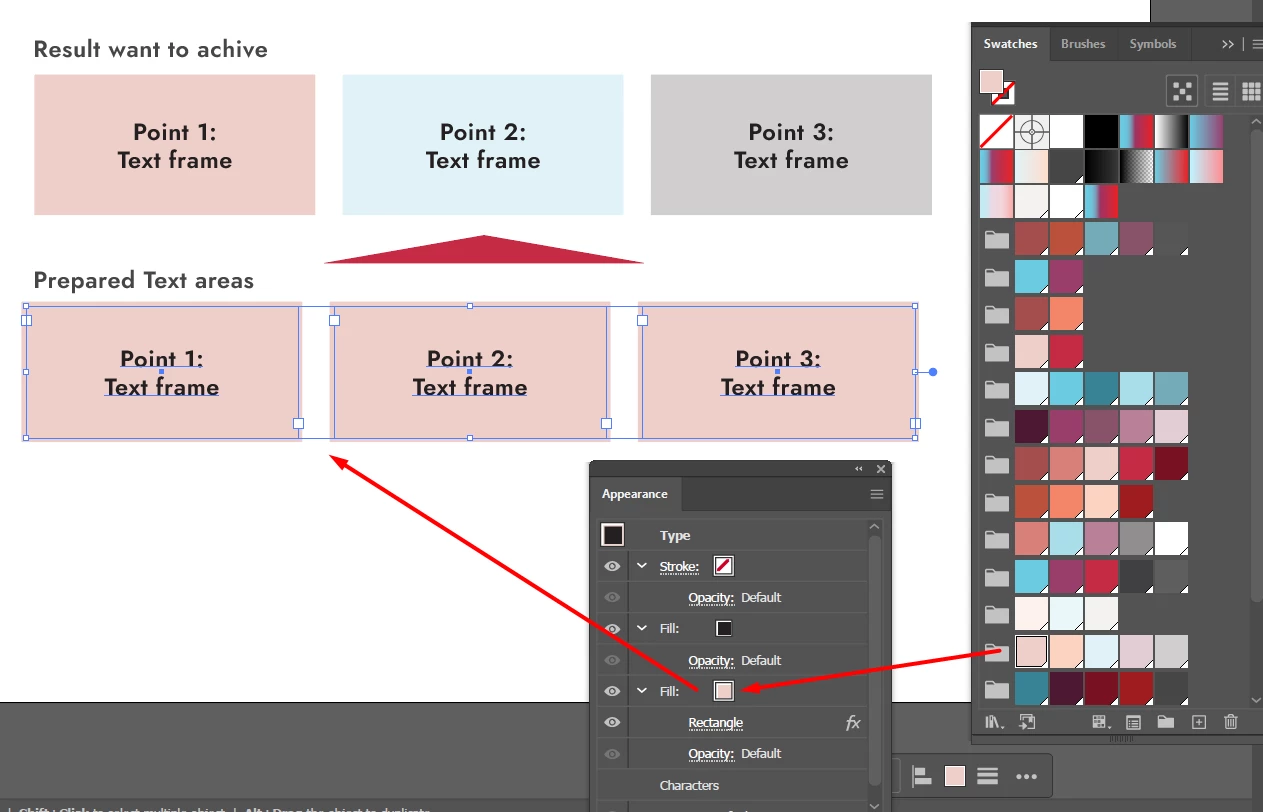


1 reply

m1b
Community Expert
Community Expert
February 16, 2025

Hi @j.khakase can you share a sample file? There are particular difficulties with your question based on exactly how the text frames are styled. I'd be happy to have a look at it and let you know if it's possible.

- Mark

j.khakase
j.khakaseAuthor
Inspiring
February 17, 2025

Hi @m1b ,

Thanks for your reply, I was looking for it. I attached the sample files and Link of it, there is only 3 objects to test, but it can be multiple. I want to randomize their shape fill by targeted color group I prepared at swatches panel.


m1b
Community Expert
Community Expert
February 18, 2025

@j.khakase Thanks for your sample files.


Unfortunately, the scripting API doesn't provide access to anything but the very most basic appearance, eg. a fill color and a stroke color. Because in your example file you use a more complex appearance (two fills and a live effect nested in a fill), a script won't really help here.


One solution would be to simplify the artwork—eg. split the artwork into a basic colored rectangle plus a point text frame. This would make a scripting approach feasible. See the attached demo file and try it with the script below. Note: this is just a demonstration—your exact needs will probably require something more specialized.

- Mark


Everytime you run script it will apply a random color from the same color group.


Can select multiple page items:

/**
 * @file Change Fill Color By Color Group Random Swatch.js
 * 
 * Experiment of applying swatch to the selected items,
 * where the swatch is chosen at random from amongst the
 * item's fill color's parent swatch group.
 *
 * @author m1b
 * @discussion https://community.adobe.com/t5/illustrator-discussions/how-to-vary-hues-for-dynamic-shapes/m-p/15159237
 */
(function () {

    var doc = app.activeDocument,
        items = doc.selection;

    if (0 === item.length)
        return alert('Please select one or more page items and try again.');

    for (var i = 0; i < items.length; i++)
        applyRandomColorGroupColor(doc, items[i]);

})();

/**
 * Apply a fill color to `item`, by choosing a random
 * swatch color from `item`s current fill color's
 * parent swatch group.
 * @author m1b
 * @version 2025-02-18
 * @param {Document} doc - the item's Document.
 * @param {PageItem} item - the item to color.
 */
function applyRandomColorGroupColor(doc, item) {

    if (!item.hasOwnProperty('fillColor'))
        return;

    // get all the colors from the item's color's parent color group
    var swatches = getColorGroupSwatchesForColor(doc, item.fillColor);

    if (
        !swatches
        || 0 === swatches.length
    )
        return alert('Could not find a color group for the selected item\'s color.')

    // random swatch
    item.fillColor = swatches[Math.floor(Math.random() * swatches.length)].color;

};

/**
 * Returns all the swatches in the same color group as `targetColor`.
 * @author m1b
 * @version 2025-02-18
 * @param {Document} doc - an Illustrator Document.
 * @param {Color} targetColor - the target of the search.
 * @returns {Swatches?}
 */
function getColorGroupSwatchesForColor(doc, targetColor) {

    var swatchGroups = doc.swatchGroups;

    for (var i = 0; i < swatchGroups.length; i++) {

        var swatches = swatchGroups[i].getAllSwatches();

        for (var j = 0; j < swatches.length; j++)

            // compare stringified versions
            if (stringify(swatches[j].color) === stringify(targetColor))
                return swatches;

    }

};

/**
 * Simple stringify object, with
 * special handling of Swatches.
 * @author m1b
 * @version 2023-04-26
 * @param {Object} obj - the object to stringify.
 * @returns {String}
 */
function stringify(obj) {

    var str = obj.toString();

    for (var key in obj) {

        if (!obj.hasOwnProperty(key))
            continue;

        if (
            key == 'spot'
            || key == 'color'
        )
            str += stringify(obj[key]);

        else
            str += obj[key];

    }

    return str;

};