

wong168
Known Participant
June 12, 2022
Answered

how to write an action selecting multiple objects in illustrator

  • June 12, 2022
  • 4 replies
  • 3826 views

hi,

i am trying to write an action to select objects in illustrator. i have attached a screenshot to show what i am trying to do...
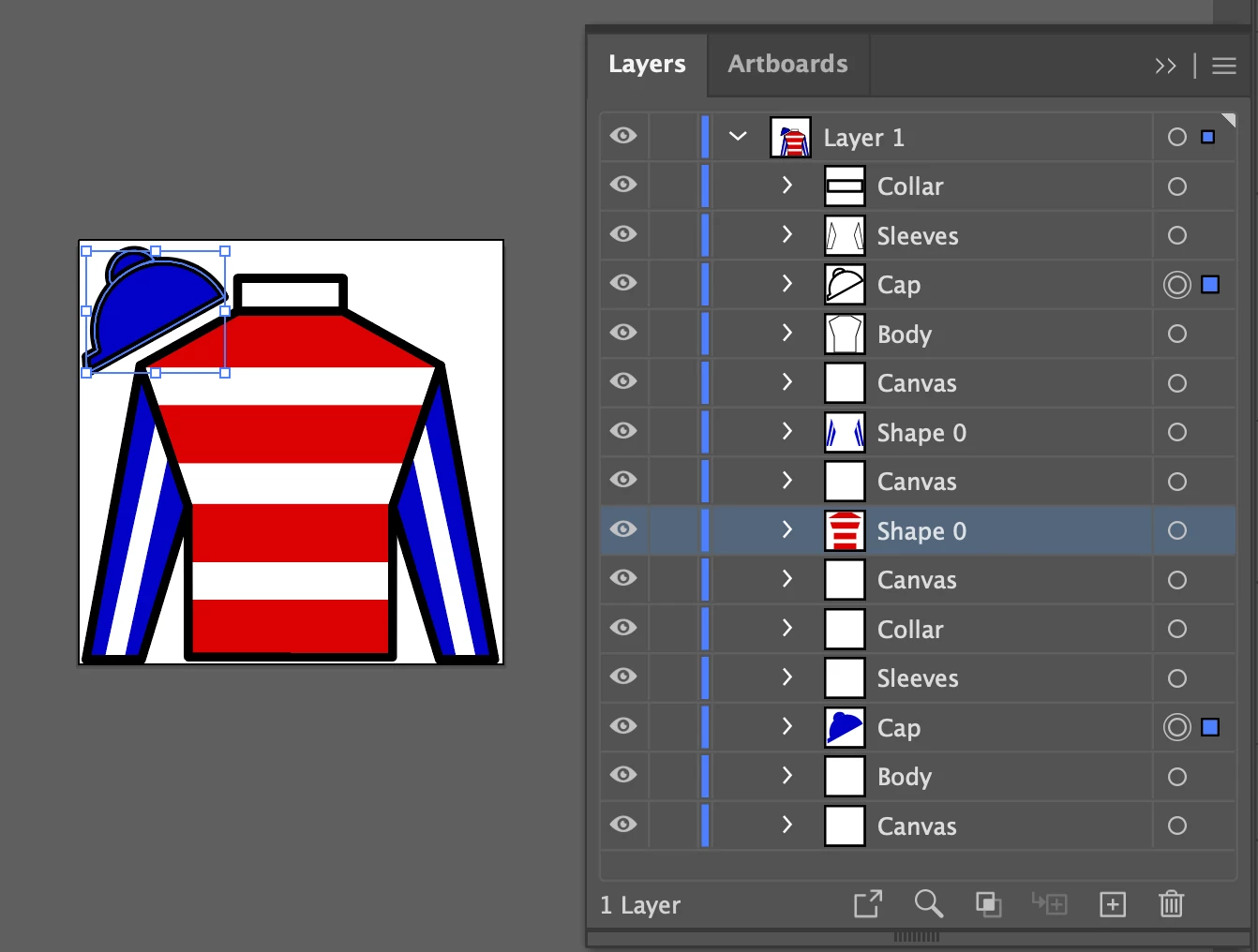
i tried to pick the two objects, both named as cap in the Layer 1 as shown in the picture, but the action is not recording as an item...

how can i get the action to record as an item to be able to select both "cap" objects?...

please comment and help to get it done...

cheers and thanks...

This topic has been closed for replies.
Correct answer m1b

mark,

a page item named "canvas", it is not an artboard...

yes, remove all of them ... there is nothing in the page...

thanks and cheers,


Here's a modified version of @femkeblanco's earlier script. This time it removes 'canvas' named items. I changed the order of the loop to go backwards, because the item collection indices will be messed if I remove the items from the start first.

- Mark

var items = app.activeDocument.pageItems;
for (var i = items.length - 1; i >= 0; i--) {
    if (items[i].name == "canvas") {
        items[i].remove();
    }
}


4 replies

Kurt Gold
Community Expert
Community Expert
June 14, 2022

"I think it's a bit undue that my answer was marked correct while you did most of the work in getting the OP to his goal."


Femke,


some (perhaps inane) notes about so-called "correct" answers:


As Mark already stated, it's all good, at least if one doesn't take the entire rating system too seriously. Since its advent about eight years or so ago, the rating system has been of course error-prone due to different reasons. For example, there are a lot of questioners who immediately mark the first reply to their requests as "correct", probably just in terms of "yeah, there is an answer and it's correct or very nice that there is one". They do not necessarily mean that it is technically or functionally "correct".


Then there are other cases and some questioners may just not be able to evaluate the answers they received and therefore just mark an "arbitrary" answer as "correct". And there are some other mysterious cases.


I'm even pretty sure that there are a lot of "correct" answers in the Adobe forums which are actually "wrong" or at least misleading.


Frankly, I still do not like the rating system and always voted against it, but in the end it succeeded for whatever reason.


Your answer in this thread definitely deserves the "correct" badge. Mark knows that and as a gentleman he just did the "dirty work" for you, so we can move on to some other challenges. ::-)


femkeblanco
Legend
June 15, 2022

Thanks @Kurt Gold.  I agree.  

Kurt Gold
Community Expert
Community Expert
June 13, 2022

Wong,


as I (and Mark as well) already stated: You cannot select items with an action based on their names in the Layers palette. It would be beneficial, but currently it is just not possible and unfortunately I doubt that it may be incorporated soon.


Notes in the Attributes palette are very useful, especially if you are going to select certain objects repeatedly during running actions. But they have to be already there or they may be created as part of an action based on unique appearance attributes.


In your case (considering the screenshot you provided) it rather looks that the cap objects have no unique attributes and therefore it is not possible to "catch" them in order to assign notes.


Sometimes there may be some tricks to do it despite the general action inability, but to check that, normally a couple of sample Illustrator files have to be shared in order to have a look.


Kurt Gold
Community Expert
Community Expert
June 12, 2022

Yes, a script can be incorporated in an action.


Some of the scripting experts may chime in and provide something.


femkeblanco
Legend
June 12, 2022

This will select any page items named "Cap" in layer "Layer 1".  (I presume these are groups or compound paths.)

var items = app.activeDocument.layers["Layer 1"].pageItems;
for (var i = 0; i < items.length; i++) {
    if (items[i].name == "Cap") {
        items[i].selected = true;
    }
}


wong168
wong168Author
Known Participant
June 12, 2022

hi advisor,

how can i incorporated this script to my action?

please advise...

cheers and thanks

Kurt Gold
Community Expert
Community Expert
June 12, 2022

Unfortunately, this cannot be done with an action.


A script would be required.


wong168
wong168Author
Known Participant
June 12, 2022

kurt,

can a script works within action? ... how to write a script so it works to select both "cap" object? ... i have no knewledge in writing script...

cheers and thanks