
Participant
January 12, 2025
Question

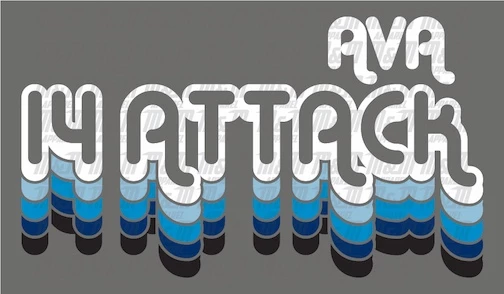
How would I replicate this text effect?

  • January 12, 2025
  • 5 replies
  • 850 views

Hello! I've been asked to repliacte the effect of the text here but with different wording. I'm having trouble figuring out how to do this and also what font I should use since I can't seem to find anything similar to it. Any help would be appreciated!
5 replies

Community Expert
January 13, 2025

As all the experts have said you can use the appearance panel to duplicate fills and shift them using the Transform live effect. This will make it still editable with no need to create text outlines. I have made an example of the two ways I would do it, one with the native Illustrator effects and one with Astute Graphics Plugins which I find a lot easier to use.

Monika Gause
Community Expert
Community Expert
January 12, 2025

If you need it as a graphic style, you can do it like this: https://youtu.be/VWzIo_UilP0


In order to make it plotter ready, flatten transparency, keep alpha transparency. Afterwards search for the invisible objects and delete them.

Monika Gause
Community Expert
Community Expert
January 12, 2025

The font is Alba.ttf from Creative Market

It's a commercial font, so you have to pay for it.


As for how to do it: check out what Barbara wrote or do you need a graphic style for it. THat original example is not a blockshadow , it's just 5 copies moved down.

Community Expert
January 12, 2025

The font can be used for personal non-commercial purposes for free:
https://www.dafont.com/alba.font


At first glance it looks like the image was created using the Alba Shadow style, which has its own built-in block shadow effect. But it really looks like the regular Alba style was used with path offset style effects applied to create the outline shapes.


I prefer creating these kinds of effects where they're expanded and "friendly" to vinyl cutters and routing tables. Live line strokes don't work well with those kinds of machines. One path offset effect has to be created for the outline around the letters. An additional, slightly larger path offset effect is then created so Pathfinder operations can knock out the negative area between the duplicate shapes.

Mohammad.Harb
Community Expert
Community Expert
January 12, 2025

Use the Appearance panel, Duplicate the text and use the transform effect to shift the text horizontal

one more way,  use the Blend tool. 

barbara_a7746676
Community Expert
Community Expert
January 12, 2025

Not sure what the font is.

One way to create the effect would be type the text, duplicate it and paste the duplicate in back. Give the duplicate a thick stroke and match the stroke and fill color. Move the duplicate down slightly.

Repeat for the next duplicates.