
Participant
July 30, 2021
Answered

how would you make this shape in Illustrator?

  • July 30, 2021
  • 1 reply
  • 330 views

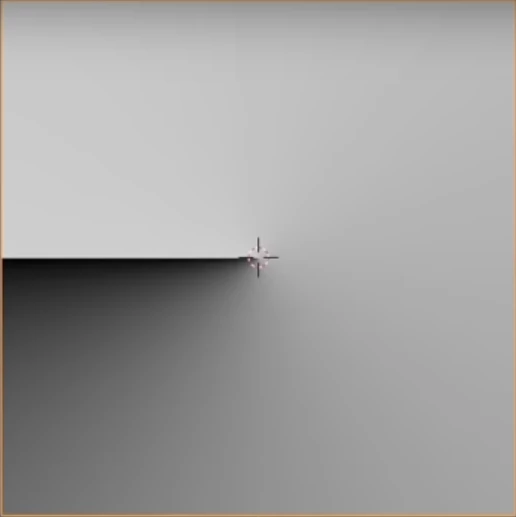
I'm trying to create this shape in Illustrator (minus the crosshair in the middle), but so far couldn't really understand how to approach this problem. my instinct is to make a gradient with a rectangle and then bend it around itself, but I can't manage to do it properly. 

Any help\suggestions?
 

This topic has been closed for replies.
Correct answer Doug A Roberts

Create an ellipse and give it a stroke the same width as its diameter. Apply a gradient to the stroke; set it to 'along stroke' in the gradient options.

Create a rectangle the size you need and use it as a clipping mask for the circle (ctrl+7).

1 reply

Doug A Roberts
Community Expert
Doug A RobertsCommunity ExpertCorrect answer
Community Expert
July 30, 2021

Create an ellipse and give it a stroke the same width as its diameter. Apply a gradient to the stroke; set it to 'along stroke' in the gradient options.

Create a rectangle the size you need and use it as a clipping mask for the circle (ctrl+7).

dorabadaAuthor
Participant
July 30, 2021

You are a genius. thank you so much!