BenSCR
Inspiring
Mar 9, 2018 1:15 PM UTC
Answered

HUD

How can I create a HUD style/shape like this picture....

    Mario Arizmendi
    Mario ArizmendiCorrect answer
    Legend
    Mar 9, 2018 1:58 PM UTC

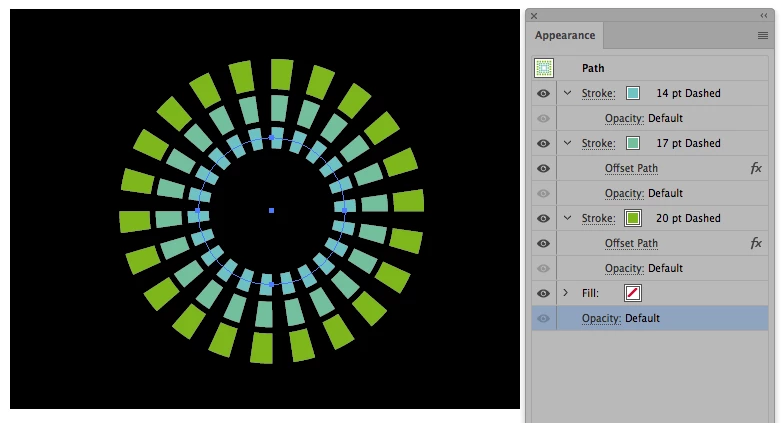
    Something like this

    24 replies

    Inspiring
    Mar 23, 2025 3:47 PM UTC

    I solve this problem with knockout group.

    Appearance palette:

    - delete dashed option on three strokes.

    - add new stroke (red color, but no meaning color, it's only for study), set big size and set dash and set opacity zero %.


    On layer "HUD icon Knockout" set Knockout group in Transparency palette.

    HUD icon for knockout<Ellipse> is nested with "HUD icon Knockout" layer.


    Uploaded new version of ai file (see link above|up|upward)

    Translate
    Mario Arizmendi
    Mario ArizmendiCorrect answer
    Legend
    Mar 9, 2018 1:58 PM UTC

    Something like this

    Translate
    BenSCR
    BenSCRAuthor
    Inspiring
    Mar 9, 2018 3:15 PM UTC

    Thanks for this screenshot, it works perfectly!

    What do I need to do to cut out elements to make it a 'Half-Moon' shape like the picture I posted.

    Translate
    Mario Arizmendi
    Legend
    Mar 9, 2018 3:30 PM UTC

    So, you can Objetc/expand appearance and then erase the unwanted elements

    Translate
    Monika Gause
    Community Expert
    Community Expert
    Mar 9, 2018 1:18 PM UTC

    Draw circles, cut parts out of them

    Apply thick strokes

    Apply dashes to strokes

    Translate